> ## Documentation Index
> Fetch the complete documentation index at: https://rpa.bazhuayu.com/helpcenter/llms.txt
> Use this file to discover all available pages before exploring further.

# 获取网页元素信息

## 指令说明

**描述：** 获取网页元素中的文本内容、元素源代码、元素值、元素链接地址、元素属性、元素位置等信息。

## 参数说明

<Tabs>
  <Tab title="常规">
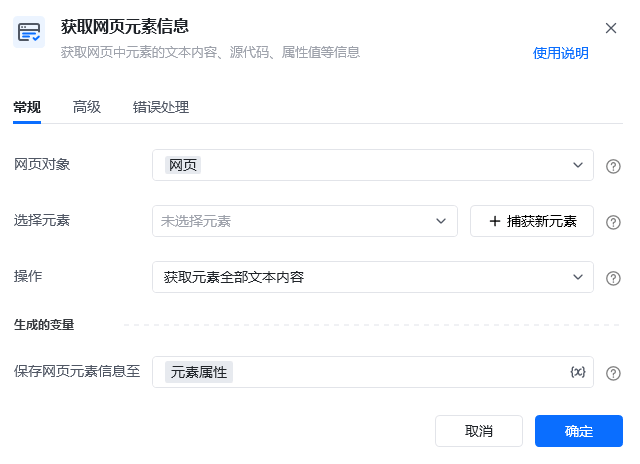
    <img src="https://mintcdn.com/bazhuayu-rpa-docs/2nc_spg9_b4MXqPM/helpcenter/commands/web-automation/images/web-elem-attr-01.png?fit=max&auto=format&n=2nc_spg9_b4MXqPM&q=85&s=d69db016401d8083b7a155cbd73829a9" alt="获取网页元素信息指令参数面板" width="640" height="464" data-path="helpcenter/commands/web-automation/images/web-elem-attr-01.png" />

    | 参数       | 说明                                                                                                                                                                                                                  |
    | -------- | ------------------------------------------------------------------------------------------------------------------------------------------------------------------------------------------------------------------- |
    | **网页对象** | 选择要操作的目标元素所在的网页对象                                                                                                                                                                                                   |
    | **选择元素** | 从「元素库」中选择一个已定义的元素或通过「捕获新元素」来捕获新的网页元素作为操作目标                                                                                                                                                                          |
    | **操作**   | 下拉选择要获取的元素信息：<br />获取元素全部文本内容：元素源码里面全部的文本内容；<br />获取元素源代码；<br />获取元素值；<br />获取元素链接地址；<br />获取元素属性值：须填写「属性名称」，填写要获取的网页元素的属性名称，如class；<br />获取元素位置：须填写「相对于」，选择在整个屏幕中的位置还是在浏览器页面中的位置；<br />获取元素可见文本内容：元素在网页页面上显示的文本内容； |
  </Tab>

  <Tab title="高级">
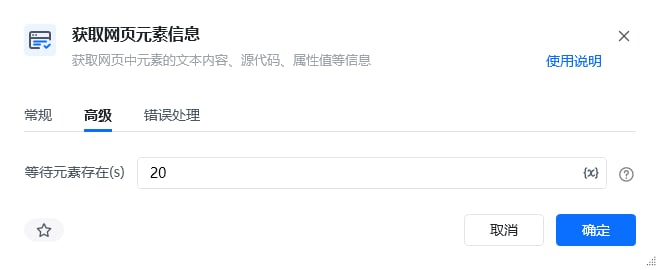
    <img src="https://mintcdn.com/bazhuayu-rpa-docs/2nc_spg9_b4MXqPM/helpcenter/commands/web-automation/images/web-elem-attr-01-adv.png?fit=max&auto=format&n=2nc_spg9_b4MXqPM&q=85&s=e89018d74070a594f39f634afb50b315" alt="获取网页元素信息指令高级参数面板" width="660" height="270" data-path="helpcenter/commands/web-automation/images/web-elem-attr-01-adv.png" />

    | 参数            | 说明                |
    | ------------- | ----------------- |
    | **等待元素存在（s）** | 等待目标元素存在的超时时间，单位秒 |
  </Tab>
</Tabs>

## 使用示例

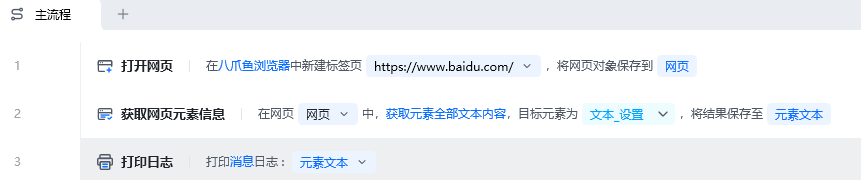
<img src="https://mintcdn.com/bazhuayu-rpa-docs/2nc_spg9_b4MXqPM/helpcenter/commands/web-automation/images/web-elem-attr-02.png?fit=max&auto=format&n=2nc_spg9_b4MXqPM&q=85&s=50a39b8a4480b19c1960b51819fa2acb" alt="获取网页元素信息使用示例 - 流程搭建" width="861" height="180" data-path="helpcenter/commands/web-automation/images/web-elem-attr-02.png" />

**该流程执行逻辑：**

使用【打开网页】指令在八爪鱼浏览器中打开百度首页

使用【获取网页元素信息】指令获取元素「文本\_设置」的 「获取元素全部文本内容」，并打印出来。

### 效果展示

<img src="https://mintcdn.com/bazhuayu-rpa-docs/2nc_spg9_b4MXqPM/helpcenter/commands/web-automation/images/web-elem-attr-03.png?fit=max&auto=format&n=2nc_spg9_b4MXqPM&q=85&s=f32879a7d0b9389461353927270669f7" alt="获取网页元素信息使用示例 - 效果展示" width="1347" height="239" data-path="helpcenter/commands/web-automation/images/web-elem-attr-03.png" />

<Info>
  使用指令过程中遇到问题？前往 [八爪鱼RPA 开发者社区问答板块](https://rpa.bazhuayu.com/community/questions) 提问，获取官方与社区帮助。
</Info>