> ## Documentation Index
> Fetch the complete documentation index at: https://rpa.bazhuayu.com/helpcenter/llms.txt
> Use this file to discover all available pages before exploring further.
# 获取已打开的网页对象
## 指令说明
**描述:** 根据标题或者网站匹配已打开的浏览器页面,供后续流程使用。
## 参数说明
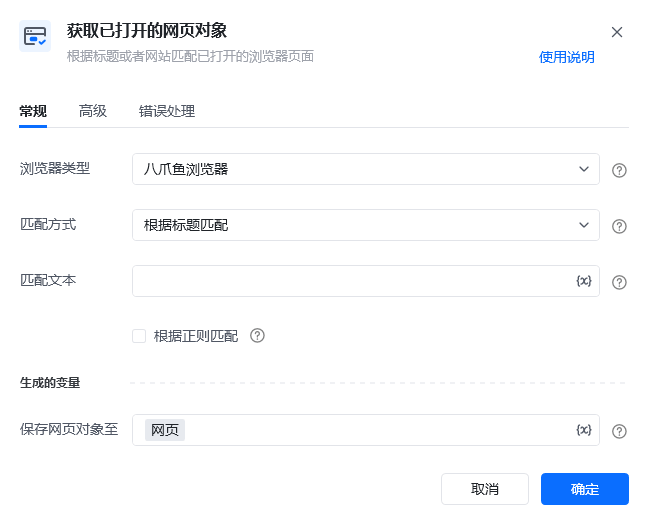 | 参数 | 说明 |
| --------- | ----------------------------------------------------------------------------------------------------------------------------------- |
| **浏览器类型** | 支持下拉选择:八爪鱼浏览器、谷歌浏览器、Edge浏览器、360安全浏览器、AdsPower、飞跨浏览器、紫鸟浏览器V6、紫鸟浏览器、易得客浏览器、稳卖AI浏览器(原牛卖浏览器)、Hubstudio、跨境卫士浏览器、站斧浏览器、云登浏览器、比特浏览器、自定义浏览器 |
| **浏览器路径** | 浏览器类型选择自定义浏览器时,该参数需要填写。选择自定义浏览器的可执行文件路径 |
| **匹配方式** | 下拉选择:根据标题匹配、根据网址匹配、匹配当前选中的网页 |
| **匹配文本** | 参数“匹配方式”选择根据标题匹配或根据网址匹配时需要填写,输入要匹配的文本,支持模糊匹配,支持正则表达式匹配 |
| 参数 | 说明 |
| --------- | ----------------------------------------------------------------------------------------------------------------------------------- |
| **浏览器类型** | 支持下拉选择:八爪鱼浏览器、谷歌浏览器、Edge浏览器、360安全浏览器、AdsPower、飞跨浏览器、紫鸟浏览器V6、紫鸟浏览器、易得客浏览器、稳卖AI浏览器(原牛卖浏览器)、Hubstudio、跨境卫士浏览器、站斧浏览器、云登浏览器、比特浏览器、自定义浏览器 |
| **浏览器路径** | 浏览器类型选择自定义浏览器时,该参数需要填写。选择自定义浏览器的可执行文件路径 |
| **匹配方式** | 下拉选择:根据标题匹配、根据网址匹配、匹配当前选中的网页 |
| **匹配文本** | 参数“匹配方式”选择根据标题匹配或根据网址匹配时需要填写,输入要匹配的文本,支持模糊匹配,支持正则表达式匹配 |
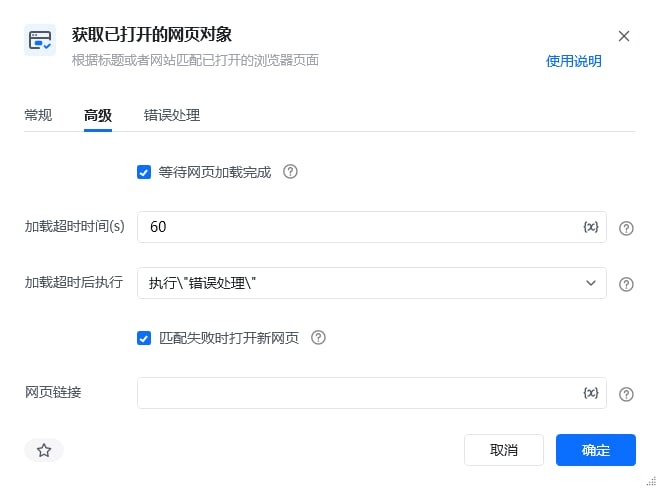 | 参数 | 说明 |
| -------------- | -------------------------------------- |
| **等待网页加载完成** | 是否需要等待网页加载完成后再进行下一步 |
| **加载超时时间(s)** | 设置网页最大的加载超时时间,单位为秒 |
| **加载超时后执行** | 最大加载超时后,网页页面仍然无法加载完成,则会执行「错误处理」或「停止加载」 |
| **匹配失败时打开新网页** | 根据网页标题或网址匹配失败时,打开新的指定网页链接 |
| **网页链接** | 匹配失败时打开的新网页链接地址 |
## 使用示例
| 参数 | 说明 |
| -------------- | -------------------------------------- |
| **等待网页加载完成** | 是否需要等待网页加载完成后再进行下一步 |
| **加载超时时间(s)** | 设置网页最大的加载超时时间,单位为秒 |
| **加载超时后执行** | 最大加载超时后,网页页面仍然无法加载完成,则会执行「错误处理」或「停止加载」 |
| **匹配失败时打开新网页** | 根据网页标题或网址匹配失败时,打开新的指定网页链接 |
| **网页链接** | 匹配失败时打开的新网页链接地址 |
## 使用示例
 **该流程执行逻辑:**
使用【获取已打开的网页对象】指令获取指定浏览器上已打开的网页
根据匹配方式匹配选择已打开的网页
后续流程可对该网页对象进行操作,如执行【打印日志】获取网页的链接
### 效果展示
根据匹配方式,成功获取已打开的网页对象,可供后续流程使用。
**该流程执行逻辑:**
使用【获取已打开的网页对象】指令获取指定浏览器上已打开的网页
根据匹配方式匹配选择已打开的网页
后续流程可对该网页对象进行操作,如执行【打印日志】获取网页的链接
### 效果展示
根据匹配方式,成功获取已打开的网页对象,可供后续流程使用。

 使用指令过程中遇到问题?前往 [八爪鱼RPA 开发者社区问答板块](https://rpa.bazhuayu.com/community/questions) 提问,获取官方与社区帮助。