> ## Documentation Index
> Fetch the complete documentation index at: https://rpa.bazhuayu.com/helpcenter/llms.txt
> Use this file to discover all available pages before exploring further.

# 开始监听网页请求

## 指令说明

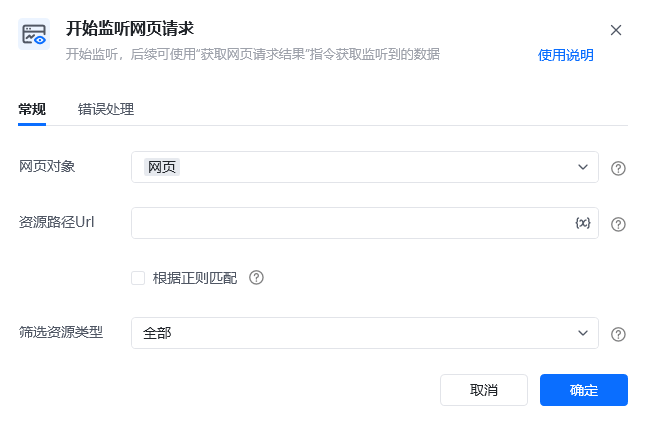
**描述：** 开始监听，后续可使用"获取网页请求结果"指令获取监听到的数据

## 参数说明

<Tabs>
  <Tab title="常规">
    <img src="https://mintcdn.com/bazhuayu-rpa-docs/2nc_spg9_b4MXqPM/helpcenter/commands/web-automation/images/web-monitor-start-01.png?fit=max&auto=format&n=2nc_spg9_b4MXqPM&q=85&s=a929a07998d6e0e657b92362c0641542" alt="开始监听网页请求指令参数面板" width="647" height="426" data-path="helpcenter/commands/web-automation/images/web-monitor-start-01.png" />

    | 参数          | 说明                                                                                                                                      |
    | ----------- | --------------------------------------------------------------------------------------------------------------------------------------- |
    | **网页对象**    | 选择一个之前通过【打开网页】或【获取已打开的网页对象】指令创建的网页对象                                                                                                    |
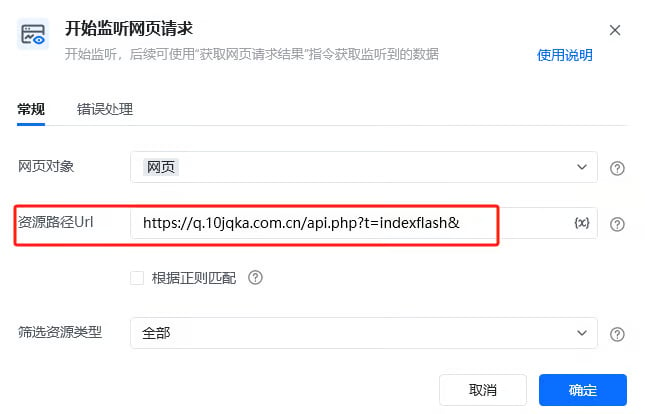
    | **资源路径Url** | 请输入需要监听资源路径Url，筛选网页监听结果(值为空则忽略Url筛选条件，即监听所有)<br />支持同时监听多个网址，格式：api1\|api2，需要勾选“根据正则匹配”<br />若勾选“根据正则匹配”，需注意特殊符号，例如若要使用问号，需要加上反斜杠，即 \\? |
    | **根据正则匹配**  | 根据正则表达式筛选需要监听资源路径Url                                                                                                                    |
    | **筛选资源类型**  | 选择要获取的网页监听结果类型<br />全部<br />Fetch/XHR：常用<br />CSS<br />图片：常用<br />媒体<br />字体<br />文档：常用<br />WebSocket<br />其他                          |
  </Tab>

  <Tab title="高级">
    本指令暂无高级参数。
  </Tab>
</Tabs>

## 使用示例

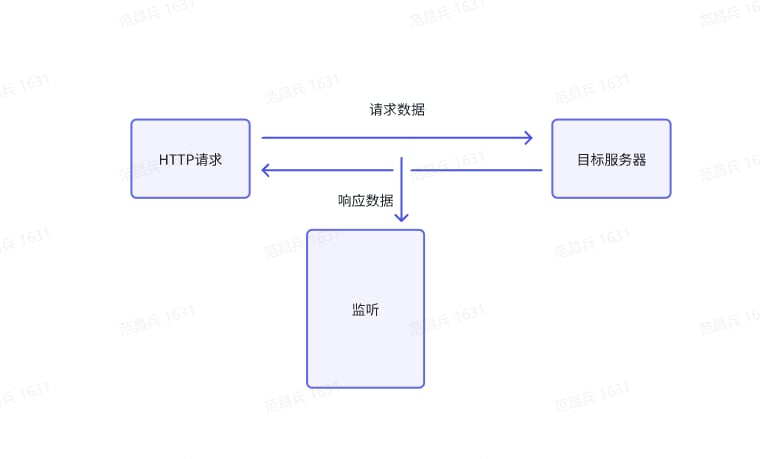
监听的流程

<img src="https://mintcdn.com/bazhuayu-rpa-docs/2nc_spg9_b4MXqPM/helpcenter/commands/web-automation/images/web-monitor-start-listen-flow.png?fit=max&auto=format&n=2nc_spg9_b4MXqPM&q=85&s=1cc53f4db35abf8660762e845892e4e8" alt="监听的流程" width="760" height="459" data-path="helpcenter/commands/web-automation/images/web-monitor-start-listen-flow.png" />

### 需求分析

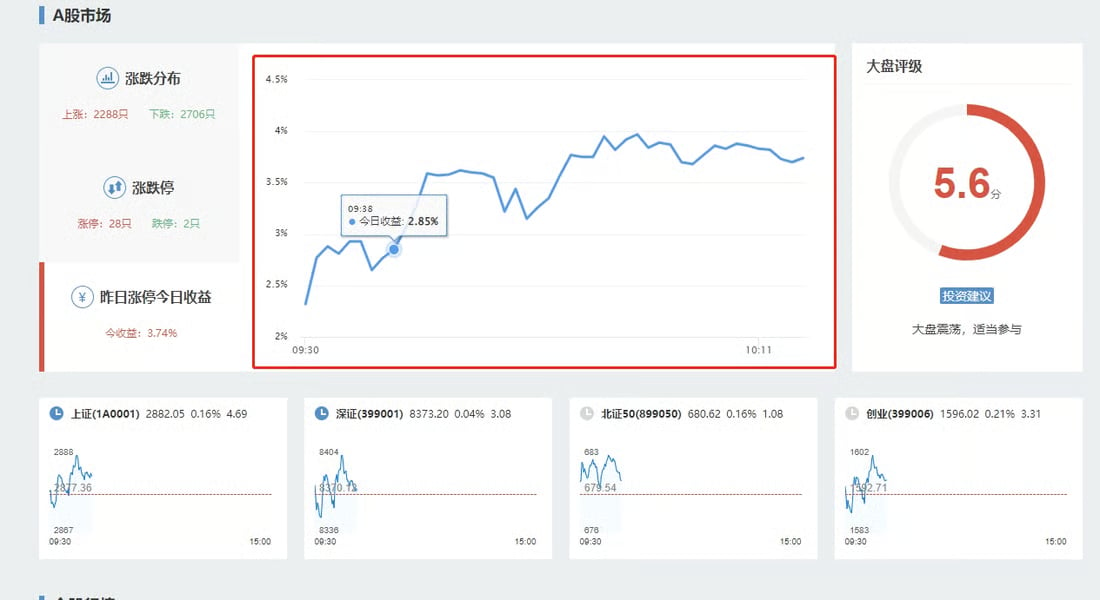
对于网页源码中不显示的数据获取，如下图案例中所示：图表中数据，可以通过获取网站返回的接口信息，从接口中获取数据。

<img src="https://mintcdn.com/bazhuayu-rpa-docs/2nc_spg9_b4MXqPM/helpcenter/commands/web-automation/images/web-monitor-start-need-01.png?fit=max&auto=format&n=2nc_spg9_b4MXqPM&q=85&s=f6a90399e14f8110ca4045ec54403f9b" alt="开始监听网页请求 - 需求分析" width="1100" height="600" data-path="helpcenter/commands/web-automation/images/web-monitor-start-need-01.png" />

### 资源路径URL分析（抓包分析）

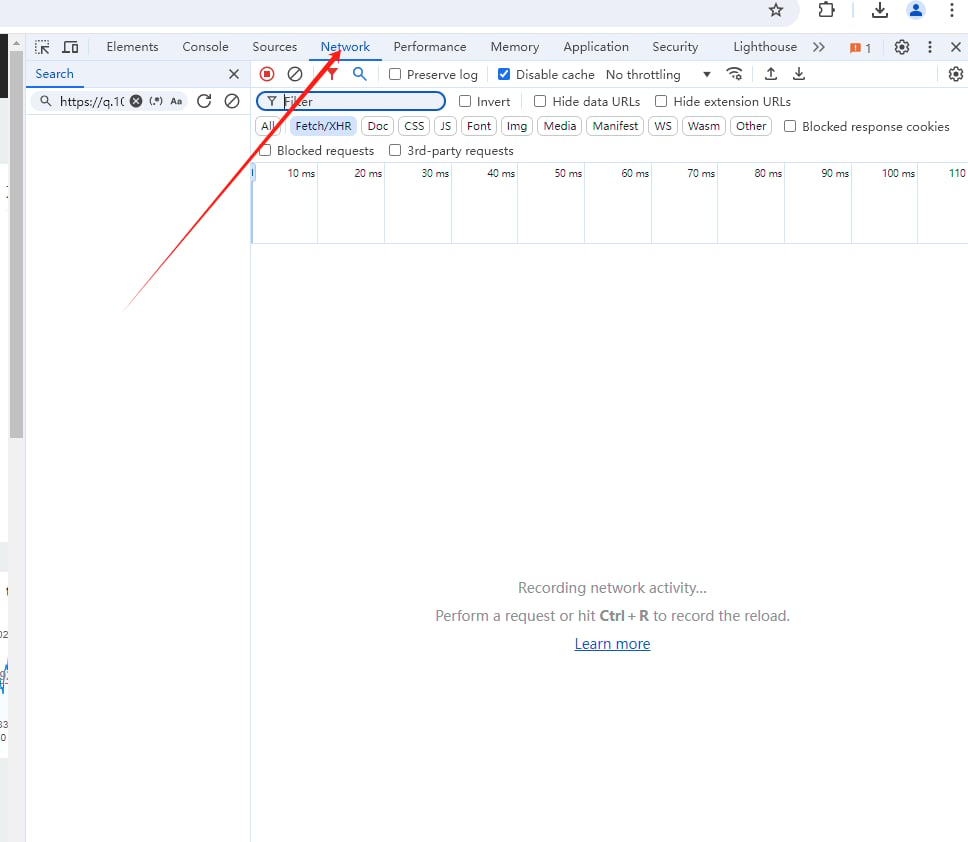
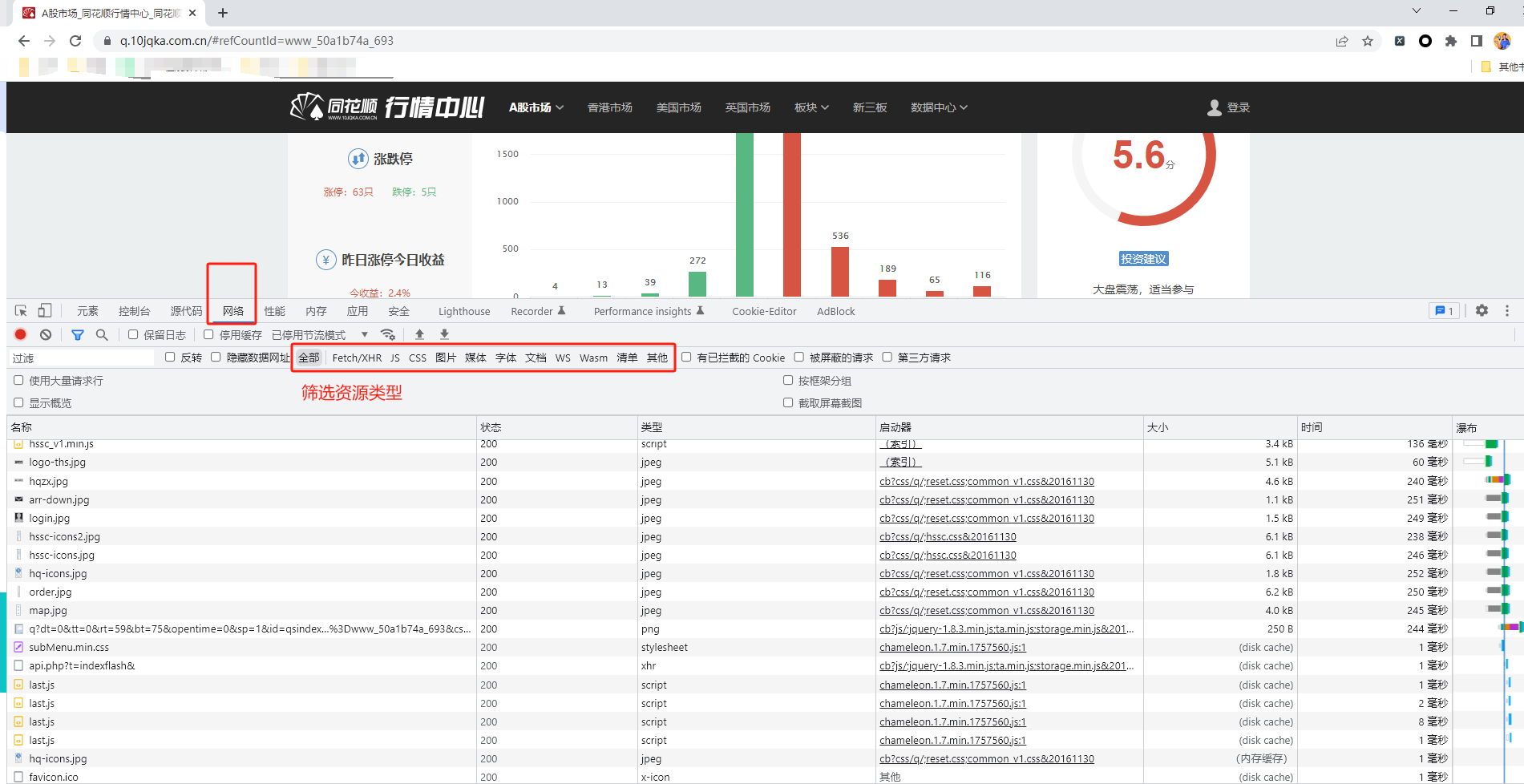
① 在浏览器里打开想要抓取数据的网页，按键盘F12键进入到开发者管理后台，然后点击Network（网络）

<img src="https://mintcdn.com/bazhuayu-rpa-docs/2nc_spg9_b4MXqPM/helpcenter/commands/web-automation/images/web-monitor-start-packet-01.png?fit=max&auto=format&n=2nc_spg9_b4MXqPM&q=85&s=072743f3ff0fd285a94d8ae664a39692" alt="开始监听网页请求 - 抓包分析 1" width="968" height="842" data-path="helpcenter/commands/web-automation/images/web-monitor-start-packet-01.png" />

② 按 Ctrl + R 重新加载网页（或者刷新当前网页），筛选资源类型

<img src="https://mintcdn.com/bazhuayu-rpa-docs/2nc_spg9_b4MXqPM/helpcenter/commands/web-automation/images/web-monitor-start-packet-02a.png?fit=max&auto=format&n=2nc_spg9_b4MXqPM&q=85&s=27919883584f41729f6c2f382f0f47b8" alt="开始监听网页请求 - 抓包分析 2-1" width="611" height="85" data-path="helpcenter/commands/web-automation/images/web-monitor-start-packet-02a.png" />

<img src="https://mintcdn.com/bazhuayu-rpa-docs/2nc_spg9_b4MXqPM/helpcenter/commands/web-automation/images/web-monitor-start-packet-02b.png?fit=max&auto=format&n=2nc_spg9_b4MXqPM&q=85&s=bf86515393936f34a64cab58c34a957e" alt="开始监听网页请求 - 抓包分析 2-2" width="1901" height="978" data-path="helpcenter/commands/web-automation/images/web-monitor-start-packet-02b.png" />

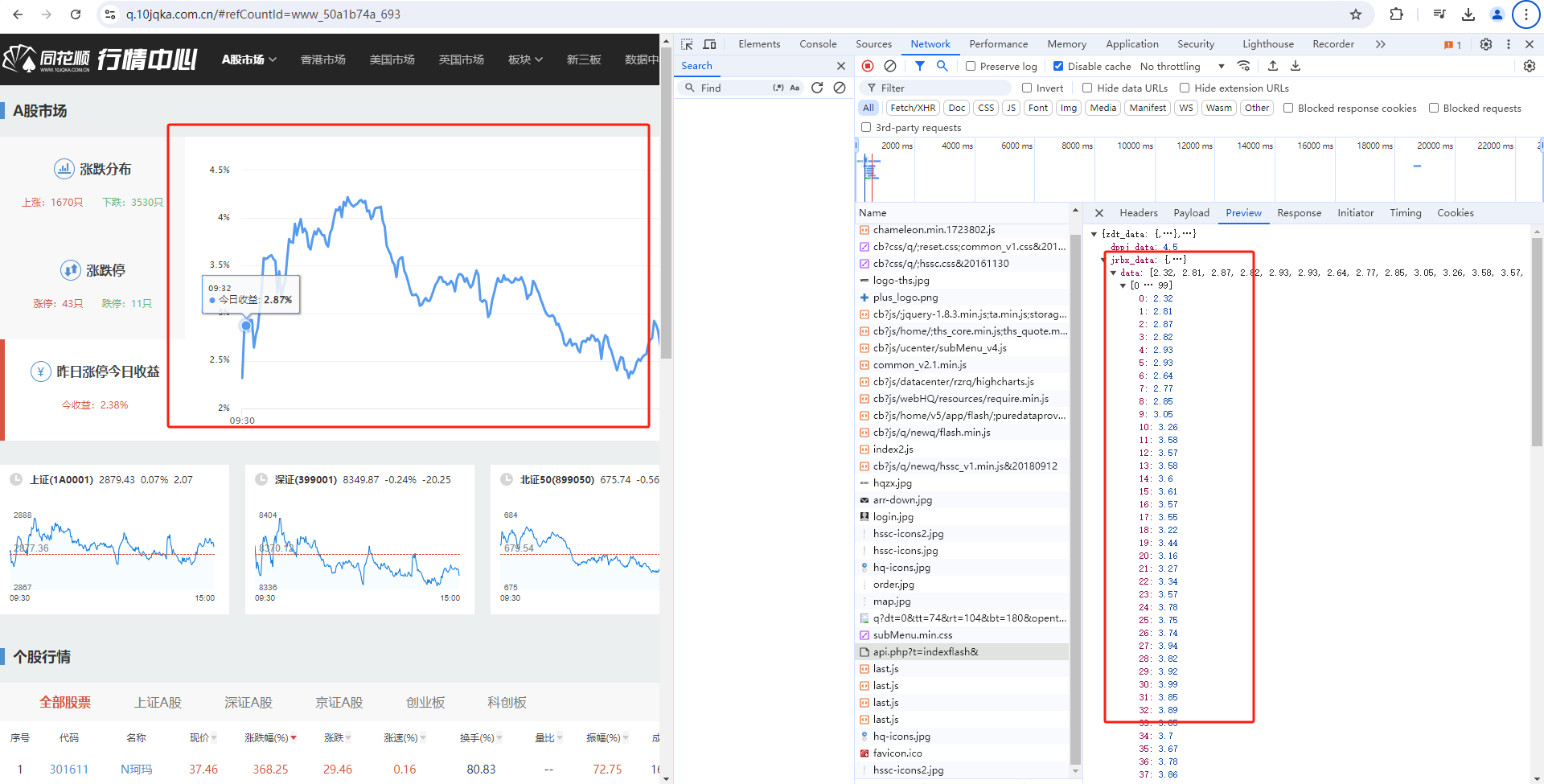
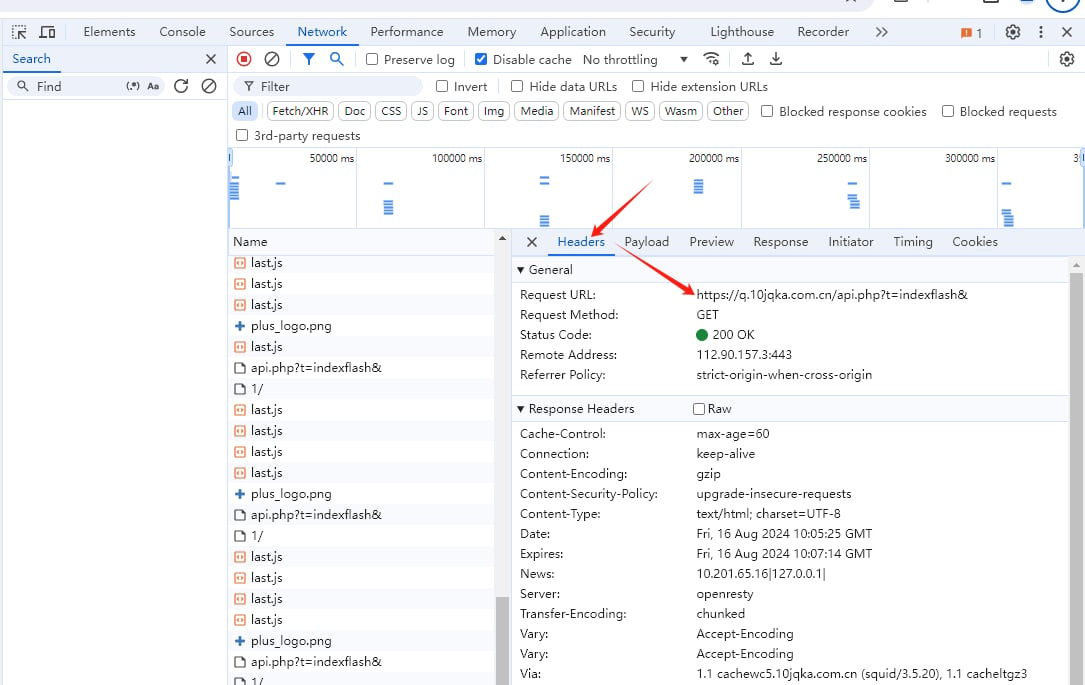
③ 等待页面数据加载完成，然后查看接口筛选，找到有包含自己需要的数据的接口。如下图所示，需要【昨日涨跌今日收益】相关数据，查看每个接口的【Preview】是否包含需要的数据，如果包含，对应的【Headers】里的请求url就是需要监控的资源路径url

<img src="https://mintcdn.com/bazhuayu-rpa-docs/2nc_spg9_b4MXqPM/helpcenter/commands/web-automation/images/web-monitor-start-packet-03a.png?fit=max&auto=format&n=2nc_spg9_b4MXqPM&q=85&s=d9f69c5302f68be1548fd24579197d67" alt="开始监听网页请求 - 抓包分析 3-1" width="1920" height="975" data-path="helpcenter/commands/web-automation/images/web-monitor-start-packet-03a.png" />

<img src="https://mintcdn.com/bazhuayu-rpa-docs/2nc_spg9_b4MXqPM/helpcenter/commands/web-automation/images/web-monitor-start-packet-03b.png?fit=max&auto=format&n=2nc_spg9_b4MXqPM&q=85&s=0ef0927f55e0e0998c9bfd12f2096a04" alt="开始监听网页请求 - 抓包分析 3-2" width="1085" height="685" data-path="helpcenter/commands/web-automation/images/web-monitor-start-packet-03b.png" />

### 应用搭建

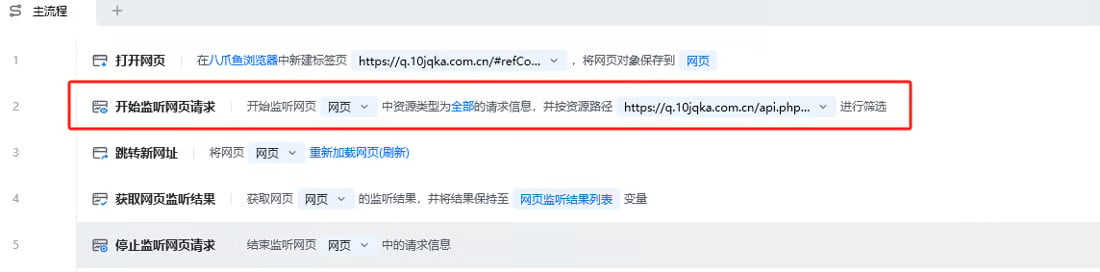
示例监听网页：[https://q.10jqka.com.cn/](https://q.10jqka.com.cn/)

示例资源路径Url筛选：[https://q.10jqka.com.cn/api.php?t=indexflash&](https://q.10jqka.com.cn/api.php?t=indexflash&)
<img src="https://mintcdn.com/bazhuayu-rpa-docs/2nc_spg9_b4MXqPM/helpcenter/commands/web-automation/images/web-monitor-start-app-01.png?fit=max&auto=format&n=2nc_spg9_b4MXqPM&q=85&s=81142c0440113e50b5220d534d9f7577" alt="开始监听网页请求 - 应用搭建 1" width="1100" height="272" data-path="helpcenter/commands/web-automation/images/web-monitor-start-app-01.png" />

<img src="https://mintcdn.com/bazhuayu-rpa-docs/2nc_spg9_b4MXqPM/helpcenter/commands/web-automation/images/web-monitor-start-app-02.png?fit=max&auto=format&n=2nc_spg9_b4MXqPM&q=85&s=762e9686d5c287594c58e52cfa5253d7" alt="开始监听网页请求 - 应用搭建 2" width="645" height="414" data-path="helpcenter/commands/web-automation/images/web-monitor-start-app-02.png" />

**该流程执行逻辑：**

打开网页，「开始监听网页请求」，并设置好监听的"资源路径Url"

使用「跳转新网址」进行当前网页的刷新，加载出来网页的新资源

根据实际需求，「获取网页监听结果」

### 效果展示

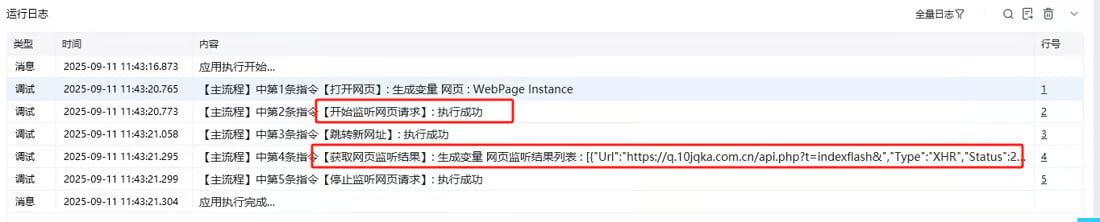
<img src="https://mintcdn.com/bazhuayu-rpa-docs/2nc_spg9_b4MXqPM/helpcenter/commands/web-automation/images/web-monitor-start-result-01.png?fit=max&auto=format&n=2nc_spg9_b4MXqPM&q=85&s=cb98ec27981b672d49bbed9f42b3a08d" alt="开始监听网页请求 - 效果展示" width="1100" height="222" data-path="helpcenter/commands/web-automation/images/web-monitor-start-result-01.png" />

### 使用小 Tips

* 【开始监听网页请求】一般与【跳转新网站】、【获取网页监听结果】、【停止监听网页请求】一起使用
* 【开始监听网页请求】之后**必须要【跳转新网站】或者进行网页的刷新**，才可以触发到网页url资源的新加载，才可以获取到网页的监听结果

<Info>
  使用指令过程中遇到问题？前往 [八爪鱼RPA 开发者社区问答板块](https://rpa.bazhuayu.com/community/questions) 提问，获取官方与社区帮助。
</Info>