> ## Documentation Index
> Fetch the complete documentation index at: https://rpa.bazhuayu.com/helpcenter/llms.txt
> Use this file to discover all available pages before exploring further.
# Webhook 触发器
> Webhook 是一种 web 回调或者 http 的 push API,是向APP或者其他应用提供实时信息的一种方式。
## 一、功能介绍
### 1.1 什么是 Webhook
Webhook 是一种 web 回调或者 http 的 push API,是向APP或者其他应用提供实时信息的一种方式。是一种基于 HTTP 的回调函数,可在 2 个应用编程接口(API)之间实现轻量级的事件驱动通信。
可以简单理解成,当某个应用发生特定事件时,会向另一个应用发送HTTP请求。
### 1.2 八爪鱼 RPA 的 Webhook 有什么功能
八爪鱼RPA可以针对每个 RPA 应用生成不同的 Webhook 接口,您可以在自己的业务系统里通过代码调用这个 Webhook 接口,从而触发对应的 RPA 应用,让其在指定的机器人上运行;同时支持在代码中修改 RPA应用 中的输入参数。
目前该接口的请求频率是:每秒最多5次,每分钟最多20次。
简单说就是:可以启动 RPA 应用,修改应用中的参数。
### 1.3 简单案例
想象一下,你经营着一家电商小店。每当有顾客下单,你都希望自动完成一系列操作,比如打印订单、准备发货通知等。八爪鱼RPA能帮你实现这个自动化流程。
①首先为名为”订单处理“的 RPA 应用创建一个Webhook接口;
②当有新订单生成时,你的店铺系统会发送一个包含订单号和收货地址等信息的HTTP请求到这个Webhook接口;
③八爪鱼 RPA 接收到请求后,会立即启动对应的 RPA 应用,使用这些订单信息自动完成后续的处理工作,比如更新库存、生成发货标签等。
这样,你就无需手动干预,订单处理流程就能高效、自动地进行。
### 1.4 如何创建 Webhook
| 操作步骤 | 附图 |
| ------------------------------------------------------------------------------------------------------------------------- | ------------------------------------------------------------------------------------------------------------------------------------------------------------------------------------------------------------------------------------------------------------------------------------------------------------------------------------------------------------------------------------------------------------------------------------------------------------------------------------------------------------------------------------------------------------------------------------------------------------------------------------------------------------------------------------------------------------------------------------------------------------------------------------------------------------------------------------------------------------------------------------------------------------------------------------------------------------------------------------------------------------------------------------------------------------------------------------------------------------------------------------------------------------------------------------------------------------------------------------------------------------------------------------------------------------------------------------------------------------------------------------------------------------------------------------------------------------------------------------------------------------------------------------------------------------------------------------------------------------------------------------------------------------------------------------------------------------------------------ |
| 在使用Webhook之前,我们首先需要通过【触发器】栏目下的 "Webhook 触发器"来创建 Webhook | 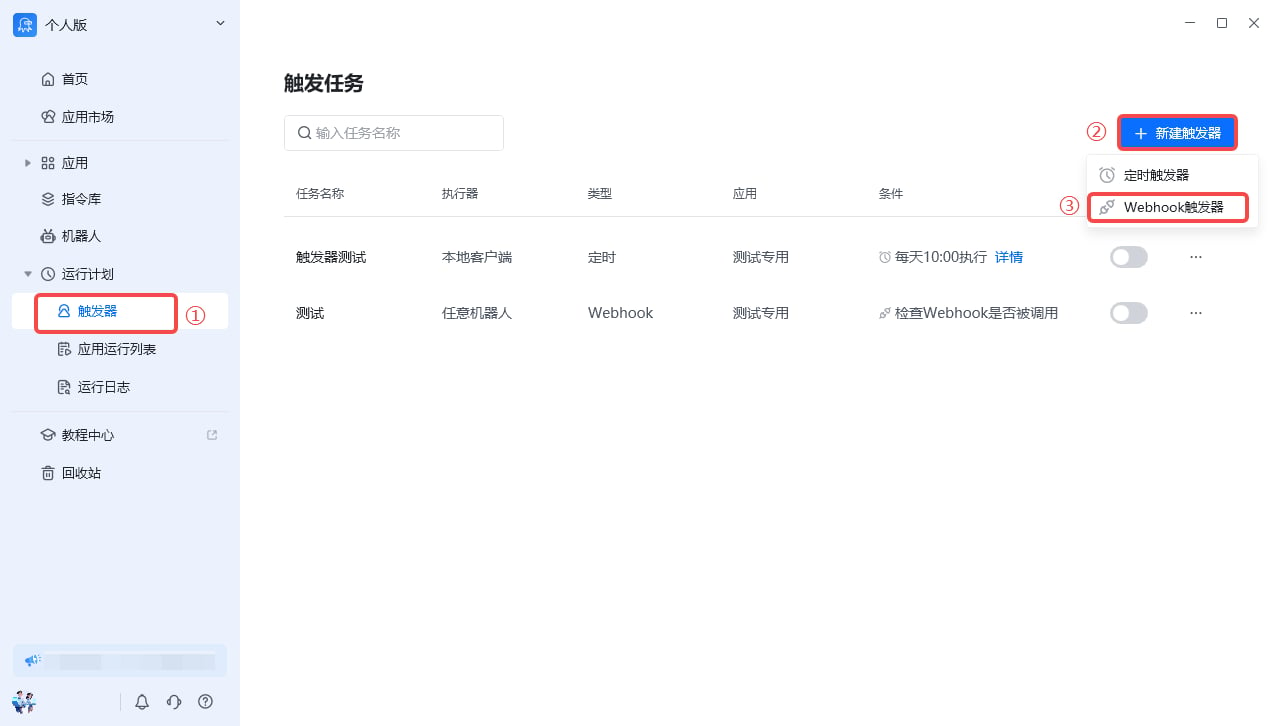 |
| 填写触发器名称--->
|
| 填写触发器名称--->
指定运行的机器人--->
选择要运行的应用--->
点击"确定" | 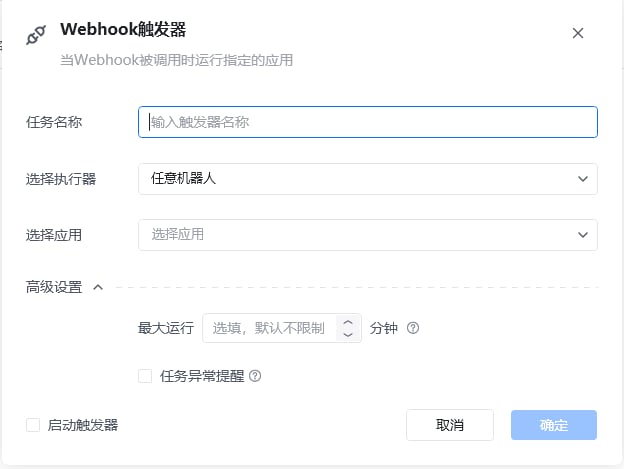 |
| 创建成功后我们就能看到 Webhook 的信息。
|
| 创建成功后我们就能看到 Webhook 的信息。
到这里Webhook触发器就传建好了,我们可以把 Webhook 地址和签名复制下来,放到调用触发器的代码里面。
同时需要勾选上启动触发器,这样 Webhook 才能生效。 | 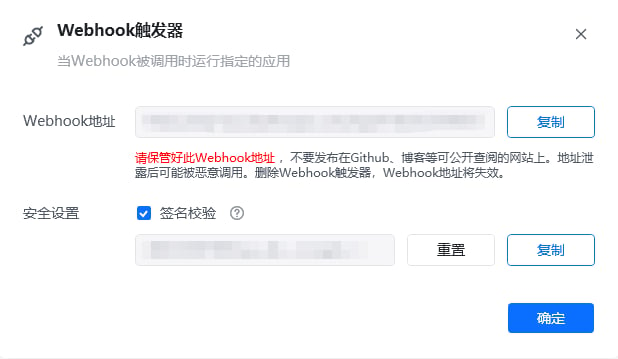 |
## 二、如何调用Webhook
Webhook 接口接收的 Json 格式的数据,Json格式为
```
{
"sign": "timestamp + "\n" + 签名校验", //注释:时间戳与签名进行算法加密,即将timestamp + "\n" + 密钥 当做签名字符串;先使用 HmacSHA256 算法计算签名,再进行 Base64 编码。
"params": {
"应用参数1": "被触发任务任务的自定义参数",
"应用参数2": "被触发任务任务的自定义参数"
},
"SpecifiedBot":"机器人Id",
"timestamp": "当前时间的时间戳"
}
```
| sign | 签名校验,可以为空,当 Webhook 触发器的安全设置没有勾选使用”签名校验“时,该 sign 的值为空 |
| ------------ | ------------------------------------------------------- |
| params | 需要传递给应用的输入变量,同样为Json,其中 Key 是应用某个输入变量的名称,Value是需要传递的变量值 |
| SpecifiedBot | 指定 RPA 应用到特定的机器人上运行 |
| timestamp | 当前时间的时间戳(秒) |
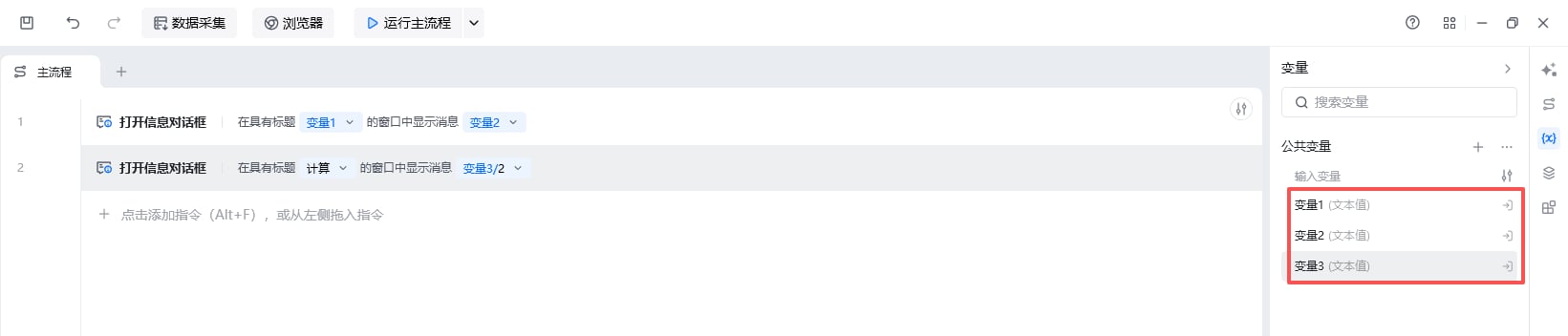
以下面这个应用为例:
|
## 二、如何调用Webhook
Webhook 接口接收的 Json 格式的数据,Json格式为
```
{
"sign": "timestamp + "\n" + 签名校验", //注释:时间戳与签名进行算法加密,即将timestamp + "\n" + 密钥 当做签名字符串;先使用 HmacSHA256 算法计算签名,再进行 Base64 编码。
"params": {
"应用参数1": "被触发任务任务的自定义参数",
"应用参数2": "被触发任务任务的自定义参数"
},
"SpecifiedBot":"机器人Id",
"timestamp": "当前时间的时间戳"
}
```
| sign | 签名校验,可以为空,当 Webhook 触发器的安全设置没有勾选使用”签名校验“时,该 sign 的值为空 |
| ------------ | ------------------------------------------------------- |
| params | 需要传递给应用的输入变量,同样为Json,其中 Key 是应用某个输入变量的名称,Value是需要传递的变量值 |
| SpecifiedBot | 指定 RPA 应用到特定的机器人上运行 |
| timestamp | 当前时间的时间戳(秒) |
以下面这个应用为例:
 ## 三、如何传递传递参数
我们通过 Webhook 启动这个应用,同时需要把变量1、变量2、变量3的值通过 Webhook 传递过来,此时请求的 Json 数据为
```
{
"sign": "时间戳与签名进行算法加密,即将timestamp + "\n" + 密钥当做签名字符串,使用 HmacSHA256 算法计算签名,再进行 Base64 编码",
"params": {
"变量1": "AAA",
"变量2": "BBBB",
"变量3": 10,
},
"timestamp": "当前时间的时间戳"
}
```
```
```
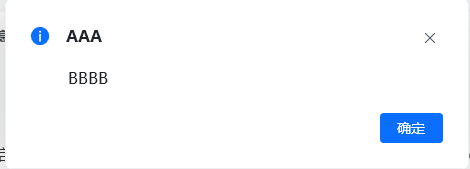
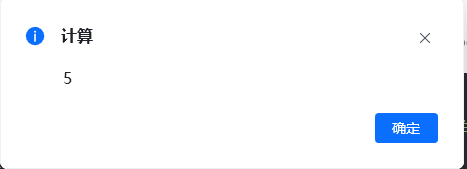
应用的运行结果是出现两个消息确认框。其中第一个确认框的标题和内容分别是:“AAA”和“BBBB”,第二个是:“计算”和“5”
## 三、如何传递传递参数
我们通过 Webhook 启动这个应用,同时需要把变量1、变量2、变量3的值通过 Webhook 传递过来,此时请求的 Json 数据为
```
{
"sign": "时间戳与签名进行算法加密,即将timestamp + "\n" + 密钥当做签名字符串,使用 HmacSHA256 算法计算签名,再进行 Base64 编码",
"params": {
"变量1": "AAA",
"变量2": "BBBB",
"变量3": 10,
},
"timestamp": "当前时间的时间戳"
}
```
```
```
应用的运行结果是出现两个消息确认框。其中第一个确认框的标题和内容分别是:“AAA”和“BBBB”,第二个是:“计算”和“5”
 ## 四、如何获取机器人ID
| 操作步骤 | 附图 |
| ----------------------------------------------------- | ------------------------------------------------------------------------------------------------------------------------------------------------------------------------------------------------------------------------------------------------------------------------------------------------------------------------------------------------------------------------------------------------------------------------------------------------------------------------------------------------------------------------------------------------------------------------------------------------------------------------------------------------------------------------------------------------------------------------------------------------------------------------------------------------------------------------------------------------------------------------------------------------------------------------------------------------------------------------------------------------------------------------------------------------------------------------------------------------------------------------------------------------------------------------------------------------------------------------------------------------------------------------------------------------------------------------------------------------------------------------------------------------------------------------------------------------------------------------------------------------------------------------------------------------------------------------------------------------------------------------------------------------------------------------------------------------------------------------------ |
| 在八爪鱼 RPA中切换到企业身份--->
## 四、如何获取机器人ID
| 操作步骤 | 附图 |
| ----------------------------------------------------- | ------------------------------------------------------------------------------------------------------------------------------------------------------------------------------------------------------------------------------------------------------------------------------------------------------------------------------------------------------------------------------------------------------------------------------------------------------------------------------------------------------------------------------------------------------------------------------------------------------------------------------------------------------------------------------------------------------------------------------------------------------------------------------------------------------------------------------------------------------------------------------------------------------------------------------------------------------------------------------------------------------------------------------------------------------------------------------------------------------------------------------------------------------------------------------------------------------------------------------------------------------------------------------------------------------------------------------------------------------------------------------------------------------------------------------------------------------------------------------------------------------------------------------------------------------------------------------------------------------------------------------------------------------------------------------------------------------------------------------ |
| 在八爪鱼 RPA中切换到企业身份--->
点击左下角头像标志--->
打开企业管理后台 | 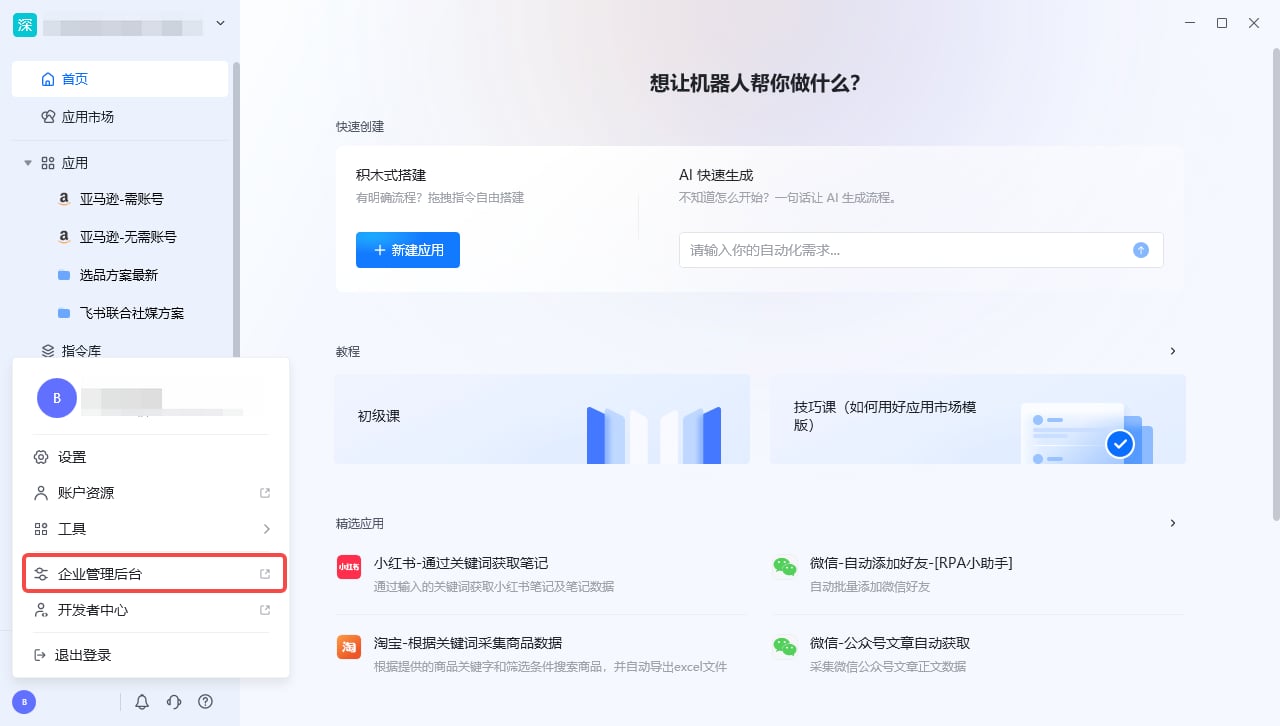 |
| 打开机器人管理界面--->
|
| 打开机器人管理界面--->
点击”详情“ | 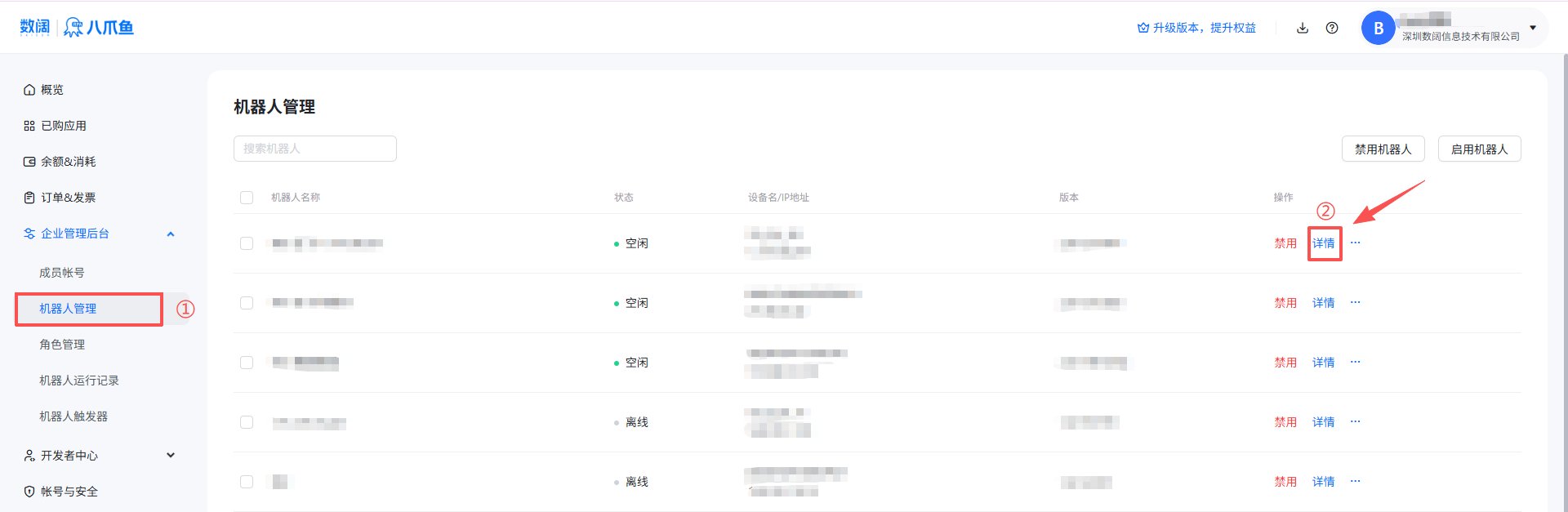 |
| 在机器人详情页面复制机器人ID |
|
| 在机器人详情页面复制机器人ID |  |
## 五、调用Webhook的示例代码
### 5.1 C#示例代码
```
//.net6 及以上平台示例代码
using System.Security.Cryptography;
using System.Text;
using System.Text.Json;
using WebhookDemo.Dtos;
var key = "替换为校验签名";
var url = "Webhook地址";
using var client = new HttpClient();
try
{
var @params = new Dictionary
{
{ "应用参数1", "参数1的值" },
{ "应用参数2", "参数2的值" }
};
var timestamp = DateTimeOffset.Now.ToUnixTimeSeconds();
var rpaWebhook = new RpaWebhookDto(
timestamp.ToString(),
GetSign(key, timestamp),
@params);
var result = await client.PostAsync(url,
new StringContent(JsonSerializer.Serialize(rpaWebhook), Encoding.UTF8, "application/json"));
if (result.IsSuccessStatusCode)
{
Console.WriteLine("调用成功");
return;
}
var res = JsonSerializer.Deserialize(
await result.Content.ReadAsStringAsync(),
new JsonSerializerOptions { PropertyNameCaseInsensitive = true }
);
Console.WriteLine("调用失败");
Console.WriteLine($"失败原因:{res!.Description}");
Console.WriteLine($"失败Code:{res!.Code}");
}
catch (Exception ex)
{
Console.WriteLine($"Exception:{ex.Message}");
throw;
}
static string GetSign(string secret, long timestamp)
{
string stringToSign = timestamp + "\n" + secret;
using HMACSHA256 hmac = new(Encoding.UTF8.GetBytes(stringToSign));
byte[] signData = hmac.ComputeHash(Array.Empty());
return Convert.ToBase64String(signData);
}
namespace WebhookDemo.Dtos
{
public sealed record RpaWebhookDto(
string Timestamp,
string Sign,
Dictionary? Params
);
public sealed record WebhookInvokeFailureDto(
string Code,
string Description,
string? RequestId
);
}
```
```
```
### 5.2 Python示例代码
```
import requests
import json
import hashlib
import hmac
import base64
import time
key = "替换为校验签名"
url = "Webhook地址"
payload = {
"应用参数1": "被触发任务任务的自定义参数",
"应用参数2": "被触发任务任务的自定义参数"
}
timestamp = str(int(time.time()))
def get_sign(secret, timestamp):
string_to_sign = timestamp + f"\n" + secret
sign_data = hmac.new(string_to_sign.encode(),None, hashlib.sha256).digest()
return base64.b64encode(sign_data).decode()
rpa_webhook = {
"timestamp": timestamp,
"sign": get_sign(key, timestamp),
"params": payload
}
try:
headers = {'Content-Type': 'application/json'}
response = requests.post(url, data=json.dumps(rpa_webhook), headers=headers)
if response.status_code == 200:
print("调用成功")
else:
res = response.json()
print("调用失败")
print(f"失败原因:{res['description']}")
print(f"失败Code:{res['code']}")
except Exception as ex:
print(f"Exception: {ex}")
raise
```
### 5.3 Java 示例代码
```
import java.io.IOException;
import java.net.URI;
import java.net.http.HttpClient;
import java.net.http.HttpRequest;
import java.net.http.HttpResponse;
import java.time.Instant;
import java.util.Base64;
import java.util.HashMap;
import java.util.Map;
import javax.crypto.Mac;
import javax.crypto.spec.SecretKeySpec;
import java.nio.charset.StandardCharsets;
import java.util.Base64;
import com.google.gson.Gson;
public class Main {
static HttpClient client = HttpClient.newHttpClient();
public static void main(String[] args) throws NoSuchAlgorithmException, IOException, InterruptedException {
String key = "替换为校验签名";
String url = "Webhook地址";
long timestamp = Instant.now().getEpochSecond();
String sign = getSign(key, timestamp);
Map params = new HashMap<>();
params.put("应用参数1", "参数1的值");
params.put("应用参数2", "参数2的值");
RpaWebhookDto rpaWebhook = new RpaWebhookDto(Long.toString(timestamp), sign, params);
String requestBody = new Gson().toJson(rpaWebhook);
HttpRequest request = HttpRequest.newBuilder()
.uri(URI.create(url))
.header("Content-Type", "application/json")
.POST(HttpRequest.BodyPublishers.ofString(requestBody))
.build();
HttpResponse response = client.send(request, HttpResponse.BodyHandlers.ofString());
if (response.statusCode() == 200) {
System.out.println("调用成功");
return;
}
WebhookInvokeFailureDto res = new Gson().fromJson(response.body(), WebhookInvokeFailureDto.class);
System.out.println("调用失败");
System.out.println("失败原因:" + res.getDescription());
System.out.println("失败Code:" + res.getCode());
}
static String getSign(String secret, long timestamp) {
String stringToSign = timestamp + "\n" + secret;
try {
Mac mac = Mac.getInstance("HmacSHA256");
SecretKeySpec secretKeySpec = new SecretKeySpec(stringToSign.getBytes(StandardCharsets.UTF_8), "HmacSHA256");
mac.init(secretKeySpec);
byte[] result = mac.doFinal();
return Base64.getEncoder().encodeToString(result);
} catch (Exception e) {
throw new RuntimeException("getSign error", e);
}
}
static class RpaWebhookDto {
String Timestamp;
String Sign;
Map Params;
public RpaWebhookDto(String timestamp, String sign, Map params) {
Timestamp = timestamp;
Sign = sign;
Params = params;
}
}
static class WebhookInvokeFailureDto {
String Code;
String Description;
String RequestId;
}
}
```
## 六、常见问题
### 6.1 为什么我的账号 Webhook 触发器是置灰状态?
使用 Webhook触发器的前提是当前帐号下有机器人,需要使用机器人可购买对应的版本套餐,[跳转增值服务](/helpcenter/helpcenter/guides/value-added)。
使用过程中遇到问题?前往 [八爪鱼RPA 开发者社区问答板块](https://rpa.bazhuayu.com/community/questions) 提问,获取官方与社区帮助。
|
## 五、调用Webhook的示例代码
### 5.1 C#示例代码
```
//.net6 及以上平台示例代码
using System.Security.Cryptography;
using System.Text;
using System.Text.Json;
using WebhookDemo.Dtos;
var key = "替换为校验签名";
var url = "Webhook地址";
using var client = new HttpClient();
try
{
var @params = new Dictionary
{
{ "应用参数1", "参数1的值" },
{ "应用参数2", "参数2的值" }
};
var timestamp = DateTimeOffset.Now.ToUnixTimeSeconds();
var rpaWebhook = new RpaWebhookDto(
timestamp.ToString(),
GetSign(key, timestamp),
@params);
var result = await client.PostAsync(url,
new StringContent(JsonSerializer.Serialize(rpaWebhook), Encoding.UTF8, "application/json"));
if (result.IsSuccessStatusCode)
{
Console.WriteLine("调用成功");
return;
}
var res = JsonSerializer.Deserialize(
await result.Content.ReadAsStringAsync(),
new JsonSerializerOptions { PropertyNameCaseInsensitive = true }
);
Console.WriteLine("调用失败");
Console.WriteLine($"失败原因:{res!.Description}");
Console.WriteLine($"失败Code:{res!.Code}");
}
catch (Exception ex)
{
Console.WriteLine($"Exception:{ex.Message}");
throw;
}
static string GetSign(string secret, long timestamp)
{
string stringToSign = timestamp + "\n" + secret;
using HMACSHA256 hmac = new(Encoding.UTF8.GetBytes(stringToSign));
byte[] signData = hmac.ComputeHash(Array.Empty());
return Convert.ToBase64String(signData);
}
namespace WebhookDemo.Dtos
{
public sealed record RpaWebhookDto(
string Timestamp,
string Sign,
Dictionary? Params
);
public sealed record WebhookInvokeFailureDto(
string Code,
string Description,
string? RequestId
);
}
```
```
```
### 5.2 Python示例代码
```
import requests
import json
import hashlib
import hmac
import base64
import time
key = "替换为校验签名"
url = "Webhook地址"
payload = {
"应用参数1": "被触发任务任务的自定义参数",
"应用参数2": "被触发任务任务的自定义参数"
}
timestamp = str(int(time.time()))
def get_sign(secret, timestamp):
string_to_sign = timestamp + f"\n" + secret
sign_data = hmac.new(string_to_sign.encode(),None, hashlib.sha256).digest()
return base64.b64encode(sign_data).decode()
rpa_webhook = {
"timestamp": timestamp,
"sign": get_sign(key, timestamp),
"params": payload
}
try:
headers = {'Content-Type': 'application/json'}
response = requests.post(url, data=json.dumps(rpa_webhook), headers=headers)
if response.status_code == 200:
print("调用成功")
else:
res = response.json()
print("调用失败")
print(f"失败原因:{res['description']}")
print(f"失败Code:{res['code']}")
except Exception as ex:
print(f"Exception: {ex}")
raise
```
### 5.3 Java 示例代码
```
import java.io.IOException;
import java.net.URI;
import java.net.http.HttpClient;
import java.net.http.HttpRequest;
import java.net.http.HttpResponse;
import java.time.Instant;
import java.util.Base64;
import java.util.HashMap;
import java.util.Map;
import javax.crypto.Mac;
import javax.crypto.spec.SecretKeySpec;
import java.nio.charset.StandardCharsets;
import java.util.Base64;
import com.google.gson.Gson;
public class Main {
static HttpClient client = HttpClient.newHttpClient();
public static void main(String[] args) throws NoSuchAlgorithmException, IOException, InterruptedException {
String key = "替换为校验签名";
String url = "Webhook地址";
long timestamp = Instant.now().getEpochSecond();
String sign = getSign(key, timestamp);
Map params = new HashMap<>();
params.put("应用参数1", "参数1的值");
params.put("应用参数2", "参数2的值");
RpaWebhookDto rpaWebhook = new RpaWebhookDto(Long.toString(timestamp), sign, params);
String requestBody = new Gson().toJson(rpaWebhook);
HttpRequest request = HttpRequest.newBuilder()
.uri(URI.create(url))
.header("Content-Type", "application/json")
.POST(HttpRequest.BodyPublishers.ofString(requestBody))
.build();
HttpResponse response = client.send(request, HttpResponse.BodyHandlers.ofString());
if (response.statusCode() == 200) {
System.out.println("调用成功");
return;
}
WebhookInvokeFailureDto res = new Gson().fromJson(response.body(), WebhookInvokeFailureDto.class);
System.out.println("调用失败");
System.out.println("失败原因:" + res.getDescription());
System.out.println("失败Code:" + res.getCode());
}
static String getSign(String secret, long timestamp) {
String stringToSign = timestamp + "\n" + secret;
try {
Mac mac = Mac.getInstance("HmacSHA256");
SecretKeySpec secretKeySpec = new SecretKeySpec(stringToSign.getBytes(StandardCharsets.UTF_8), "HmacSHA256");
mac.init(secretKeySpec);
byte[] result = mac.doFinal();
return Base64.getEncoder().encodeToString(result);
} catch (Exception e) {
throw new RuntimeException("getSign error", e);
}
}
static class RpaWebhookDto {
String Timestamp;
String Sign;
Map Params;
public RpaWebhookDto(String timestamp, String sign, Map params) {
Timestamp = timestamp;
Sign = sign;
Params = params;
}
}
static class WebhookInvokeFailureDto {
String Code;
String Description;
String RequestId;
}
}
```
## 六、常见问题
### 6.1 为什么我的账号 Webhook 触发器是置灰状态?
使用 Webhook触发器的前提是当前帐号下有机器人,需要使用机器人可购买对应的版本套餐,[跳转增值服务](/helpcenter/helpcenter/guides/value-added)。
使用过程中遇到问题?前往 [八爪鱼RPA 开发者社区问答板块](https://rpa.bazhuayu.com/community/questions) 提问,获取官方与社区帮助。