> ## Documentation Index
> Fetch the complete documentation index at: https://rpa.bazhuayu.com/helpcenter/llms.txt
> Use this file to discover all available pages before exploring further.

# 飞跨浏览器插件安装说明

说明：飞跨浏览器是一款专业的跨境电商浏览器，支持创建多个独立的浏览器环境以实现多店铺安全登录。若需在本地调用飞跨浏览器执行自动化任务，必须确保每个环境均已正确安装并启用八爪鱼 RPA 插件。

## 一、准备工作

在开始之前，请确保您已经下载并登录了飞跨浏览器客户端，并准备好需要配置的环境。[立即下载](https://www.feikua.net/download.html)

## 二、安装方式：从飞跨浏览器插件市场安装

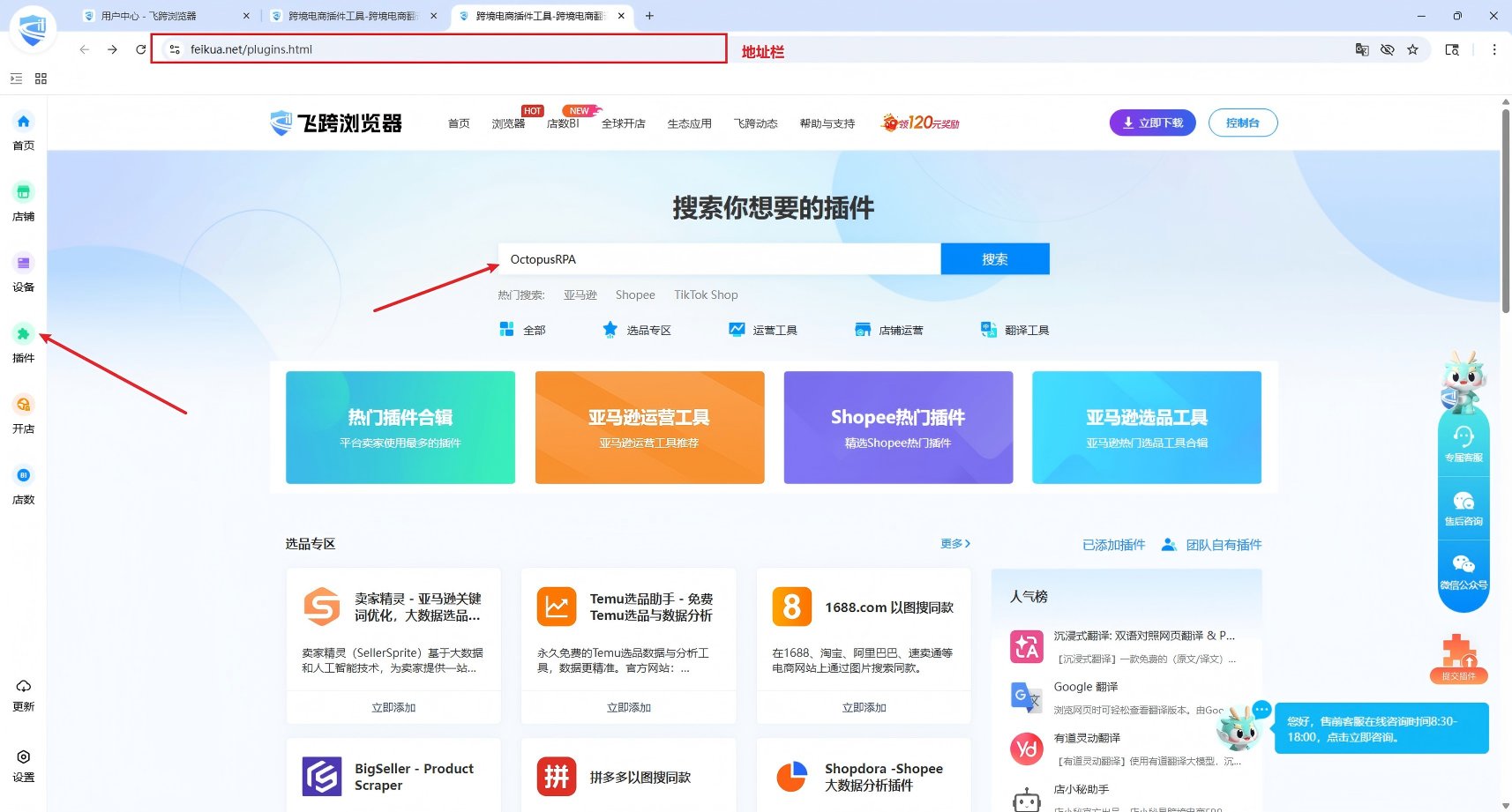
1、在飞跨客户端左侧栏点击【插件】按钮，在插件中心搜索【八爪鱼】，或者在控制台地址栏输入[https://www.feikua.net/plugins/category/keyword\_OctopusRPA.html](https://www.feikua.net/plugins/category/keyword_OctopusRPA.html)。
<img src="https://mintcdn.com/bazhuayu-rpa-docs/wC_vScfvW08KMra2/helpcenter/features/personal-center/images/auto-plugin/8l9W7G52/69c2780f3173c.png?fit=max&auto=format&n=wC_vScfvW08KMra2&q=85&s=27e7c7f98e612b7e5ccfba1492e9559b" alt="" width="1714" height="921" data-path="helpcenter/features/personal-center/images/auto-plugin/8l9W7G52/69c2780f3173c.png" />

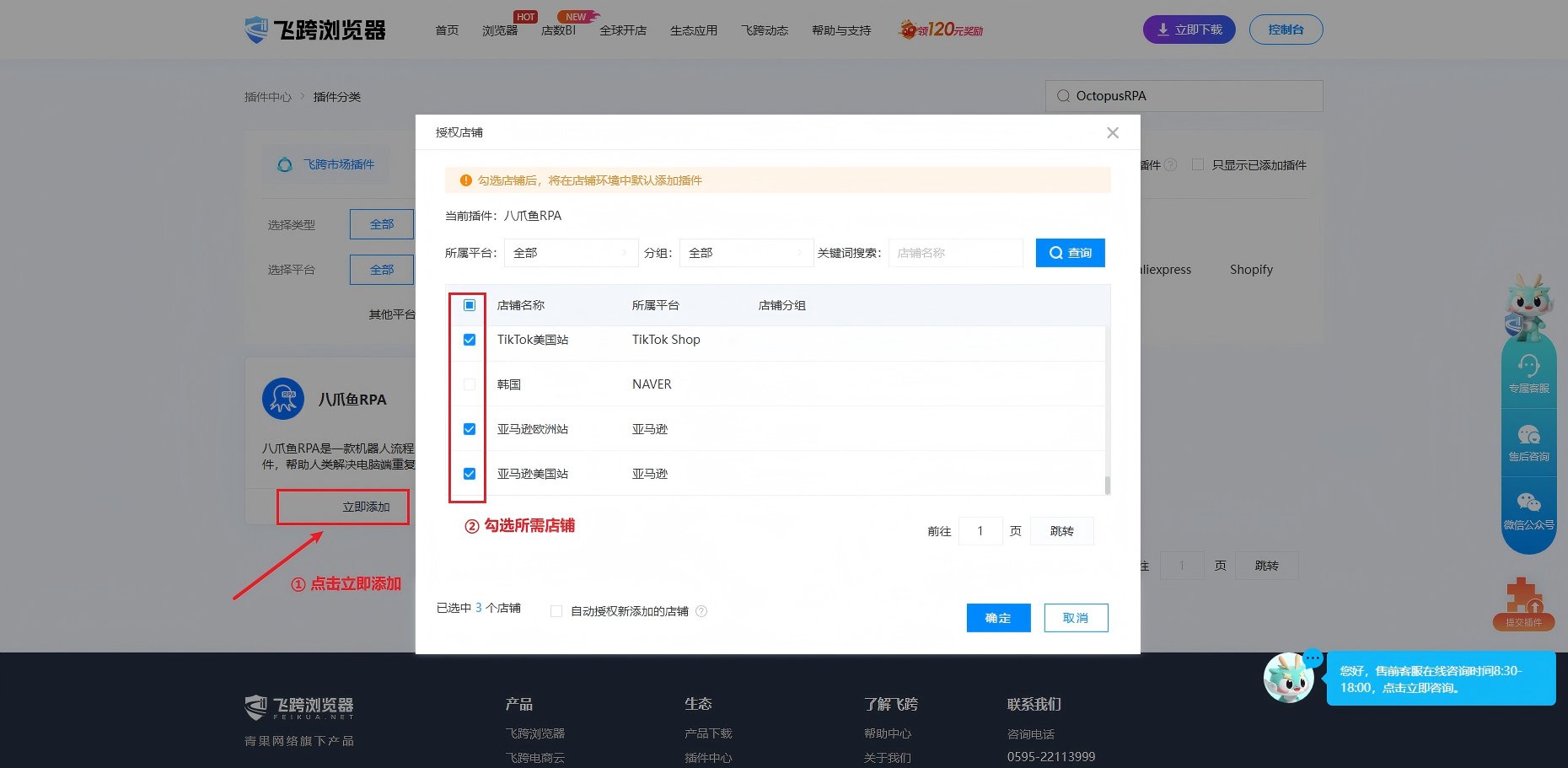
2、点击【立即添加】，在【授权店铺】弹窗勾选需要的店铺，点击确定即可。

<img src="https://mintcdn.com/bazhuayu-rpa-docs/wC_vScfvW08KMra2/helpcenter/features/personal-center/images/auto-plugin/8l9W7G52/69c2781970c88.png?fit=max&auto=format&n=wC_vScfvW08KMra2&q=85&s=05b5bdd9f87492d64109422fce42d0d0" alt="" width="1860" height="911" data-path="helpcenter/features/personal-center/images/auto-plugin/8l9W7G52/69c2781970c88.png" />

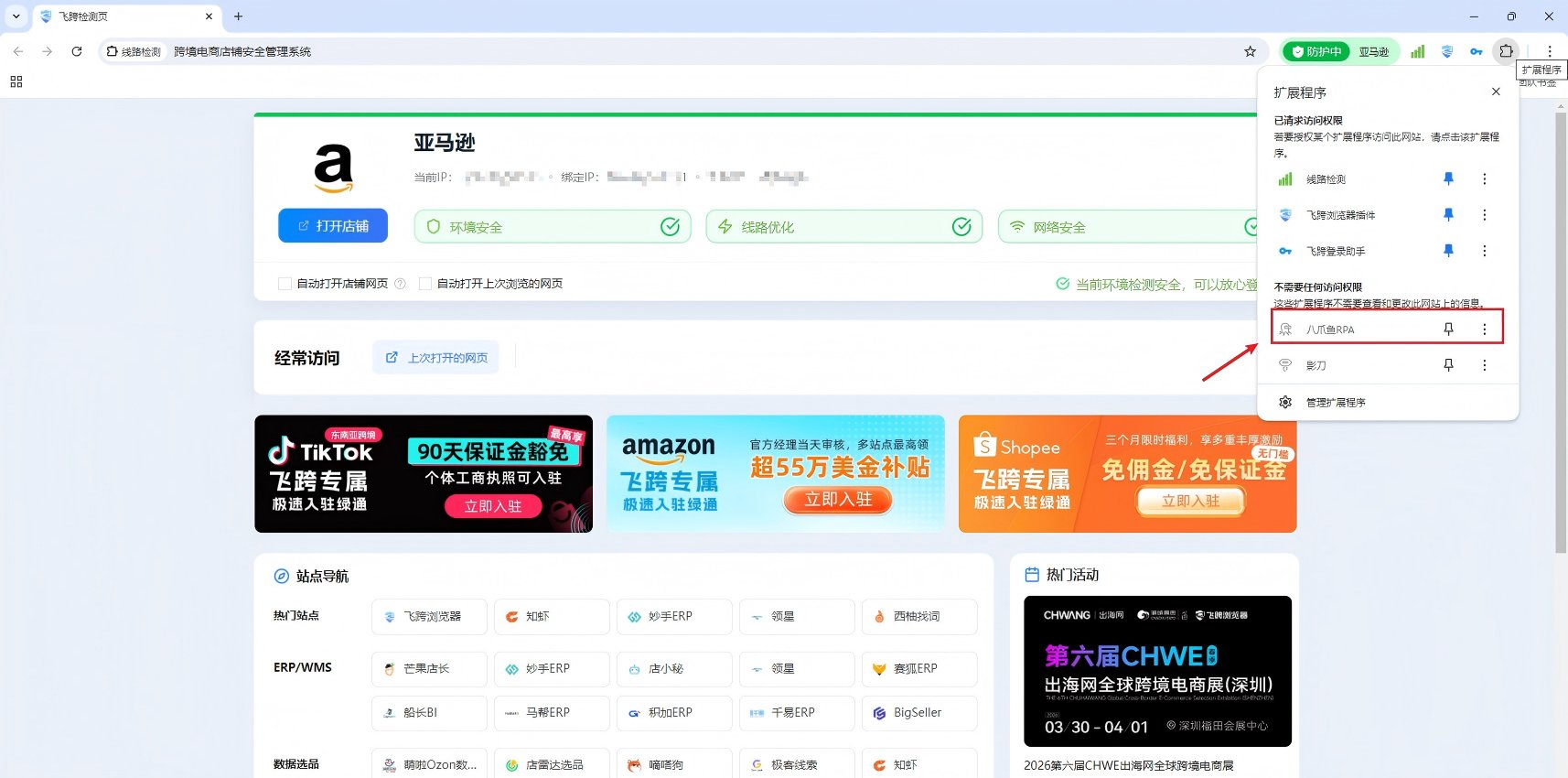
3、打开店铺，在店铺环境里面即可看到八爪鱼插件。

<img src="https://mintcdn.com/bazhuayu-rpa-docs/wC_vScfvW08KMra2/helpcenter/features/personal-center/images/auto-plugin/8l9W7G52/69c278230355c.png?fit=max&auto=format&n=wC_vScfvW08KMra2&q=85&s=4e72504f02bdb1b4bca88e8d44b34b60" alt="" width="1714" height="850" data-path="helpcenter/features/personal-center/images/auto-plugin/8l9W7G52/69c278230355c.png" />

## 三、八爪鱼RPA指令说明

### 3.1获取飞跨浏览器ID

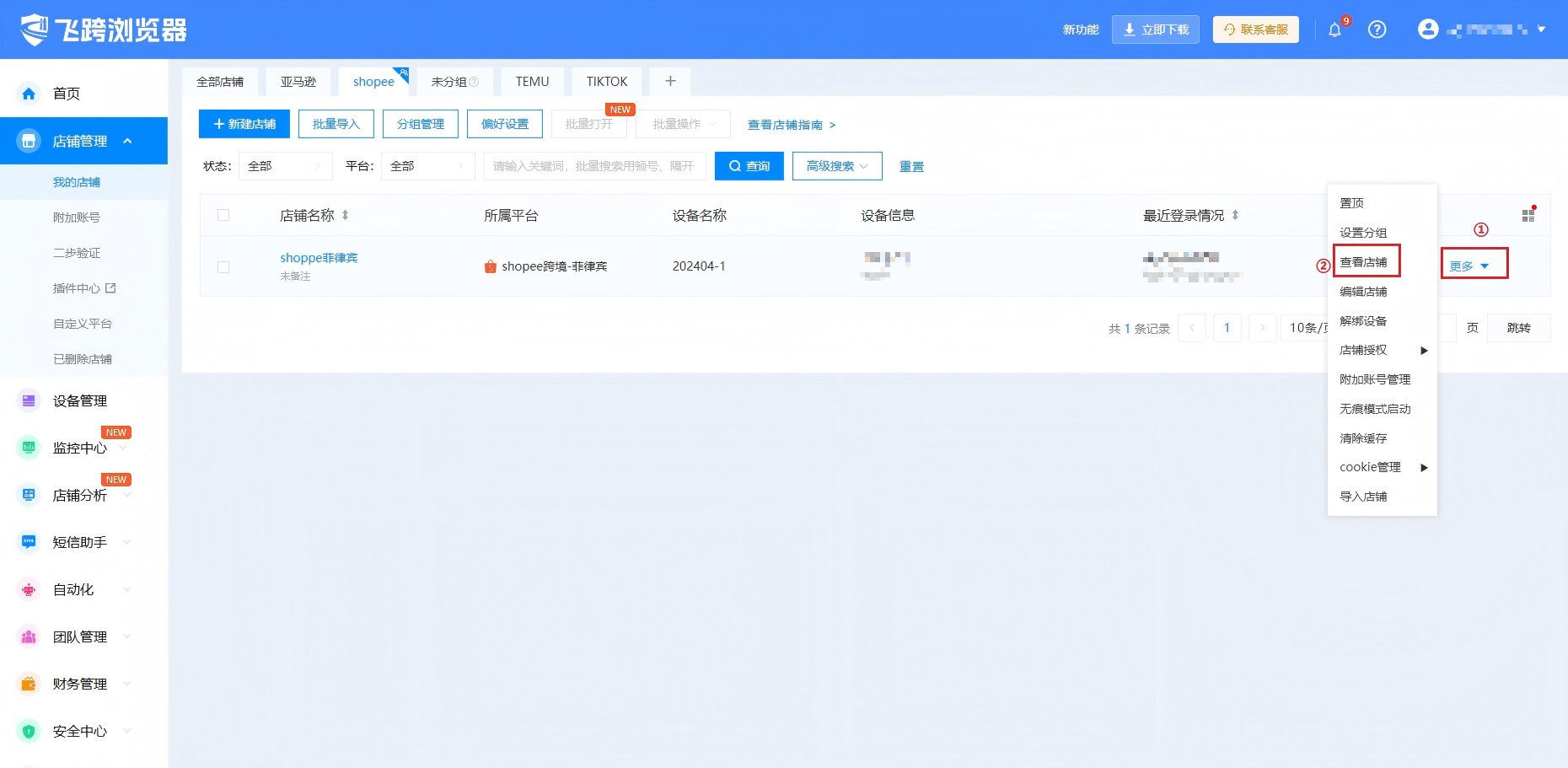
1、在我的店铺页面选择要操作的店铺，点击【更多】→【查看店铺】，

<img src="https://mintcdn.com/bazhuayu-rpa-docs/wC_vScfvW08KMra2/helpcenter/features/personal-center/images/auto-plugin/8l9W7G52/69c2783bb989e.png?fit=max&auto=format&n=wC_vScfvW08KMra2&q=85&s=774180c006b5600e5a49fa5c49b0a62f" alt="" width="1860" height="911" data-path="helpcenter/features/personal-center/images/auto-plugin/8l9W7G52/69c2783bb989e.png" />

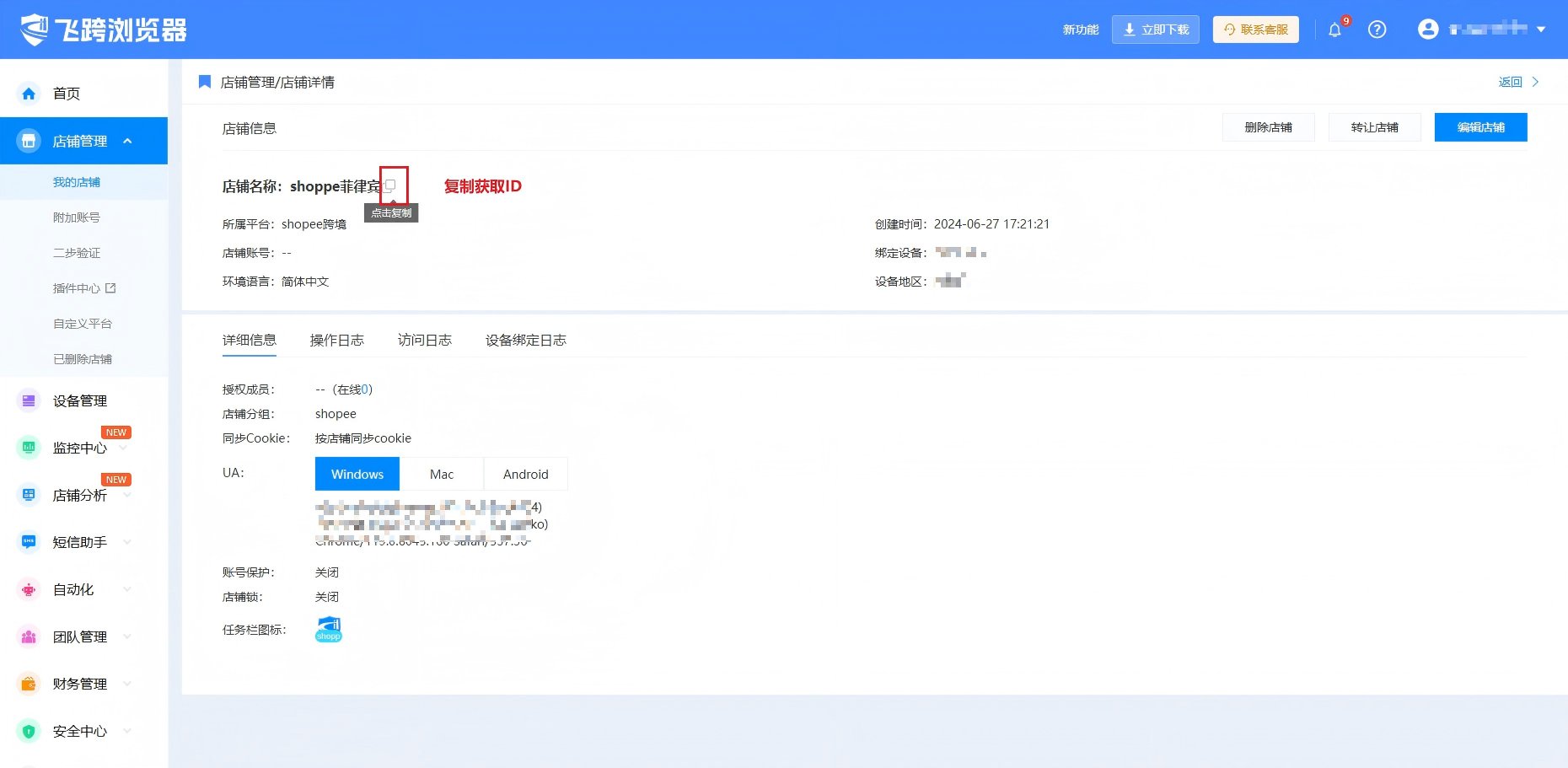
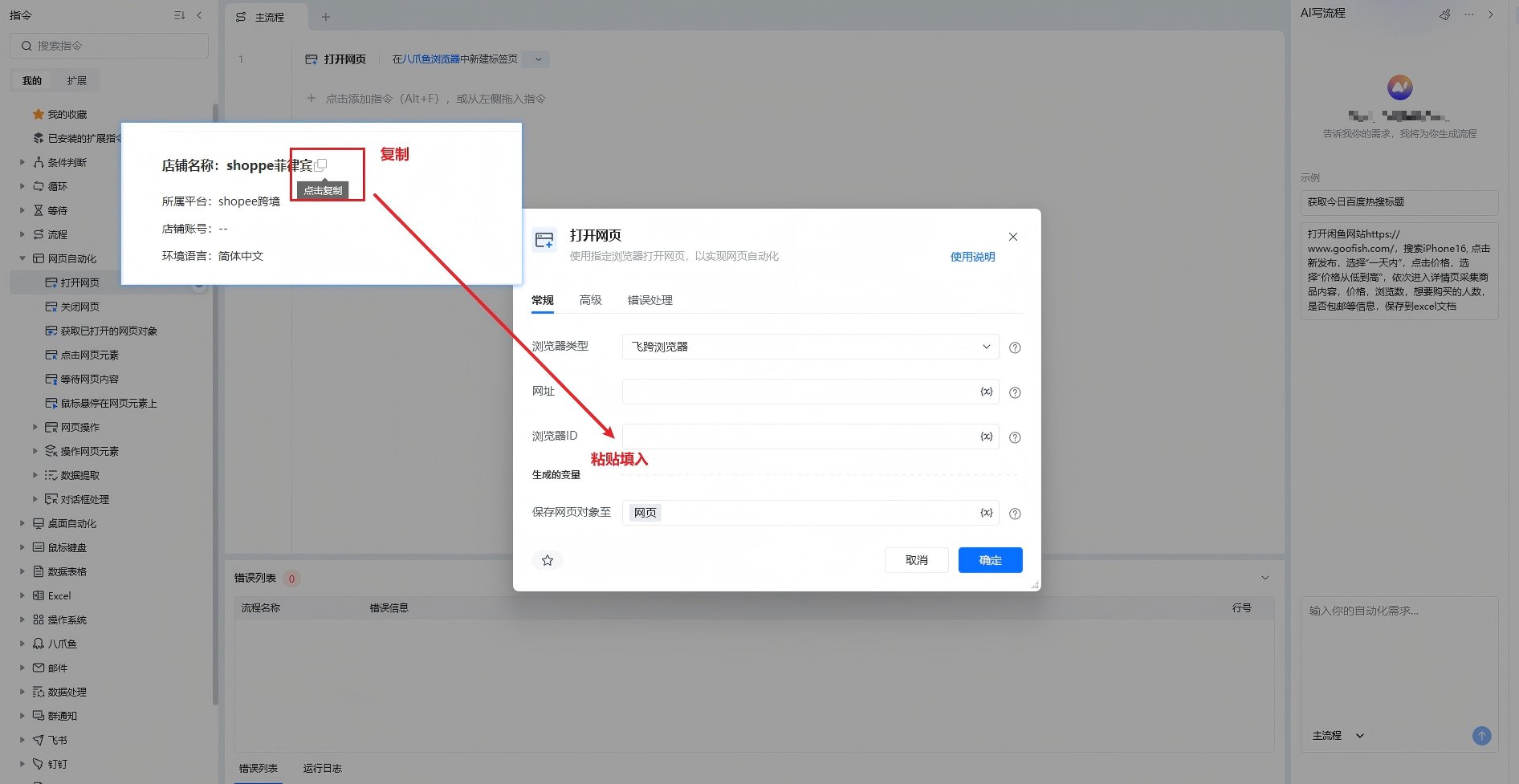
2、在店铺详情页，店铺名称后面有个复制按钮，点击复制，获取ID。

<img src="https://mintcdn.com/bazhuayu-rpa-docs/wC_vScfvW08KMra2/helpcenter/features/personal-center/images/auto-plugin/8l9W7G52/69c2784911c39.png?fit=max&auto=format&n=wC_vScfvW08KMra2&q=85&s=8de70889e94da032252b6c1a86daddba" alt="" width="1860" height="911" data-path="helpcenter/features/personal-center/images/auto-plugin/8l9W7G52/69c2784911c39.png" />

### 3.2运行RPA

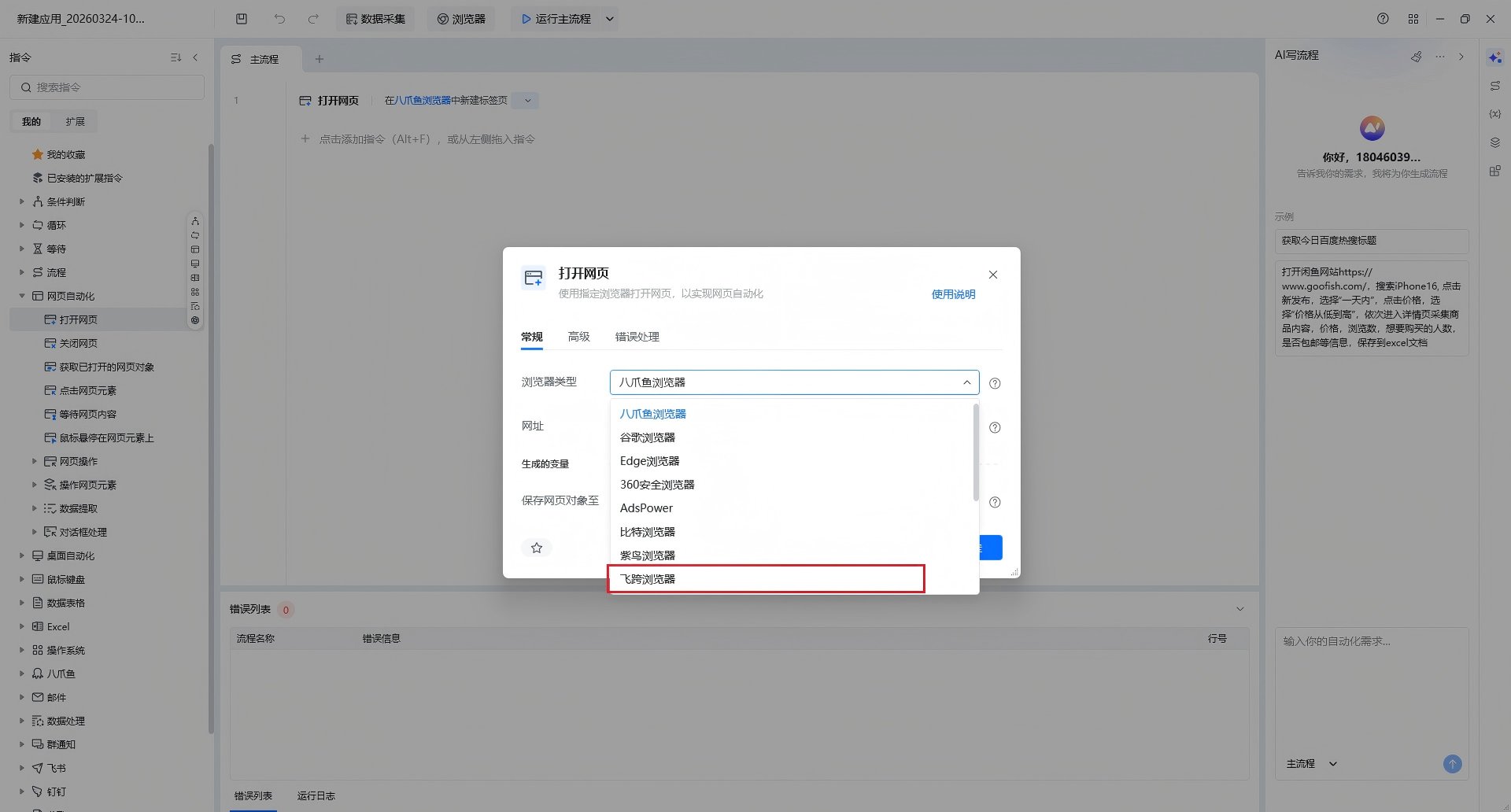
安装好插件后指令选择飞跨浏览器后，将之前在飞跨店铺获取的ID填入【浏览器ID】后即可运行。

<img src="https://mintcdn.com/bazhuayu-rpa-docs/wC_vScfvW08KMra2/helpcenter/features/personal-center/images/auto-plugin/8l9W7G52/69c278597963d.png?fit=max&auto=format&n=wC_vScfvW08KMra2&q=85&s=54595fbeb0daca0a3b6d4f0fad3c99ed" alt="" width="1920" height="1032" data-path="helpcenter/features/personal-center/images/auto-plugin/8l9W7G52/69c278597963d.png" />

<img src="https://mintcdn.com/bazhuayu-rpa-docs/wC_vScfvW08KMra2/helpcenter/features/personal-center/images/auto-plugin/8l9W7G52/69c2786755a93.png?fit=max&auto=format&n=wC_vScfvW08KMra2&q=85&s=ff1b758018bae0e08d1667357555a237" alt="" width="1892" height="977" data-path="helpcenter/features/personal-center/images/auto-plugin/8l9W7G52/69c2786755a93.png" />

## 四、注意事项

1、飞跨浏览器控制台要始终处于打开状态。