> ## Documentation Index
> Fetch the complete documentation index at: https://rpa.bazhuayu.com/helpcenter/llms.txt
> Use this file to discover all available pages before exploring further.

# 比特浏览器插件安装说明

说明：比特浏览器是一款指纹浏览器，可以设置多个不同环境的浏览器，从而实现多账号登录，调用本地电脑的比特浏览器需要先安装插件。且每个环境都需要单独安装一次八爪鱼RPA插件，并保证此插件处于开启状态。如未安装，请按照以下提示进行安装。

## 从比特生态中心安装

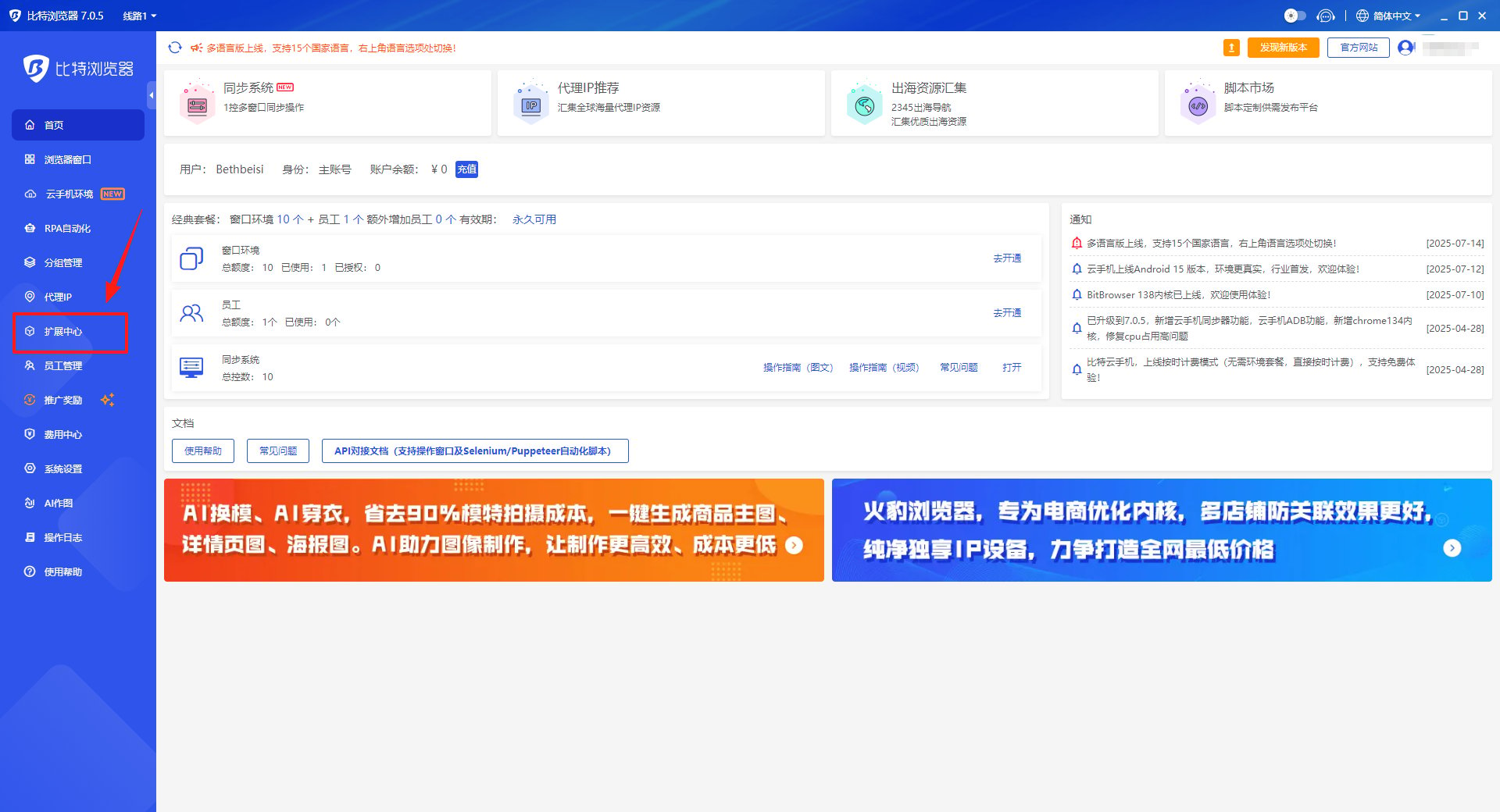
<strong>1、</strong>在比特浏览器首页点击“扩展中心”

<img src="https://mintcdn.com/bazhuayu-rpa-docs/wC_vScfvW08KMra2/helpcenter/features/personal-center/images/auto-plugin/ANs4nwbf/68a420411fbf5.png?fit=max&auto=format&n=wC_vScfvW08KMra2&q=85&s=77a5c2a0f8e78db05c6b965573c7a7f4" alt="" width="1920" height="1040" data-path="helpcenter/features/personal-center/images/auto-plugin/ANs4nwbf/68a420411fbf5.png" />

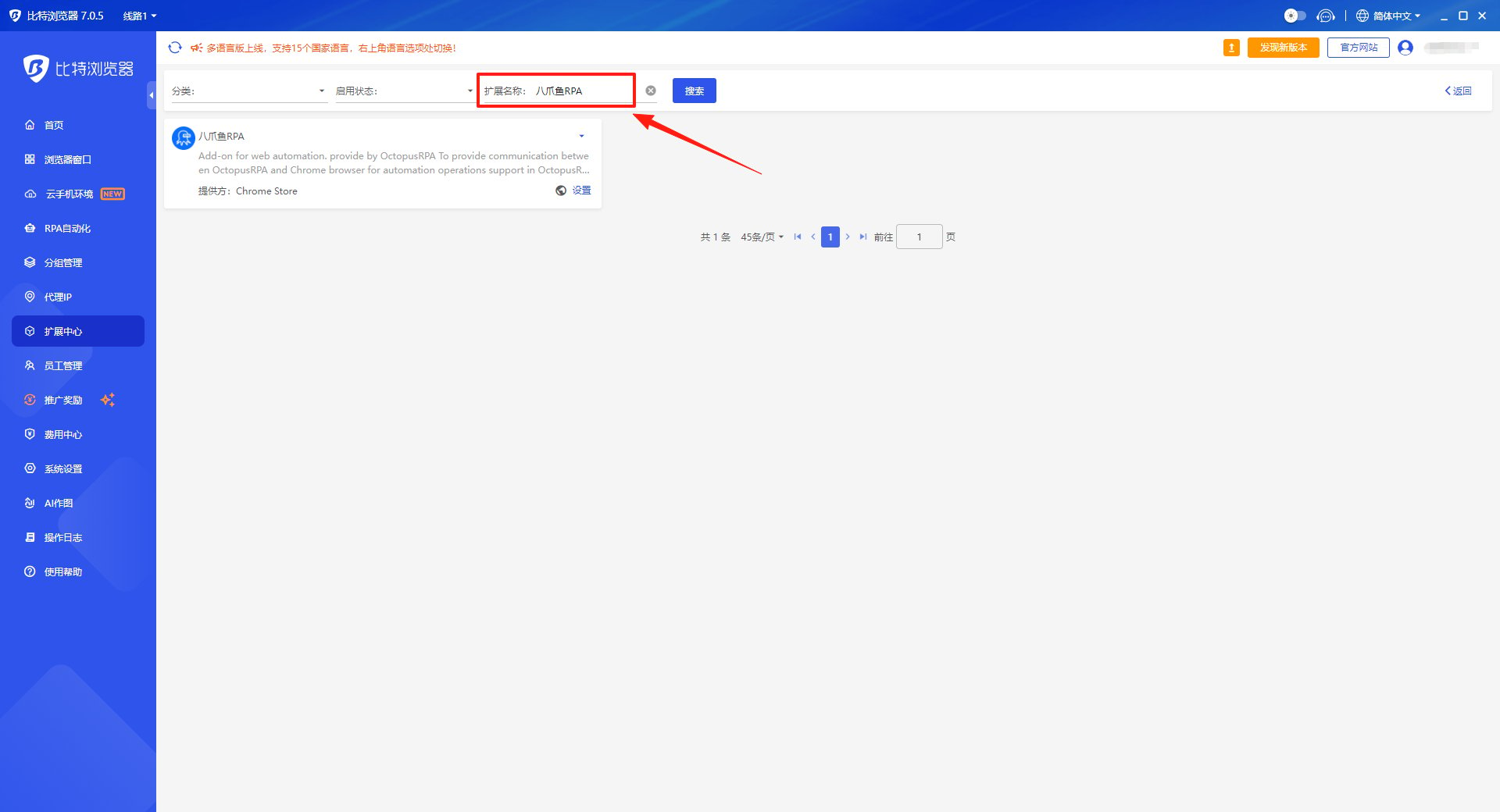
<strong>2、</strong>在扩展名称中输入“八爪鱼RPA”

<img src="https://mintcdn.com/bazhuayu-rpa-docs/wC_vScfvW08KMra2/helpcenter/features/personal-center/images/auto-plugin/ANs4nwbf/68a420cf8bdc5.png?fit=max&auto=format&n=wC_vScfvW08KMra2&q=85&s=e34d1d09791aa5ed707cd5c570a60bf7" alt="" width="1920" height="1040" data-path="helpcenter/features/personal-center/images/auto-plugin/ANs4nwbf/68a420cf8bdc5.png" />

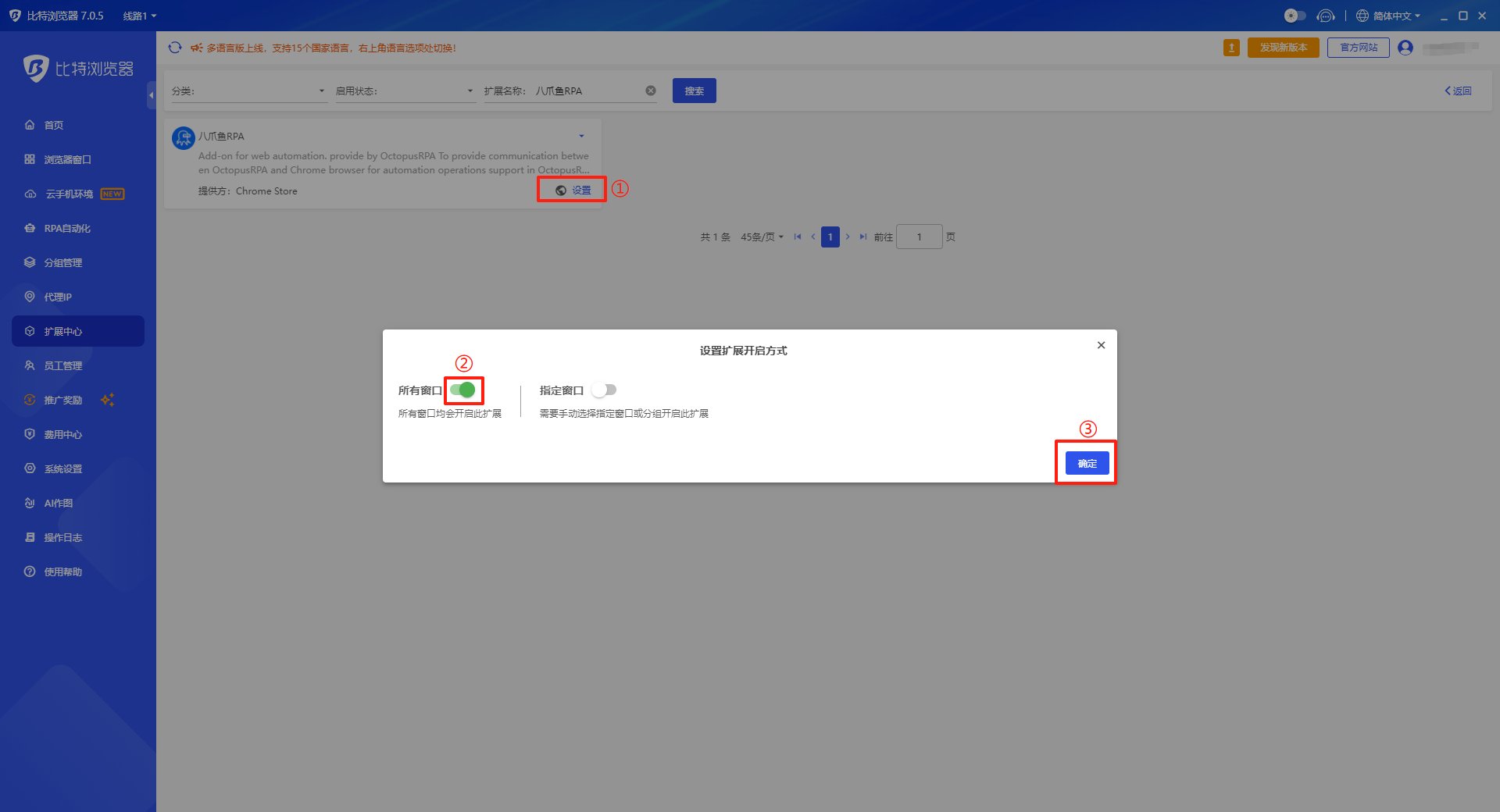
<strong>3、</strong>点击设置--->设置开启方式--->选择“所有窗口”

<img src="https://mintcdn.com/bazhuayu-rpa-docs/wC_vScfvW08KMra2/helpcenter/features/personal-center/images/auto-plugin/ANs4nwbf/68a4211d54f15.png?fit=max&auto=format&n=wC_vScfvW08KMra2&q=85&s=38ef00e3c4ba0aaa39316ddef31da4cf" alt="" width="1920" height="1040" data-path="helpcenter/features/personal-center/images/auto-plugin/ANs4nwbf/68a4211d54f15.png" />

## 八爪鱼RPA指令说明

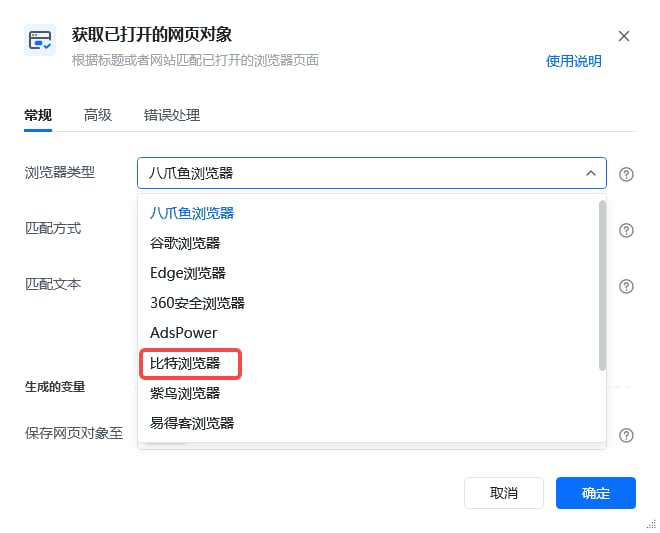
<strong>1、</strong>安装好插件后指令选择比特浏览器进行使用--->【打开网页】/【获取已打开的网页对象】选择“比特浏览器”
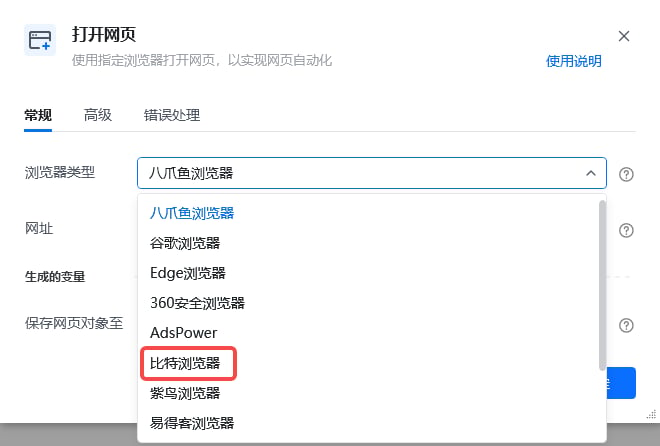
<img src="https://mintcdn.com/bazhuayu-rpa-docs/wC_vScfvW08KMra2/helpcenter/features/personal-center/images/auto-plugin/ANs4nwbf/69a7ea4435d29.png?fit=max&auto=format&n=wC_vScfvW08KMra2&q=85&s=5fbfd2fb271bd85d9cdede7d65d52f20" alt="" width="660" height="446" data-path="helpcenter/features/personal-center/images/auto-plugin/ANs4nwbf/69a7ea4435d29.png" />

<img src="https://mintcdn.com/bazhuayu-rpa-docs/wC_vScfvW08KMra2/helpcenter/features/personal-center/images/auto-plugin/ANs4nwbf/69a7ea636d28e.png?fit=max&auto=format&n=wC_vScfvW08KMra2&q=85&s=622396951dd5c8c1d43e65c651895b54" alt="" width="660" height="533" data-path="helpcenter/features/personal-center/images/auto-plugin/ANs4nwbf/69a7ea636d28e.png" />

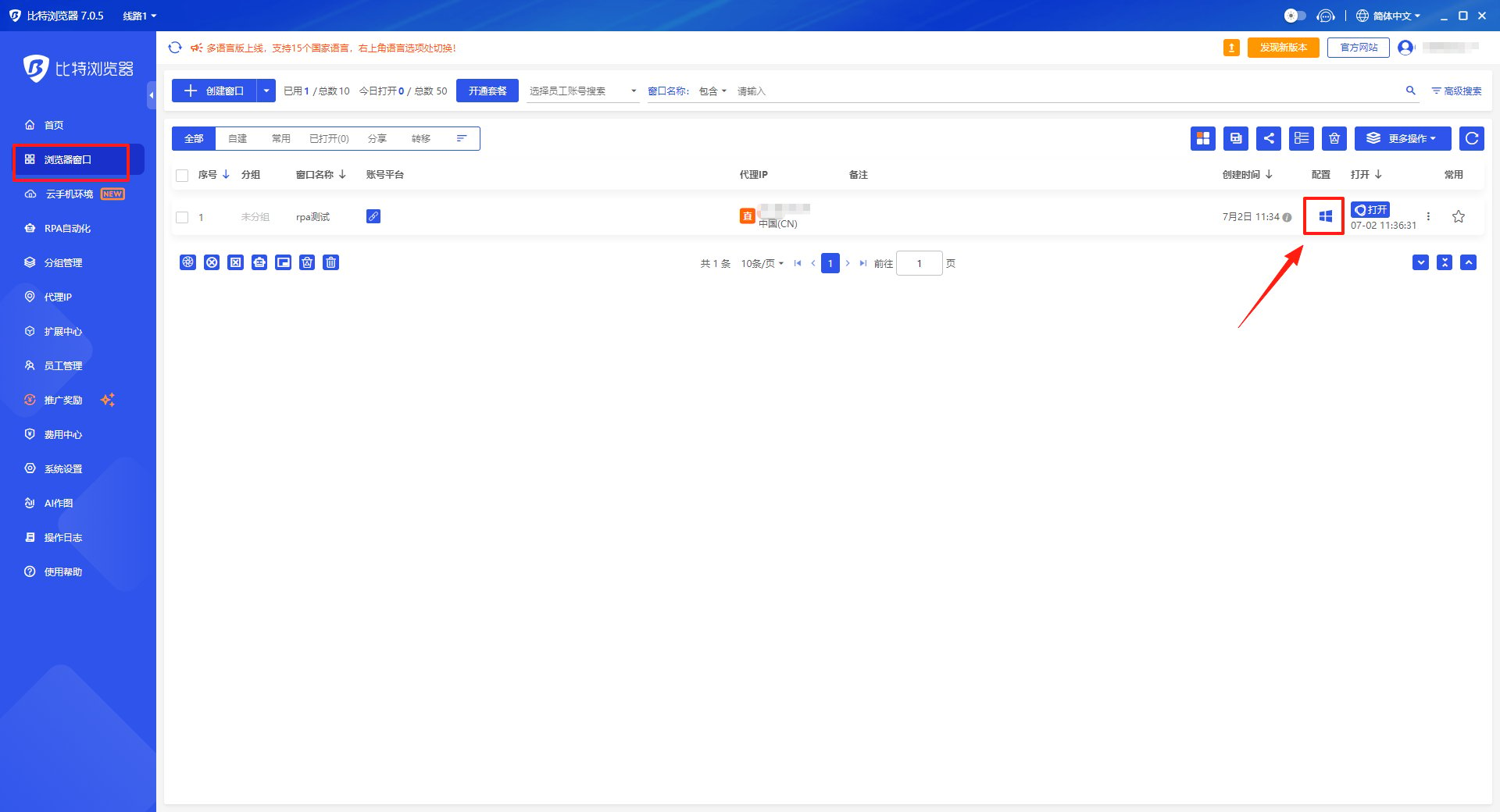
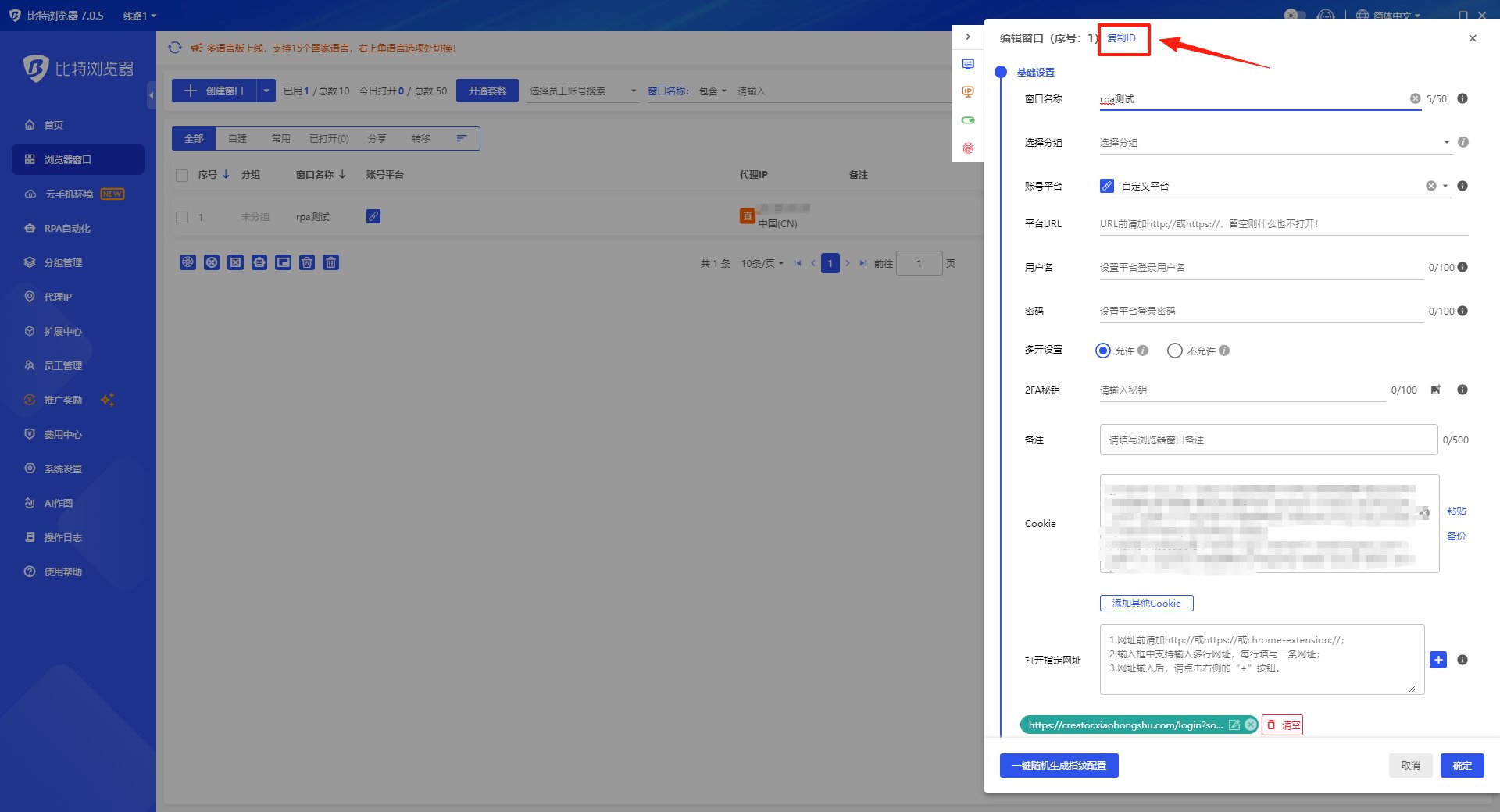
<strong>2、</strong>输入指定浏览器ID，浏览器ID的获取方式：
①点击”修改窗口配置“

<img src="https://mintcdn.com/bazhuayu-rpa-docs/wC_vScfvW08KMra2/helpcenter/features/personal-center/images/auto-plugin/ANs4nwbf/68a4223275de2.png?fit=max&auto=format&n=wC_vScfvW08KMra2&q=85&s=419bea3492171f68586c890021038c17" alt="" width="1920" height="1040" data-path="helpcenter/features/personal-center/images/auto-plugin/ANs4nwbf/68a4223275de2.png" />

②点击”复制ID“

<img src="https://mintcdn.com/bazhuayu-rpa-docs/wC_vScfvW08KMra2/helpcenter/features/personal-center/images/auto-plugin/ANs4nwbf/68a42273a360b.png?fit=max&auto=format&n=wC_vScfvW08KMra2&q=85&s=d4bf4535e30b2c3945048c726e576f1e" alt="" width="1920" height="1040" data-path="helpcenter/features/personal-center/images/auto-plugin/ANs4nwbf/68a42273a360b.png" />

## 特别注意

1. 若安装插件后运行应用，报”插件未开启“的错误。可检查浏览器插件版本，并尝试重装，可能是插件版本过旧导致的报错。