> ## Documentation Index
> Fetch the complete documentation index at: https://rpa.bazhuayu.com/helpcenter/llms.txt
> Use this file to discover all available pages before exploring further.

# 循环采集多个网页详情数据-网址循环

## 1. 应用说明

通过本应用可以实现依次打开多个不同网址，批量采集同类型网页的数据。

<div className="h-8" />

## 2. 应用实现逻辑

### 模拟、分析人操作全流程

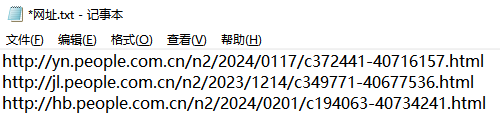
前期：准备一个包含多个“相似网页网址”的文本文件（.txt）

<img src="https://mintcdn.com/bazhuayu-rpa-docs/Un9xnU9PbcHvf1QO/helpcenter/getting-started/examples/images/EuUQb2-01.png?fit=max&auto=format&n=Un9xnU9PbcHvf1QO&q=85&s=7c5571bd01708e8becdec5aa6ce21999" alt="循环采集多个网页详情数据-网址循环" width="500" height="113" data-path="helpcenter/getting-started/examples/images/EuUQb2-01.png" />

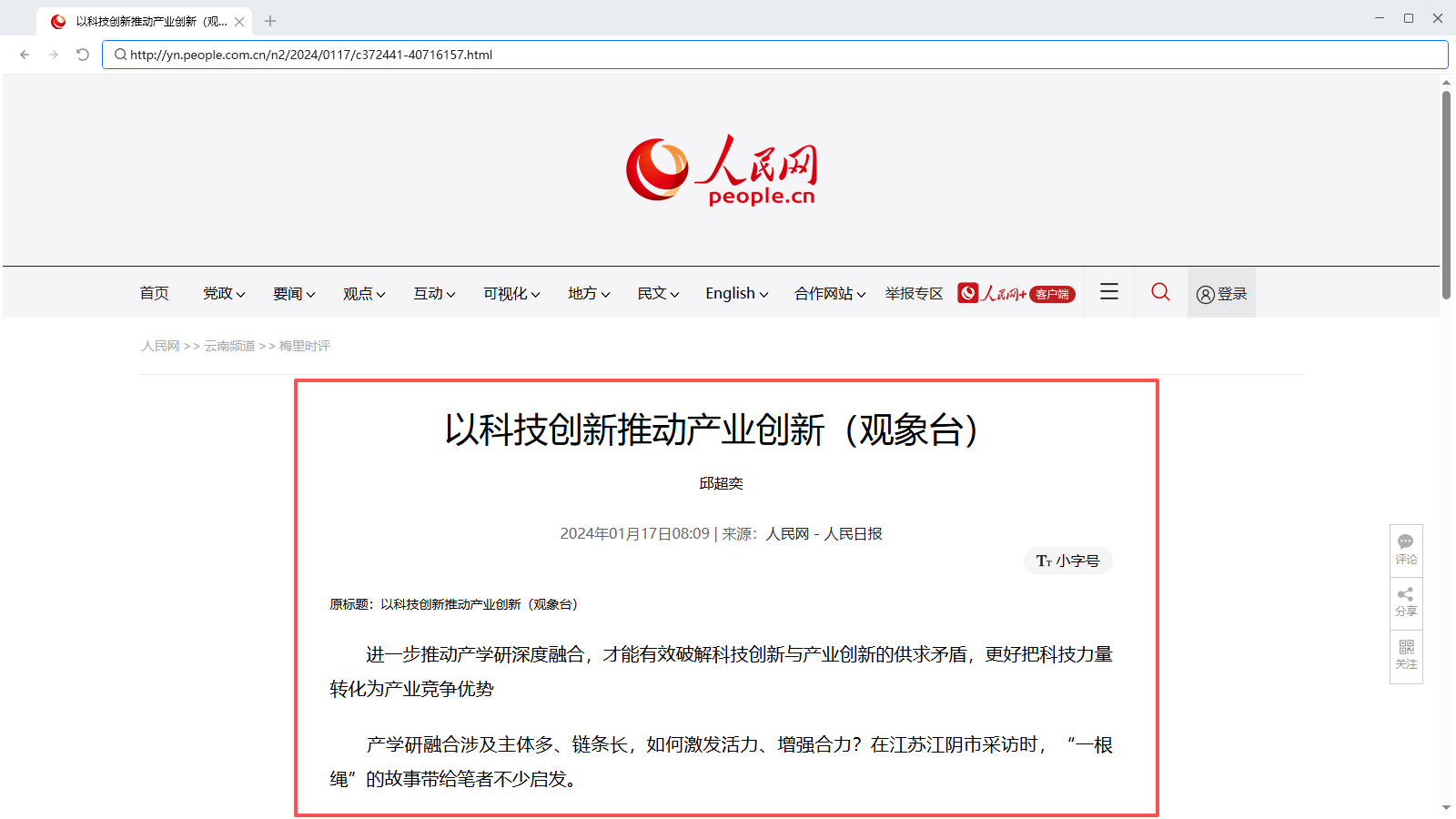
第一步：在八爪鱼浏览器内打开第一个网址链接“[http://yn.people.com.cn/n2/2024/0117/c372441-40716157.html](http://yn.people.com.cn/n2/2024/0117/c372441-40716157.html)”
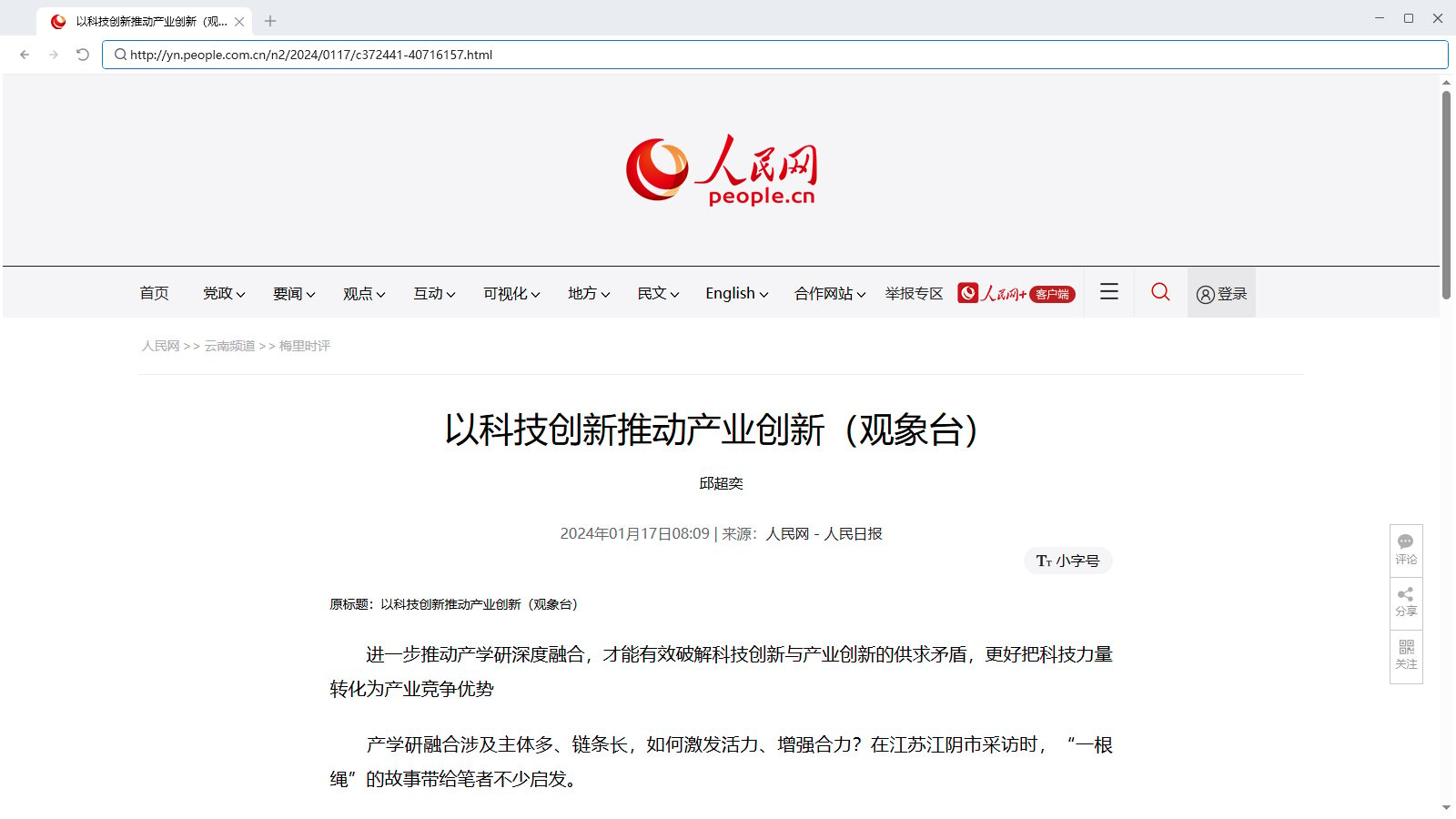
<img src="https://mintcdn.com/bazhuayu-rpa-docs/Un9xnU9PbcHvf1QO/helpcenter/getting-started/examples/images/EuUQb2-02.png?fit=max&auto=format&n=Un9xnU9PbcHvf1QO&q=85&s=cebd05bb24452775a71af874f14cc2f9" alt="循环采集多个网页详情数据-网址循环" width="1600" height="900" data-path="helpcenter/getting-started/examples/images/EuUQb2-02.png" />

第二步：获取当前页面内我们需要的信息，并存储在表格内

<img src="https://mintcdn.com/bazhuayu-rpa-docs/Un9xnU9PbcHvf1QO/helpcenter/getting-started/examples/images/EuUQb2-03.png?fit=max&auto=format&n=Un9xnU9PbcHvf1QO&q=85&s=03894952e95b0bbe0d491f7b6aae95f6" alt="循环采集多个网页详情数据-网址循环" width="1600" height="900" data-path="helpcenter/getting-started/examples/images/EuUQb2-03.png" />

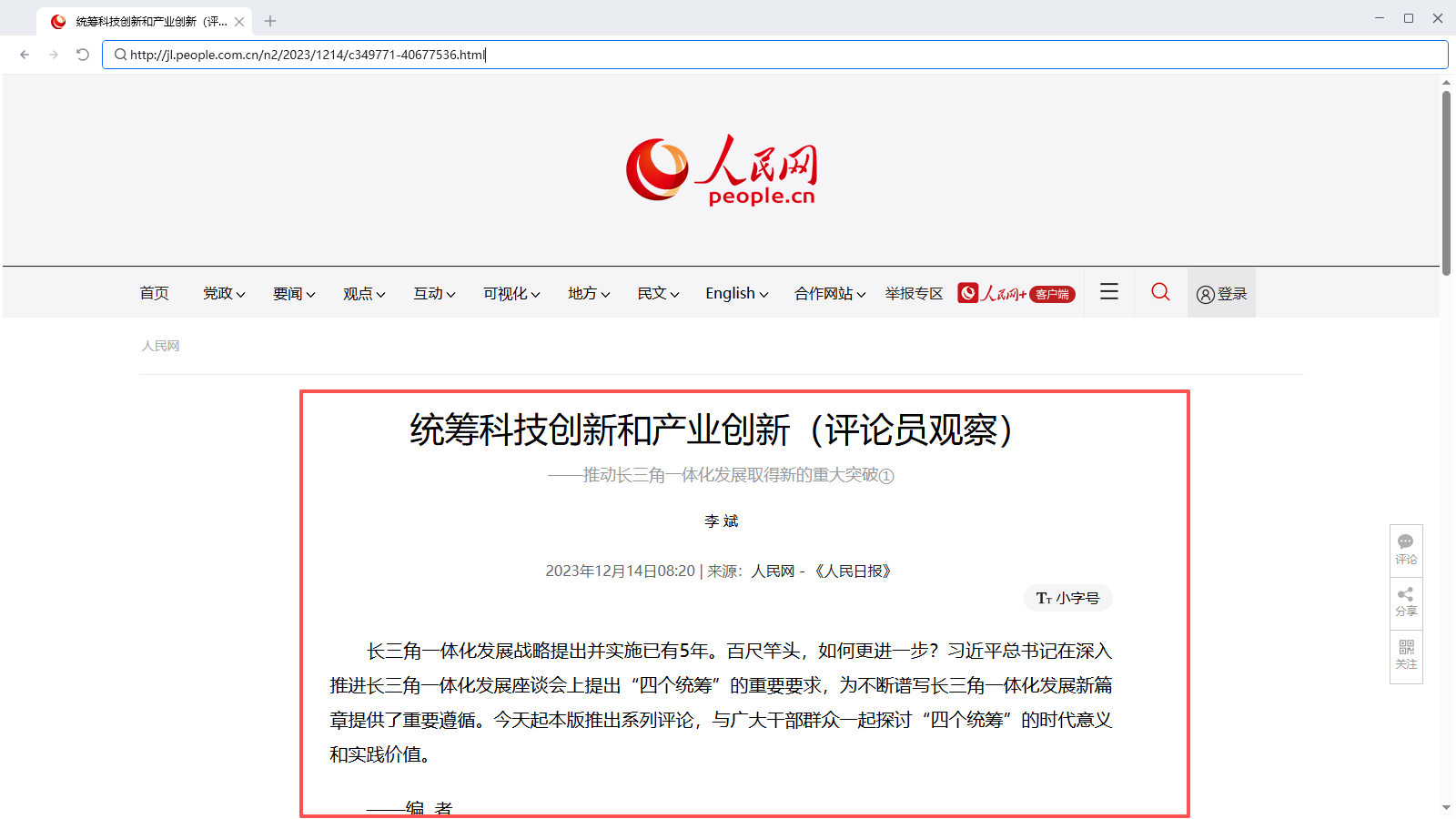
第三步：在八爪鱼浏览器内打开第二哥网址链接“[http://jl.people.com.cn/n2/2023/1214/c349771-40677536.html](http://jl.people.com.cn/n2/2023/1214/c349771-40677536.html)”
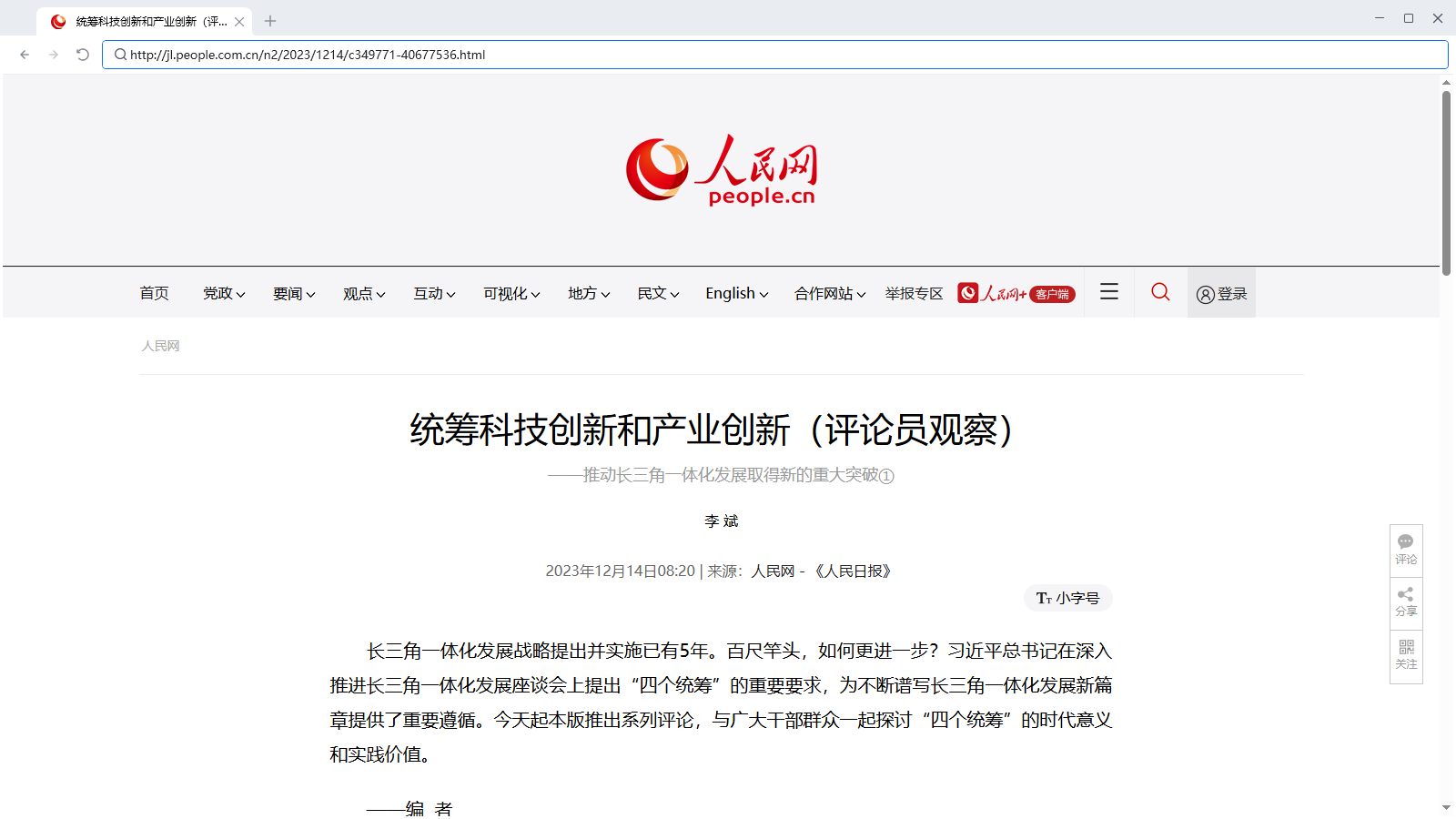
<img src="https://mintcdn.com/bazhuayu-rpa-docs/Un9xnU9PbcHvf1QO/helpcenter/getting-started/examples/images/EuUQb2-04.png?fit=max&auto=format&n=Un9xnU9PbcHvf1QO&q=85&s=29bed1f3ddfaa89347e02927c12ab4b6" alt="循环采集多个网页详情数据-网址循环" width="1600" height="900" data-path="helpcenter/getting-started/examples/images/EuUQb2-04.png" />

第四步：获取当前页面内我们需要的信息，并存储在表格内

<img src="https://mintcdn.com/bazhuayu-rpa-docs/Un9xnU9PbcHvf1QO/helpcenter/getting-started/examples/images/EuUQb2-05.png?fit=max&auto=format&n=Un9xnU9PbcHvf1QO&q=85&s=a317bffc4856621206c7b6d50c41a0ab" alt="循环采集多个网页详情数据-网址循环" width="1600" height="900" data-path="helpcenter/getting-started/examples/images/EuUQb2-05.png" />

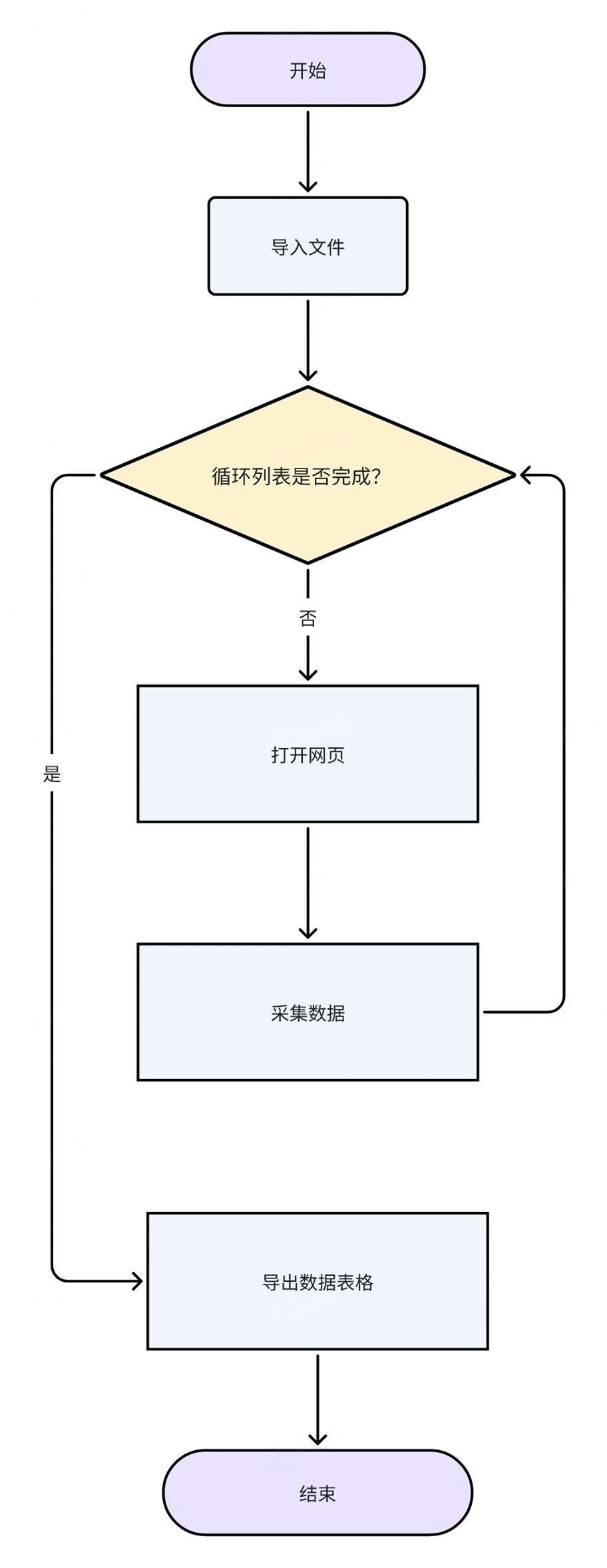
后续操作步骤一致，直至所有网址都搜索完毕。

### RPA 流程图

<img src="https://mintcdn.com/bazhuayu-rpa-docs/Un9xnU9PbcHvf1QO/helpcenter/getting-started/examples/images/EuUQb2-06.jpg?fit=max&auto=format&n=Un9xnU9PbcHvf1QO&q=85&s=7dd85afc6abfc471b7410799426e998e" alt="循环采集多个网页详情数据-网址循环" width="912" height="2356" data-path="helpcenter/getting-started/examples/images/EuUQb2-06.jpg" />

<div className="h-8" />

## 3. 应用实现

<img src="https://mintcdn.com/bazhuayu-rpa-docs/Un9xnU9PbcHvf1QO/helpcenter/getting-started/examples/images/EuUQb2-07.png?fit=max&auto=format&n=Un9xnU9PbcHvf1QO&q=85&s=55dc729ad7b425812f648a38b8277611" alt="循环采集多个网页详情数据-网址循环" width="1375" height="351" data-path="helpcenter/getting-started/examples/images/EuUQb2-07.png" />

<img src="https://mintcdn.com/bazhuayu-rpa-docs/Un9xnU9PbcHvf1QO/helpcenter/getting-started/examples/images/EuUQb2-08.png?fit=max&auto=format&n=Un9xnU9PbcHvf1QO&q=85&s=c4810f1de2e8d021bcc55f7872cc5592" alt="循环采集多个网页详情数据-网址循环" width="1375" height="237" data-path="helpcenter/getting-started/examples/images/EuUQb2-08.png" />

### 前期准备

<img src="https://mintcdn.com/bazhuayu-rpa-docs/Un9xnU9PbcHvf1QO/helpcenter/getting-started/examples/images/EuUQb2-01.png?fit=max&auto=format&n=Un9xnU9PbcHvf1QO&q=85&s=7c5571bd01708e8becdec5aa6ce21999" alt="循环采集多个网页详情数据-网址循环" width="500" height="113" data-path="helpcenter/getting-started/examples/images/EuUQb2-01.png" />

1. 准备一个包含多个“相似网页网址”的文本文件（.txt），网址如下： [http://yn.people.com.cn/n2/2024/0117/c372441-40716157.html](http://yn.people.com.cn/n2/2024/0117/c372441-40716157.html) [http://jl.people.com.cn/n2/2023/1214/c349771-40677536.html](http://jl.people.com.cn/n2/2023/1214/c349771-40677536.html) [http://hb.people.com.cn/n2/2024/0201/c194063-40734241.html](http://hb.people.com.cn/n2/2024/0201/c194063-40734241.html)
<img src="https://mintcdn.com/bazhuayu-rpa-docs/Un9xnU9PbcHvf1QO/helpcenter/getting-started/examples/images/EuUQb2-09.png?fit=max&auto=format&n=Un9xnU9PbcHvf1QO&q=85&s=0b9775d1874939f2fa1b6fb1361f2ccf" alt="循环采集多个网页详情数据-网址循环" width="658" height="339" data-path="helpcenter/getting-started/examples/images/EuUQb2-09.png" />

<img src="https://mintcdn.com/bazhuayu-rpa-docs/Un9xnU9PbcHvf1QO/helpcenter/getting-started/examples/images/EuUQb2-10.png?fit=max&auto=format&n=Un9xnU9PbcHvf1QO&q=85&s=9d0d944e14683ecd5471dbac07c3a157" alt="循环采集多个网页详情数据-网址循环" width="758" height="369" data-path="helpcenter/getting-started/examples/images/EuUQb2-10.png" />

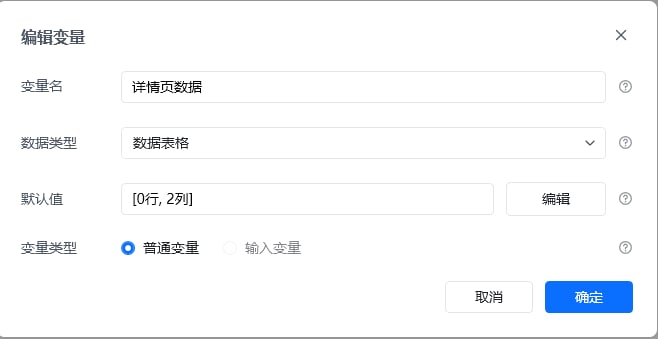
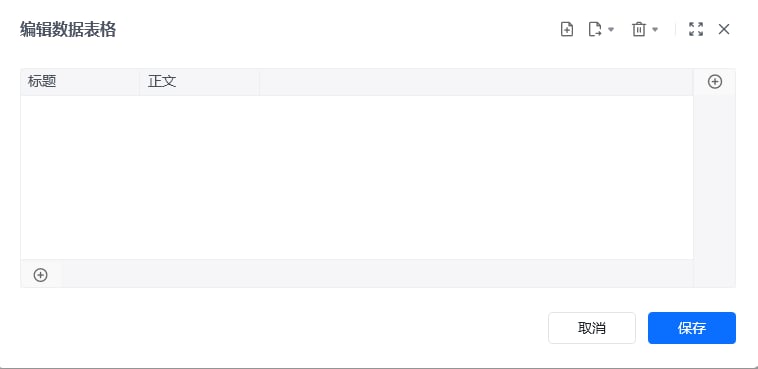
2. 创建数据表格，命名为“详情页数据“用于后续存储数据。

### 主流程指令解析

<img src="https://mintcdn.com/bazhuayu-rpa-docs/Un9xnU9PbcHvf1QO/helpcenter/getting-started/examples/images/EuUQb2-11.png?fit=max&auto=format&n=Un9xnU9PbcHvf1QO&q=85&s=fa4ff2ce8460149a73ddd9116149bfff" alt="循环采集多个网页详情数据-网址循环" width="658" height="476" data-path="helpcenter/getting-started/examples/images/EuUQb2-11.png" />

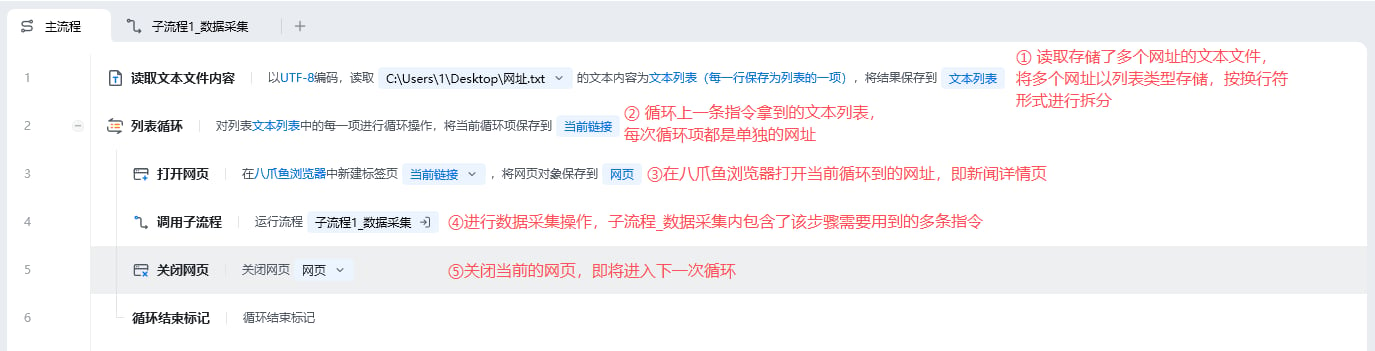
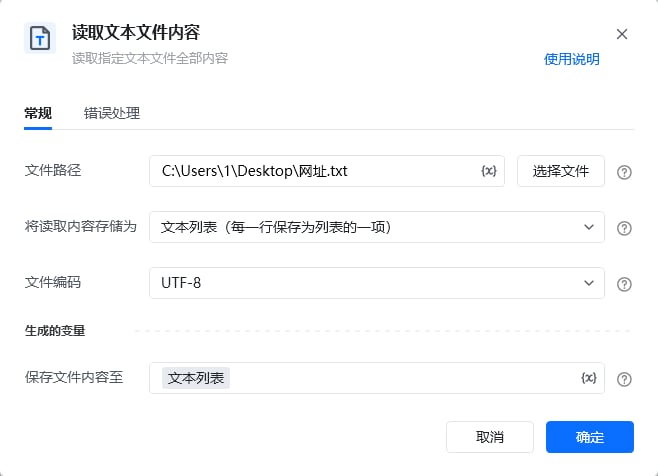
读取存储了多个网址的文本文件，将多个网址以列表类型进行存储，按换行符形式进行拆分

<img src="https://mintcdn.com/bazhuayu-rpa-docs/Un9xnU9PbcHvf1QO/helpcenter/getting-started/examples/images/EuUQb2-12.png?fit=max&auto=format&n=Un9xnU9PbcHvf1QO&q=85&s=fbf874ea5af6ab240b4ac9a2a11be737" alt="循环采集多个网页详情数据-网址循环" width="654" height="419" data-path="helpcenter/getting-started/examples/images/EuUQb2-12.png" />

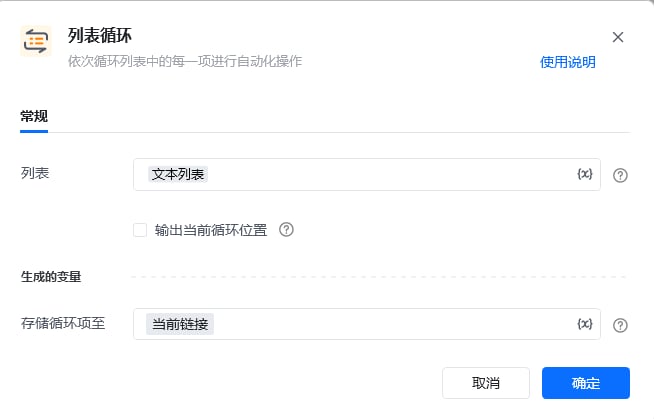
依次循环文本列表中的每一个网址，并且把当前循环到的网址命名为"当前链接"。

假设此时文本列表里面有"[www.1.com](http://www.1.com)"和"[www.2.com](http://www.2.com)"两个网址，那么会按照顺序先打开[www.1.com](http://www.1.com)，再打开[www.2.com](http://www.2.com)

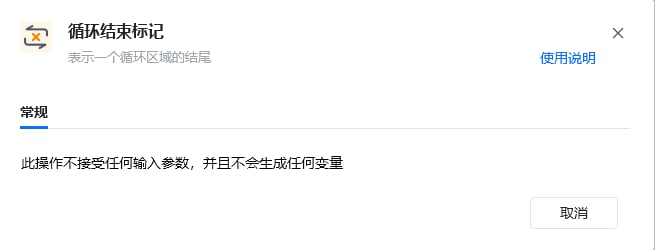
<strong>注意：</strong>每个循环相关的指令都会自动连带"循环结束标记"指令，该指令不需要输入参数，也不能删除，否则会报错

<img src="https://mintcdn.com/bazhuayu-rpa-docs/Un9xnU9PbcHvf1QO/helpcenter/getting-started/examples/images/EuUQb2-13.png?fit=max&auto=format&n=Un9xnU9PbcHvf1QO&q=85&s=4c193b4e95a46df817345d8316bcc6f1" alt="循环采集多个网页详情数据-网址循环" width="649" height="418" data-path="helpcenter/getting-started/examples/images/EuUQb2-13.png" />

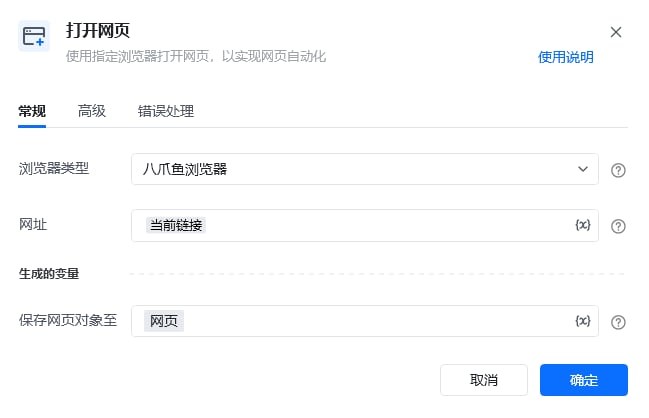
按照习惯选择常用的浏览器类型，可选八爪鱼浏览器、谷歌浏览器、Edge浏览器等，网址则填写当前循环到的链接，最后将此网页对象命名为网页。

<img src="https://mintcdn.com/bazhuayu-rpa-docs/Un9xnU9PbcHvf1QO/helpcenter/getting-started/examples/images/EuUQb2-14.png?fit=max&auto=format&n=Un9xnU9PbcHvf1QO&q=85&s=311cec4f768e7fb39ab087b842f0b025" alt="循环采集多个网页详情数据-网址循环" width="654" height="263" data-path="helpcenter/getting-started/examples/images/EuUQb2-14.png" />

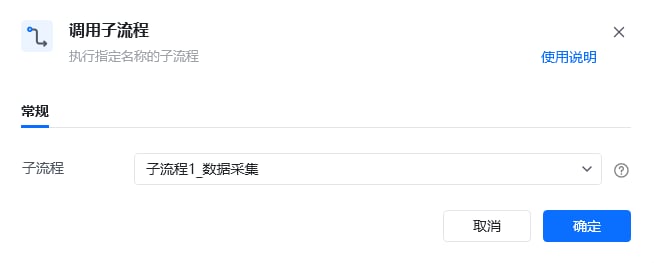
调用封装好的子流程\_数据采集，该子流程包含了数据采集需要用到的多个指令

<img src="https://mintcdn.com/bazhuayu-rpa-docs/Un9xnU9PbcHvf1QO/helpcenter/getting-started/examples/images/EuUQb2-15.png?fit=max&auto=format&n=Un9xnU9PbcHvf1QO&q=85&s=7d2a1d71cd02e099f1351b05c8c31305" alt="循环采集多个网页详情数据-网址循环" width="651" height="322" data-path="helpcenter/getting-started/examples/images/EuUQb2-15.png" />

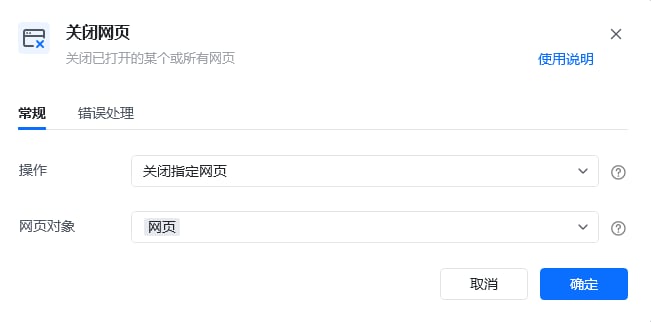
当前循环到的链接中待提取的数据被获取完后，即可关闭当前网页，即环境复原动作

<img src="https://mintcdn.com/bazhuayu-rpa-docs/Un9xnU9PbcHvf1QO/helpcenter/getting-started/examples/images/EuUQb2-16.png?fit=max&auto=format&n=Un9xnU9PbcHvf1QO&q=85&s=772e9cc3d36c63cd1f95fd08839e95d8" alt="循环采集多个网页详情数据-网址循环" width="655" height="250" data-path="helpcenter/getting-started/examples/images/EuUQb2-16.png" />

每个循环相关的指令都会自动连带“循环结束标记”指令，该指令不需要输入参数，也不能删除，否则会报错

### 子流程指令解析

<img src="https://mintcdn.com/bazhuayu-rpa-docs/Un9xnU9PbcHvf1QO/helpcenter/getting-started/examples/images/EuUQb2-17.png?fit=max&auto=format&n=Un9xnU9PbcHvf1QO&q=85&s=32d12ebd2794ff80e6bc36815084d079" alt="循环采集多个网页详情数据-网址循环" width="651" height="473" data-path="helpcenter/getting-started/examples/images/EuUQb2-17.png" />

<img src="https://mintcdn.com/bazhuayu-rpa-docs/Un9xnU9PbcHvf1QO/helpcenter/getting-started/examples/images/EuUQb2-18.png?fit=max&auto=format&n=Un9xnU9PbcHvf1QO&q=85&s=cbbe743866348a6327f0220d7c60254b" alt="循环采集多个网页详情数据-网址循环" width="1920" height="1040" data-path="helpcenter/getting-started/examples/images/EuUQb2-18.png" />

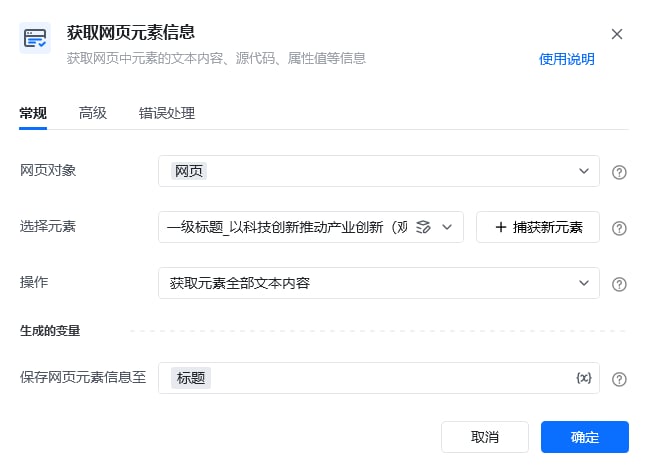
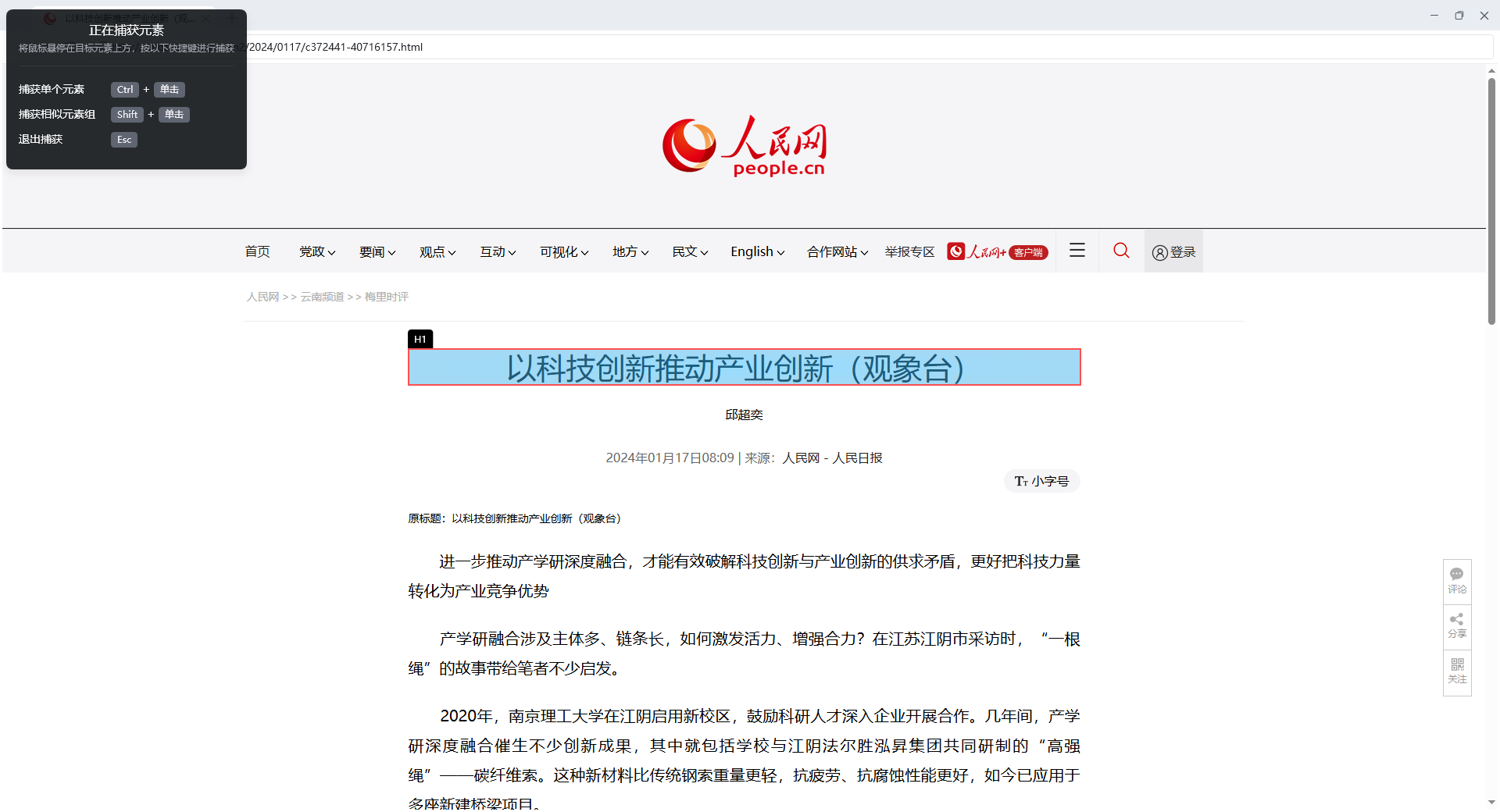
获取当前新闻标题元素对应的文本内容。
捕获元素步骤：
点击"捕获新元素"
按住ctrl键，鼠标左键选中新闻标题
点击"完成"
指令变量填写：
操作选择"获取元素全部文本内容"

<img src="https://mintcdn.com/bazhuayu-rpa-docs/Un9xnU9PbcHvf1QO/helpcenter/getting-started/examples/images/EuUQb2-19.png?fit=max&auto=format&n=Un9xnU9PbcHvf1QO&q=85&s=f1490976b371191b0393d7406ba27014" alt="循环采集多个网页详情数据-网址循环" width="648" height="473" data-path="helpcenter/getting-started/examples/images/EuUQb2-19.png" />

<img src="https://mintcdn.com/bazhuayu-rpa-docs/Un9xnU9PbcHvf1QO/helpcenter/getting-started/examples/images/EuUQb2-20.png?fit=max&auto=format&n=Un9xnU9PbcHvf1QO&q=85&s=14e3ac3f2337a42340c422be331f6da5" alt="循环采集多个网页详情数据-网址循环" width="1920" height="1040" data-path="helpcenter/getting-started/examples/images/EuUQb2-20.png" />

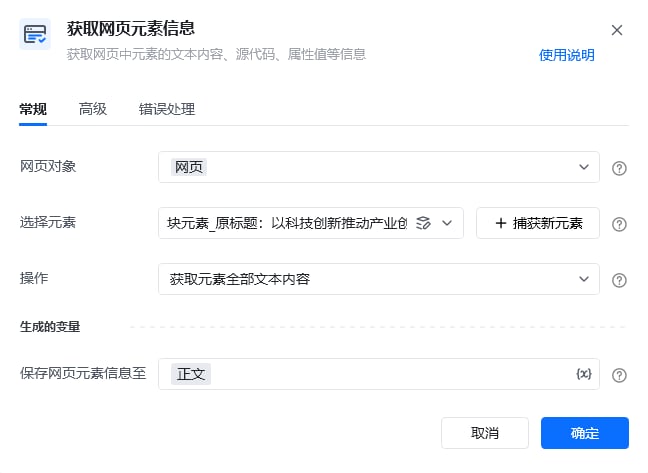
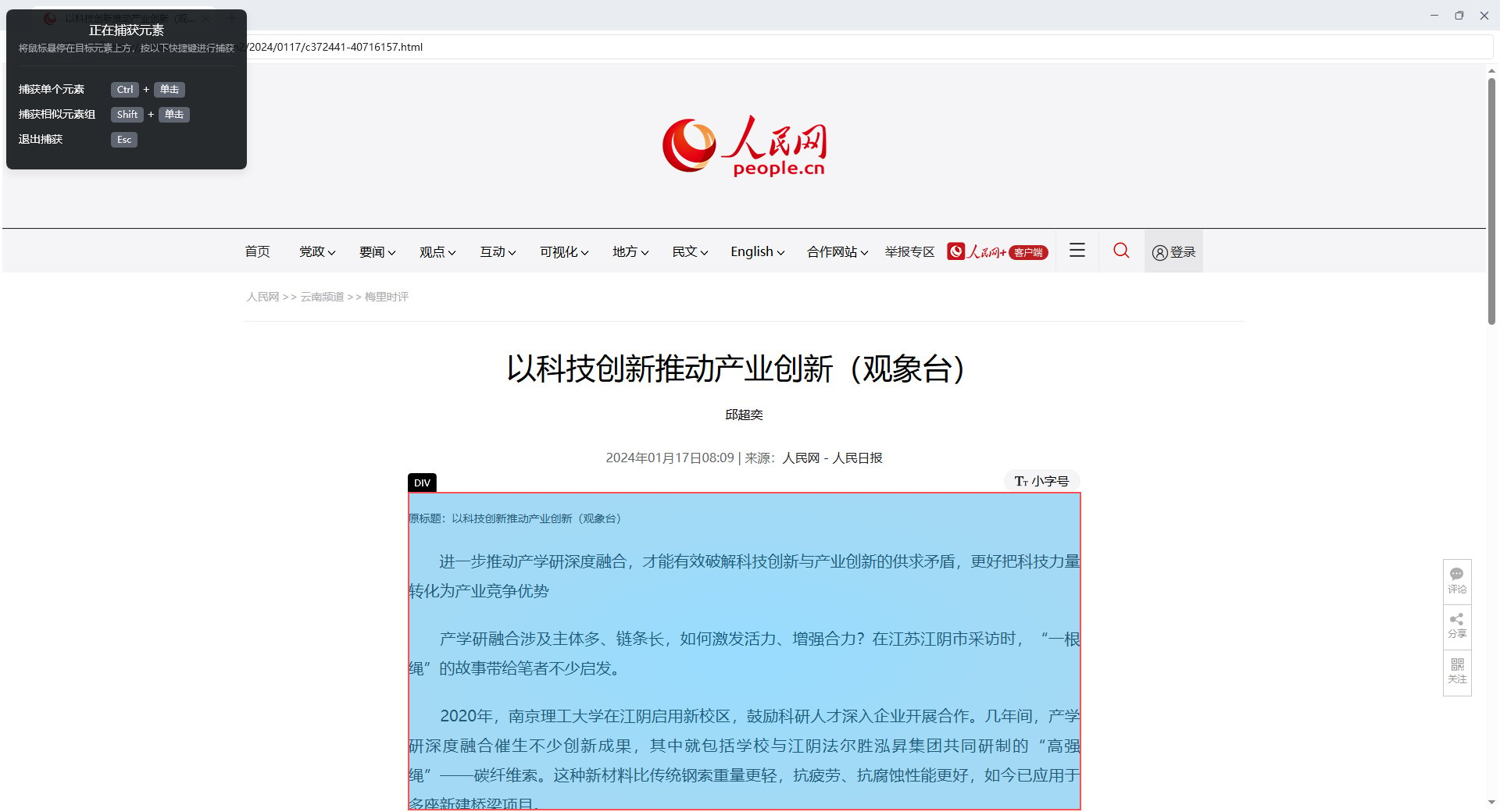
获取当前新闻正文元素对应的文本内容。
捕获元素步骤：
点击"捕获新元素"
按住ctrl键，鼠标左键选中新闻正文
点击"完成"
指令变量填写：
操作选择"获取元素全部文本内容"

<img src="https://mintcdn.com/bazhuayu-rpa-docs/Un9xnU9PbcHvf1QO/helpcenter/getting-started/examples/images/EuUQb2-21.png?fit=max&auto=format&n=Un9xnU9PbcHvf1QO&q=85&s=710c276c10a60e8958dd2ba585fb6c2f" alt="循环采集多个网页详情数据-网址循环" width="654" height="548" data-path="helpcenter/getting-started/examples/images/EuUQb2-21.png" />

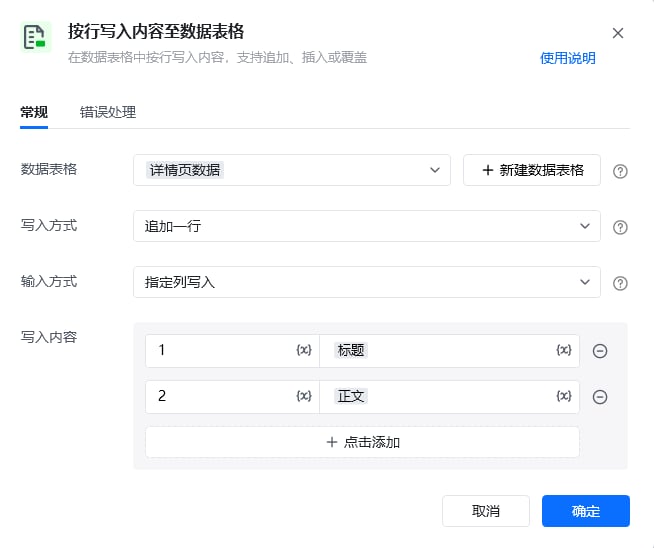
每次循环网页链接的时候，都把对应新闻的标题、正文元素的文本内容写入数据表格中

### 运行效果

<img src="https://mintcdn.com/bazhuayu-rpa-docs/Un9xnU9PbcHvf1QO/helpcenter/getting-started/examples/images/EuUQb2-22.png?fit=max&auto=format&n=Un9xnU9PbcHvf1QO&q=85&s=0730dbc9b2afbde270b8badea73b2275" alt="循环采集多个网页详情数据-网址循环" width="995" height="107" data-path="helpcenter/getting-started/examples/images/EuUQb2-22.png" />

<div className="h-8" />

## 4. 更多案例

<span style={{ color: '#9ca3af' }}>（已有多网址链接，可通过这些链接采集数据。一般适用于不能直接从列表页进入详情页或详情页有弹窗的网址）</span>

<strong>注：</strong>是同类型网页（网页结构一致）的网址
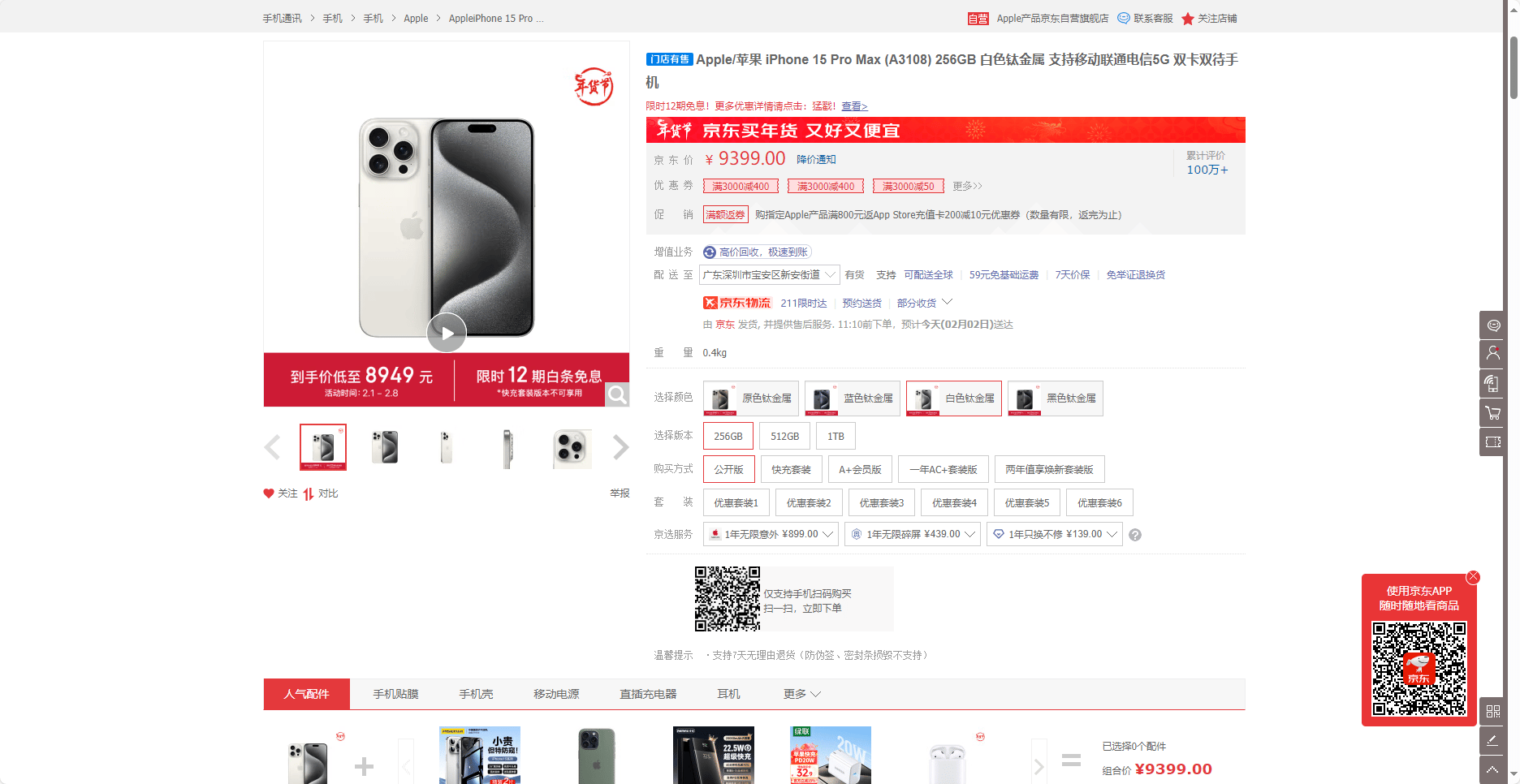
京东详情页

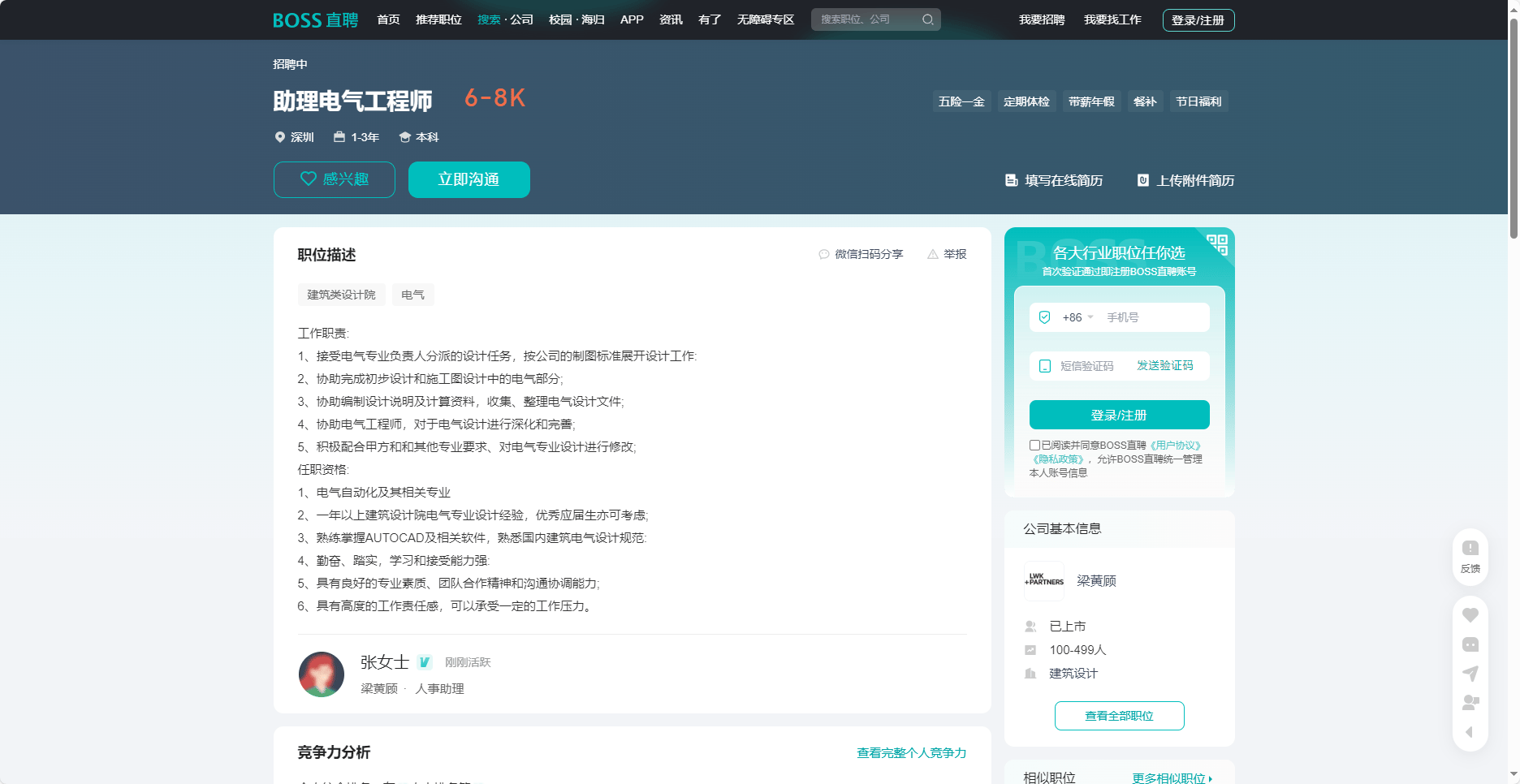
<img src="https://mintcdn.com/bazhuayu-rpa-docs/Un9xnU9PbcHvf1QO/helpcenter/getting-started/examples/images/EuUQb2-23.png?fit=max&auto=format&n=Un9xnU9PbcHvf1QO&q=85&s=d60dbcee434866356e8474282014a0de" alt="循环采集多个网页详情数据-网址循环" width="1872" height="966" data-path="helpcenter/getting-started/examples/images/EuUQb2-23.png" />

招聘网站详情页

<img src="https://mintcdn.com/bazhuayu-rpa-docs/Un9xnU9PbcHvf1QO/helpcenter/getting-started/examples/images/EuUQb2-24.png?fit=max&auto=format&n=Un9xnU9PbcHvf1QO&q=85&s=0582fba009d9c9c824ac8bfad191bb56" alt="循环采集多个网页详情数据-网址循环" width="1872" height="966" data-path="helpcenter/getting-started/examples/images/EuUQb2-24.png" />