> ## Documentation Index
> Fetch the complete documentation index at: https://rpa.bazhuayu.com/helpcenter/llms.txt
> Use this file to discover all available pages before exploring further.

# 循环采集单网页列表数据-瀑布流类型网页

## 1. 应用说明

通过本应用可以实现循环采集某个网页的列表数据-瀑布流类型网页

<div className="h-8" />

## 2. 应用实现逻辑

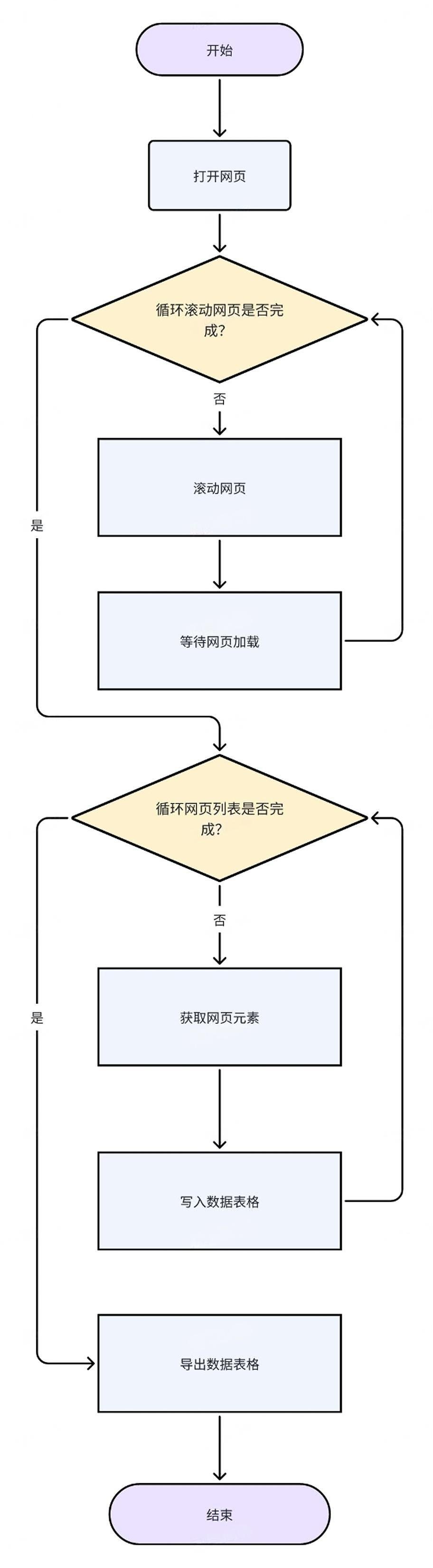
### 模拟、分析人操作全流程

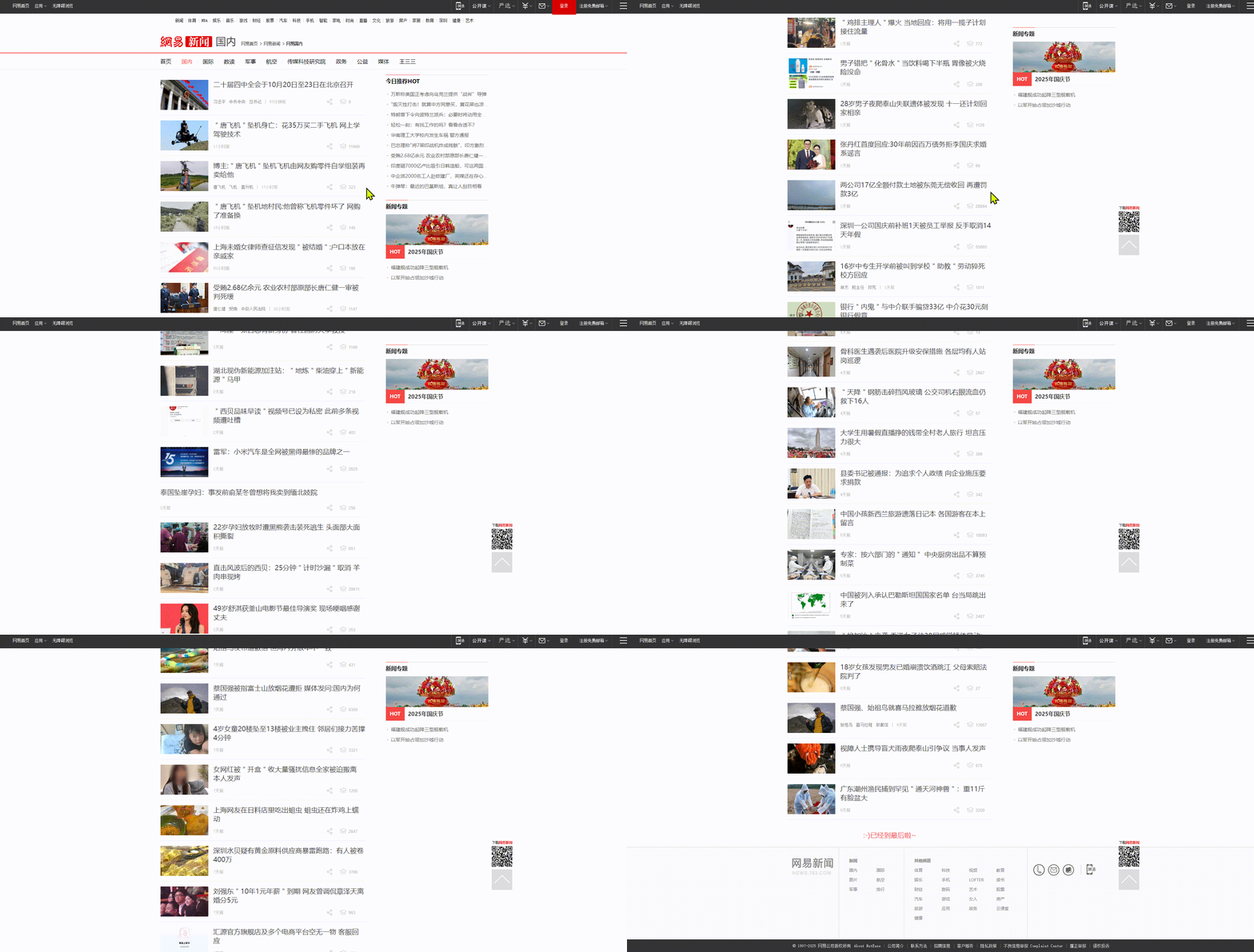
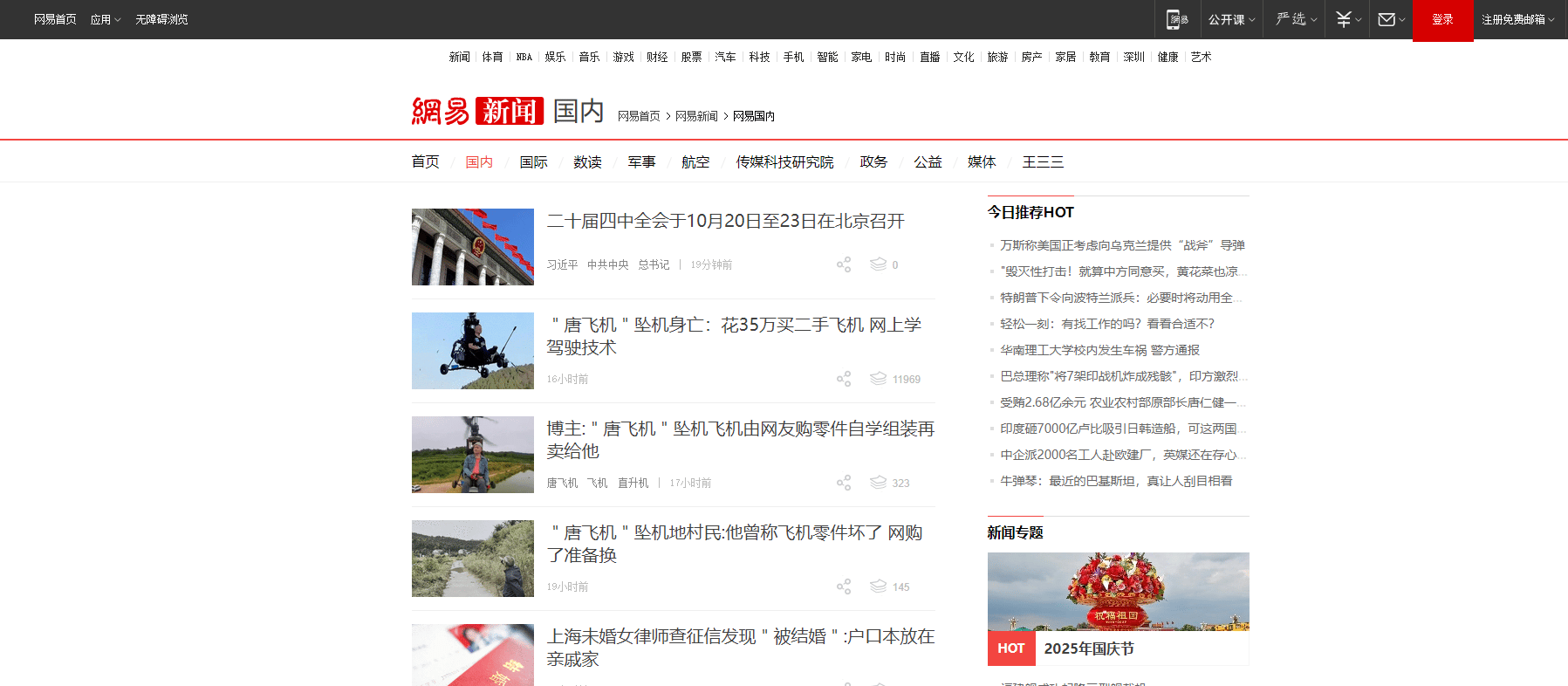
* 第一步：打开网易新闻-国内新闻（案例中网址：[https://news.163.com/domestic/](https://news.163.com/domestic/)）

<img src="https://mintcdn.com/bazhuayu-rpa-docs/D6MJZZ__w_5ViTWO/helpcenter/getting-started/examples/images/a6lvK2-01.png?fit=max&auto=format&n=D6MJZZ__w_5ViTWO&q=85&s=9d0708cd0de585f62c5ba5deecbb7f1d" alt="循环采集单网页列表数据-瀑布流类型网页" width="1797" height="786" data-path="helpcenter/getting-started/examples/images/a6lvK2-01.png" />

* 第二步：鼠标滚动加载更新的新闻列表数据

<img src="https://mintcdn.com/bazhuayu-rpa-docs/D6MJZZ__w_5ViTWO/helpcenter/getting-started/examples/images/a6lvK2-02.png?s=74950df4610aec0ffcf504d8f55bba3e" alt="循环采集单网页列表数据-瀑布流类型网页" width="1836" height="930" data-path="helpcenter/getting-started/examples/images/a6lvK2-02.png" />

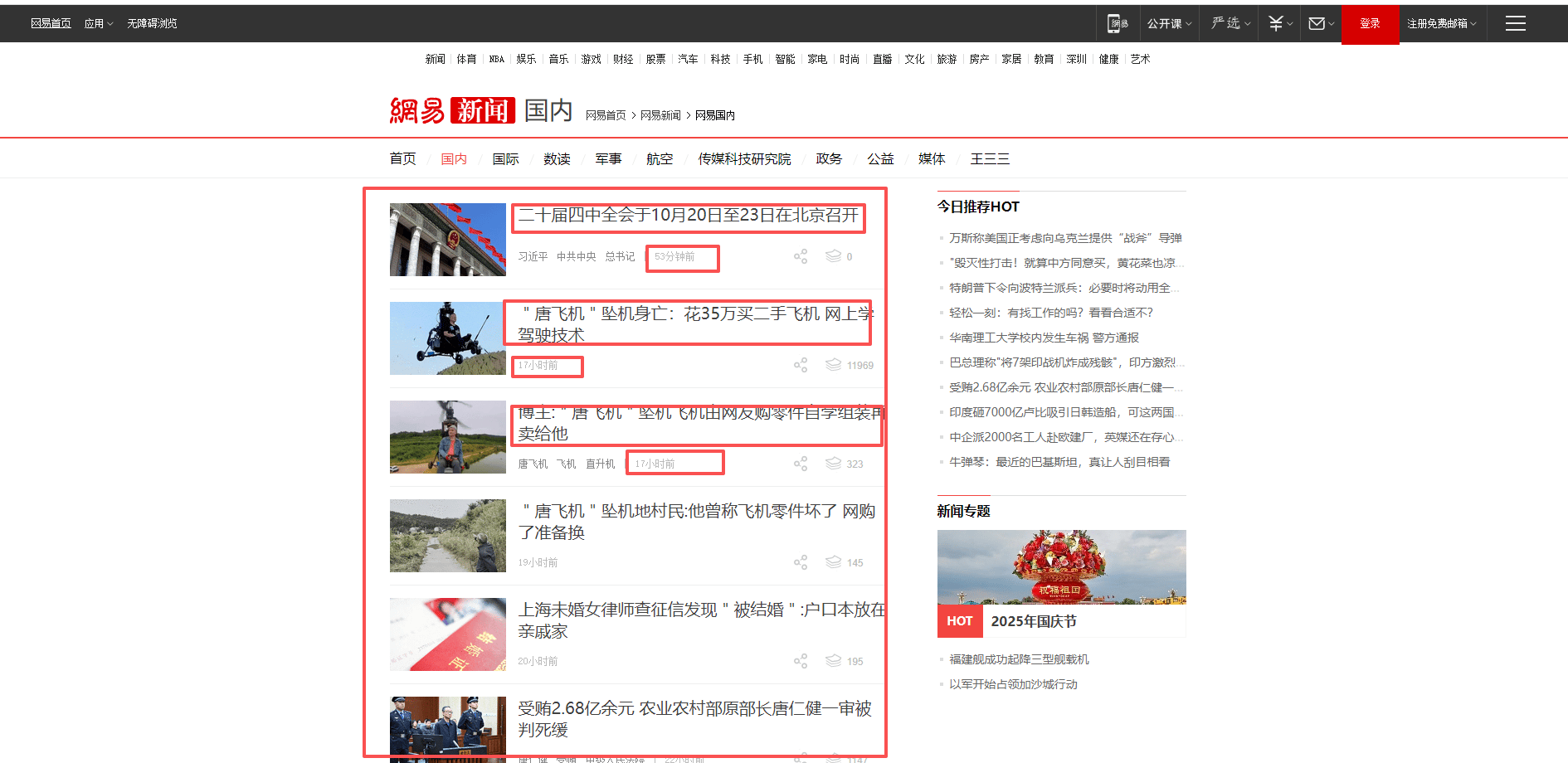
* 第三步：循环采集每个新闻列表的信息，案例中采集新闻标题，与发布时间；并将采集到的数据写入到excel中。

<img src="https://mintcdn.com/bazhuayu-rpa-docs/D6MJZZ__w_5ViTWO/helpcenter/getting-started/examples/images/a6lvK2-03.png?fit=max&auto=format&n=D6MJZZ__w_5ViTWO&q=85&s=62e3655af4372d872cde8d08253fce0c" alt="循环采集单网页列表数据-瀑布流类型网页" width="1890" height="920" data-path="helpcenter/getting-started/examples/images/a6lvK2-03.png" />

依此类推，直至当前页面所有新闻都循环完毕。

### 流程图

<img src="https://mintcdn.com/bazhuayu-rpa-docs/D6MJZZ__w_5ViTWO/helpcenter/getting-started/examples/images/a6lvK2-04.jpg?fit=max&auto=format&n=D6MJZZ__w_5ViTWO&q=85&s=816253437101bb6a1c7a4c57d477d190" alt="循环采集单网页列表数据-瀑布流类型网页" width="912" height="3304" data-path="helpcenter/getting-started/examples/images/a6lvK2-04.jpg" />

<div className="h-8" />

## 3.应用实现

### RPA应用参考

[https://rpa.bazhuayu.com/shareableLink/68da322a8e7ec427e92f04c7?ref=ZHjGqe](https://rpa.bazhuayu.com/shareableLink/68da322a8e7ec427e92f04c7?ref=ZHjGqe)
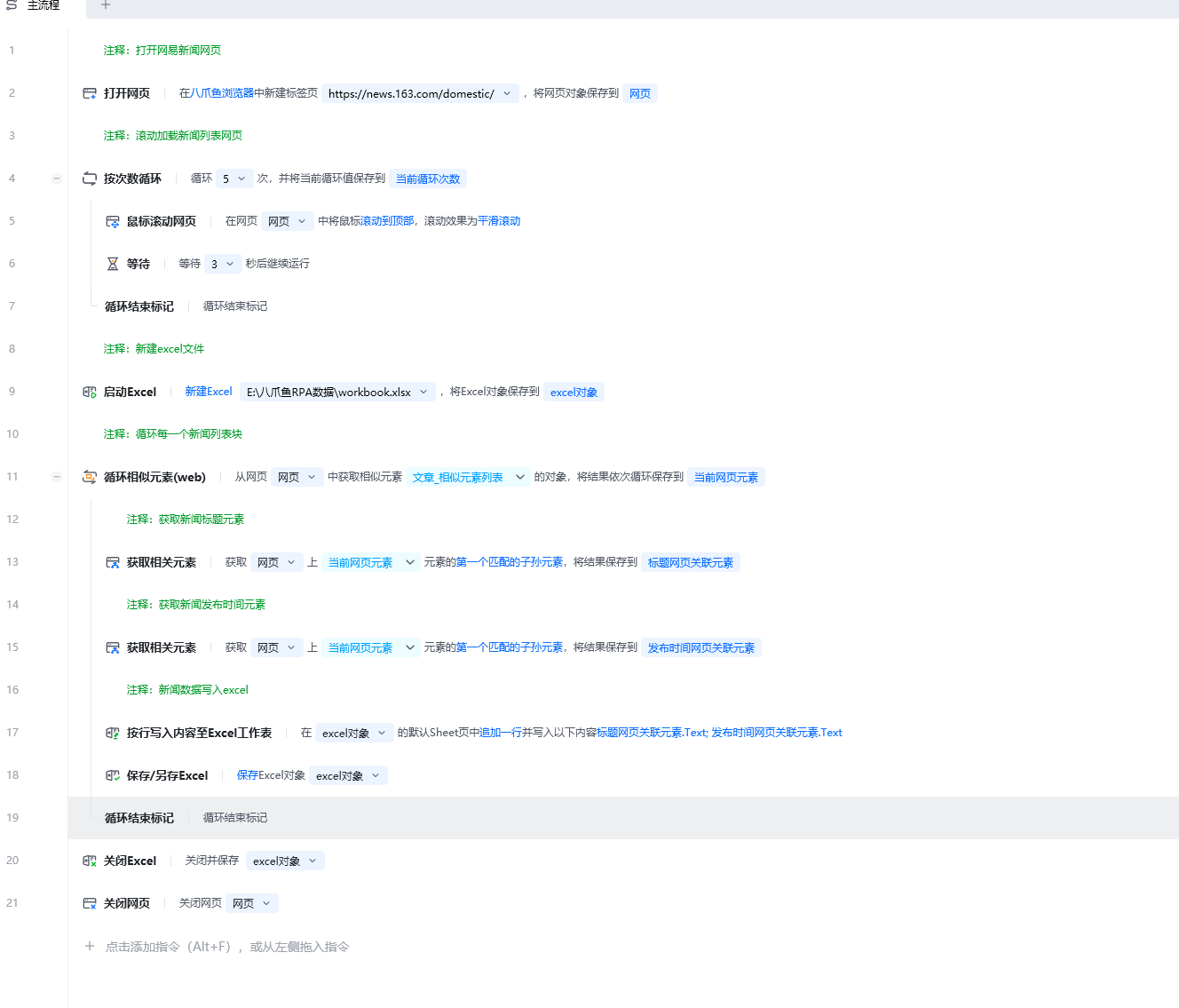
<img src="https://mintcdn.com/bazhuayu-rpa-docs/D6MJZZ__w_5ViTWO/helpcenter/getting-started/examples/images/a6lvK2-05.png?fit=max&auto=format&n=D6MJZZ__w_5ViTWO&q=85&s=4c246b941f08afd36082461566061c6d" alt="循环采集单网页列表数据-瀑布流类型网页" width="1328" height="1135" data-path="helpcenter/getting-started/examples/images/a6lvK2-05.png" />

### 流程指令解析

<img src="https://mintcdn.com/bazhuayu-rpa-docs/D6MJZZ__w_5ViTWO/helpcenter/getting-started/examples/images/a6lvK2-06.png?fit=max&auto=format&n=D6MJZZ__w_5ViTWO&q=85&s=06ebd07c566afcfa8a01a5a326b9dd3e" alt="循环采集单网页列表数据-瀑布流类型网页" width="647" height="414" data-path="helpcenter/getting-started/examples/images/a6lvK2-06.png" />

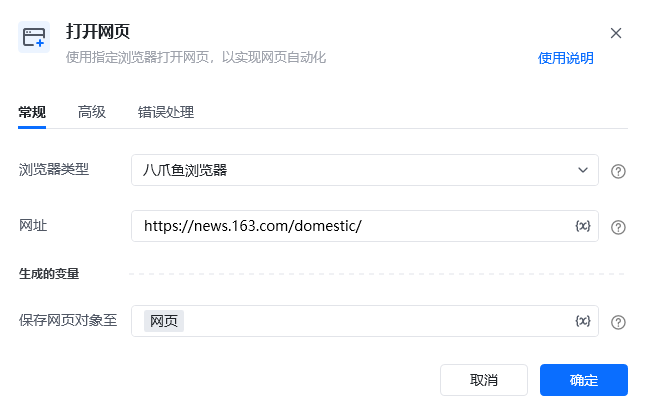
按照习惯选择常用的浏览器类型，可选八爪鱼浏览器、谷歌浏览器、Edge浏览器等，网址则填写网易新闻-国内新闻([https://news.163.com/domestic/](https://news.163.com/domestic/)) 将此网页对象命名为：网页。

<img src="https://mintcdn.com/bazhuayu-rpa-docs/D6MJZZ__w_5ViTWO/helpcenter/getting-started/examples/images/a6lvK2-07.png?fit=max&auto=format&n=D6MJZZ__w_5ViTWO&q=85&s=5c439a03d068aaf465c053cbb3925199" alt="循环采集单网页列表数据-瀑布流类型网页" width="648" height="354" data-path="helpcenter/getting-started/examples/images/a6lvK2-07.png" />

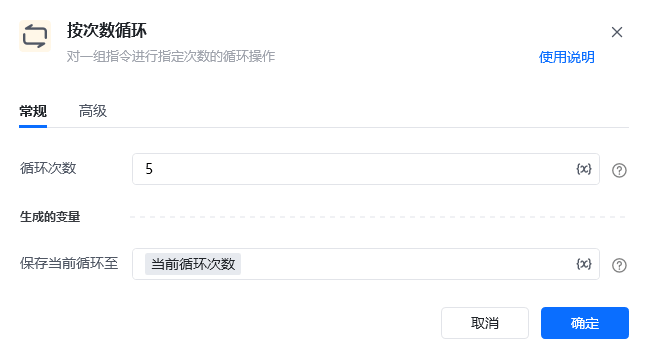
按次数循环 5 次（可根据实际情况调整次数）

<img src="https://mintcdn.com/bazhuayu-rpa-docs/D6MJZZ__w_5ViTWO/helpcenter/getting-started/examples/images/a6lvK2-08.png?fit=max&auto=format&n=D6MJZZ__w_5ViTWO&q=85&s=294a8ceccffad7f6a077729ee767a39f" alt="循环采集单网页列表数据-瀑布流类型网页" width="655" height="432" data-path="helpcenter/getting-started/examples/images/a6lvK2-08.png" />

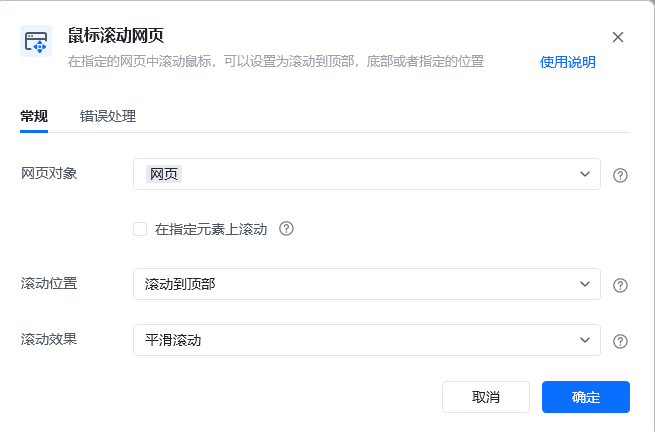
在按次数循环体中，使用鼠标滚动网页页面

<img src="https://mintcdn.com/bazhuayu-rpa-docs/D6MJZZ__w_5ViTWO/helpcenter/getting-started/examples/images/a6lvK2-09.png?fit=max&auto=format&n=D6MJZZ__w_5ViTWO&q=85&s=6265663a90933a4a8c2354afeb3c488b" alt="循环采集单网页列表数据-瀑布流类型网页" width="648" height="524" data-path="helpcenter/getting-started/examples/images/a6lvK2-09.png" />

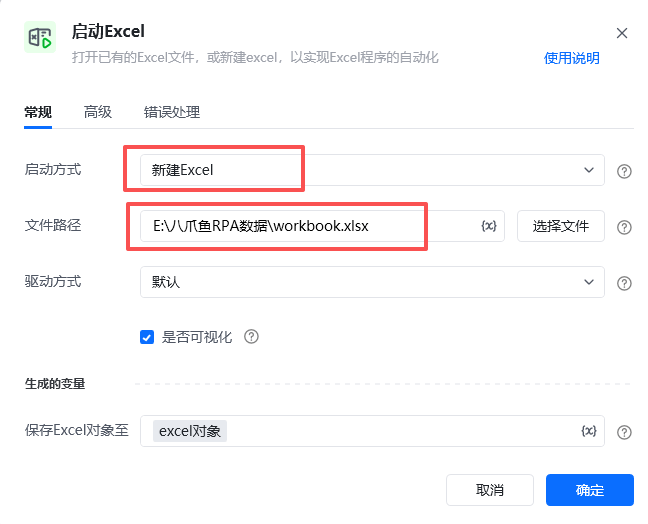
使用【启动Excel】指令创建一个新的excel

<img src="https://mintcdn.com/bazhuayu-rpa-docs/D6MJZZ__w_5ViTWO/helpcenter/getting-started/examples/images/a6lvK2-10.png?fit=max&auto=format&n=D6MJZZ__w_5ViTWO&q=85&s=c3dd991ab5f8af5ca56ba393a23206c9" alt="循环采集单网页列表数据-瀑布流类型网页" width="644" height="471" data-path="helpcenter/getting-started/examples/images/a6lvK2-10.png" />

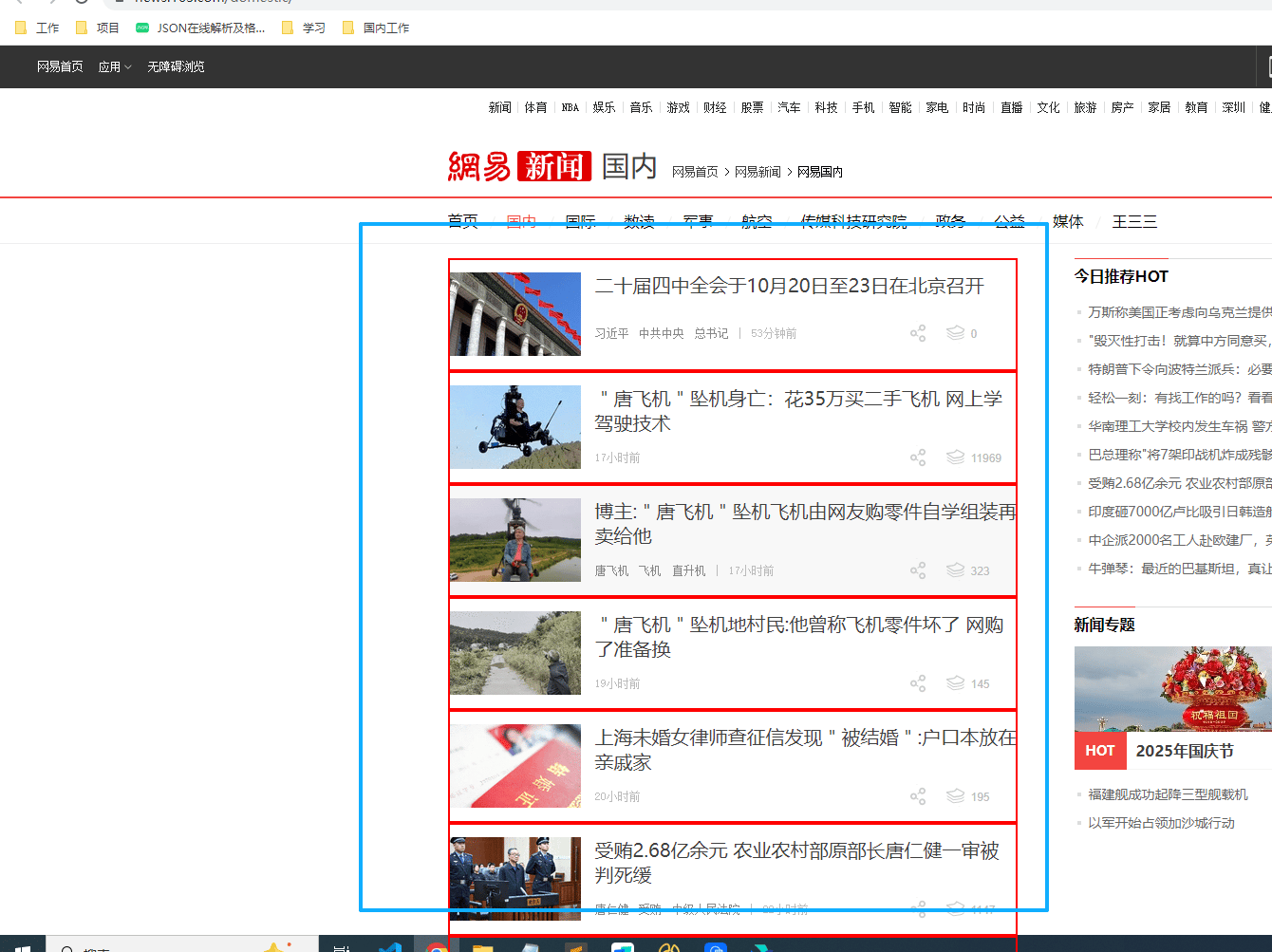
<img src="https://mintcdn.com/bazhuayu-rpa-docs/D6MJZZ__w_5ViTWO/helpcenter/getting-started/examples/images/a6lvK2-11.png?fit=max&auto=format&n=D6MJZZ__w_5ViTWO&q=85&s=17034672ca49d1d99fbdce0c1f9969a5" alt="循环采集单网页列表数据-瀑布流类型网页" width="1340" height="1003" data-path="helpcenter/getting-started/examples/images/a6lvK2-11.png" />

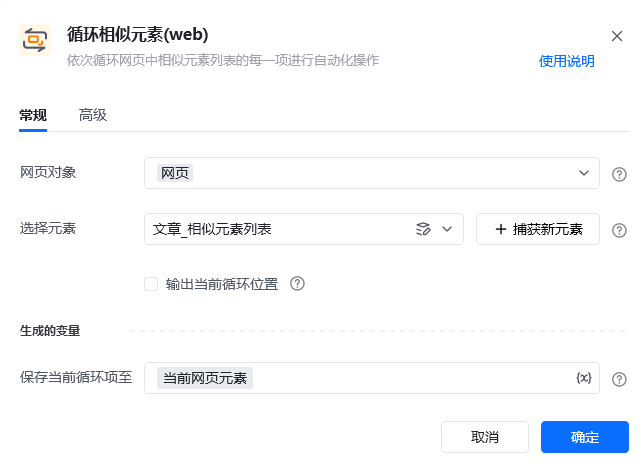
循环相似元素，获取到每个新闻的元素块 xpath参考：//div\[@class='ndi\_main']/div

<img src="https://mintcdn.com/bazhuayu-rpa-docs/D6MJZZ__w_5ViTWO/helpcenter/getting-started/examples/images/a6lvK2-12.png?fit=max&auto=format&n=D6MJZZ__w_5ViTWO&q=85&s=b08371e84de31585ec2ed8b753d1c472" alt="循环采集单网页列表数据-瀑布流类型网页" width="648" height="524" data-path="helpcenter/getting-started/examples/images/a6lvK2-12.png" />

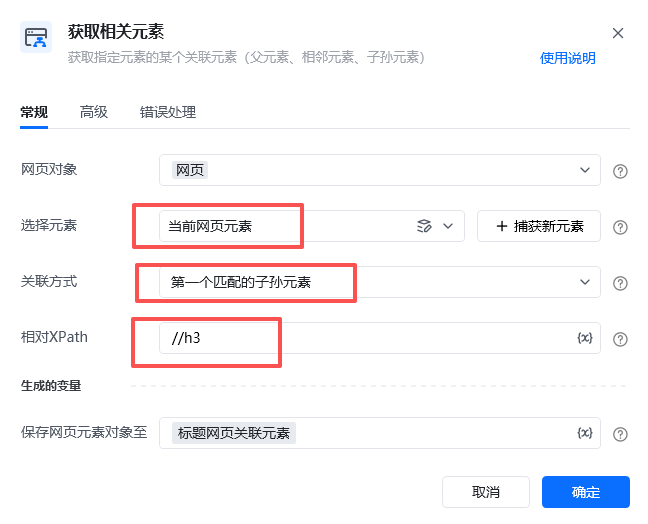
使用【获取相关元素】，选择元素为循环体的「当前网页元素」，关联方式「第一个匹配的子孙元素」。

相对xpath（相对「当前网页元素」的xpath）：//h3

<img src="https://mintcdn.com/bazhuayu-rpa-docs/D6MJZZ__w_5ViTWO/helpcenter/getting-started/examples/images/a6lvK2-13.png?fit=max&auto=format&n=D6MJZZ__w_5ViTWO&q=85&s=4fe06030a881eb12df35d77a030b289b" alt="循环采集单网页列表数据-瀑布流类型网页" width="645" height="521" data-path="helpcenter/getting-started/examples/images/a6lvK2-13.png" />

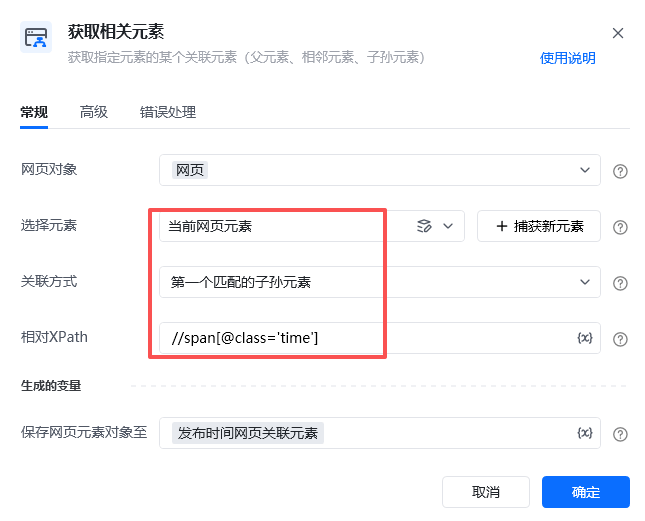
使用【获取相关元素】，选择元素为循环体的「当前网页元素」，关联方式「第一个匹配的子孙元素」。

相对xpath（相对「当前网页元素」的xpath）：//span\[@class='time']

<img src="https://mintcdn.com/bazhuayu-rpa-docs/D6MJZZ__w_5ViTWO/helpcenter/getting-started/examples/images/a6lvK2-14.png?fit=max&auto=format&n=D6MJZZ__w_5ViTWO&q=85&s=e777c68f590e39d4039242d0977ee8de" alt="循环采集单网页列表数据-瀑布流类型网页" width="646" height="591" data-path="helpcenter/getting-started/examples/images/a6lvK2-14.png" />

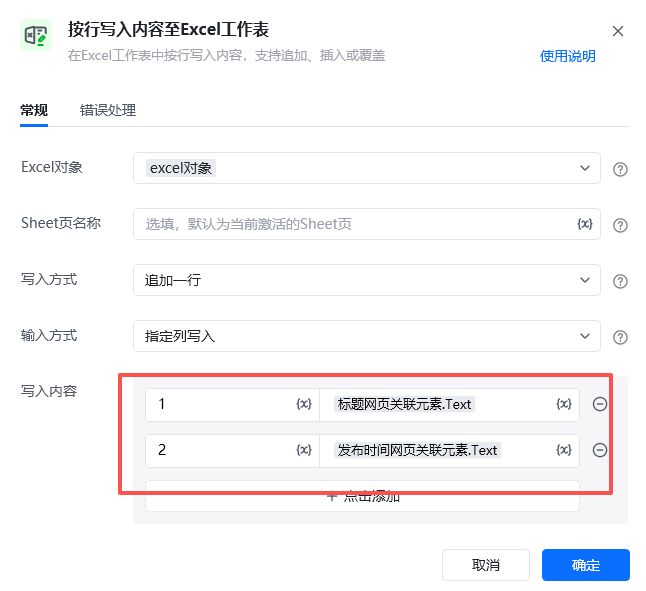
将采集的网页元素内容 写入到excel文件中。

可以通过「素.Text」的方式快捷获取到元素的文本信息。

第一列写入：新闻的标题，「标题网页关联元素.Text」

第二列写入：新闻的发布时间，「发布时间网页关联元素.Text」

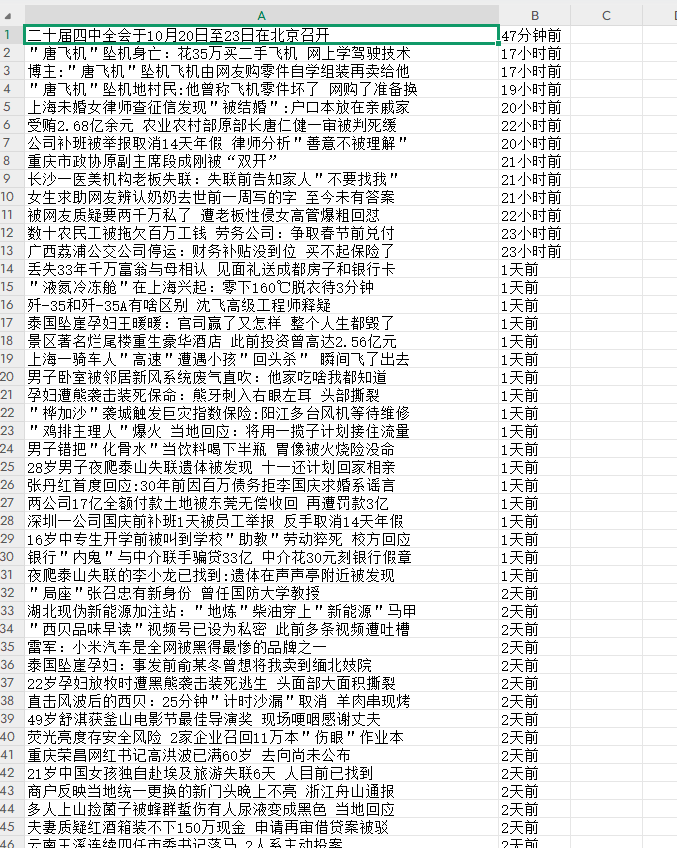
### 运行效果

<img src="https://mintcdn.com/bazhuayu-rpa-docs/D6MJZZ__w_5ViTWO/helpcenter/getting-started/examples/images/a6lvK2-15.png?fit=max&auto=format&n=D6MJZZ__w_5ViTWO&q=85&s=f1ba09ca5a94f70b59cab3783eaaf031" alt="循环采集单网页列表数据-瀑布流类型网页" width="677" height="848" data-path="helpcenter/getting-started/examples/images/a6lvK2-15.png" />

<div className="h-8" />

## 4.更多案例

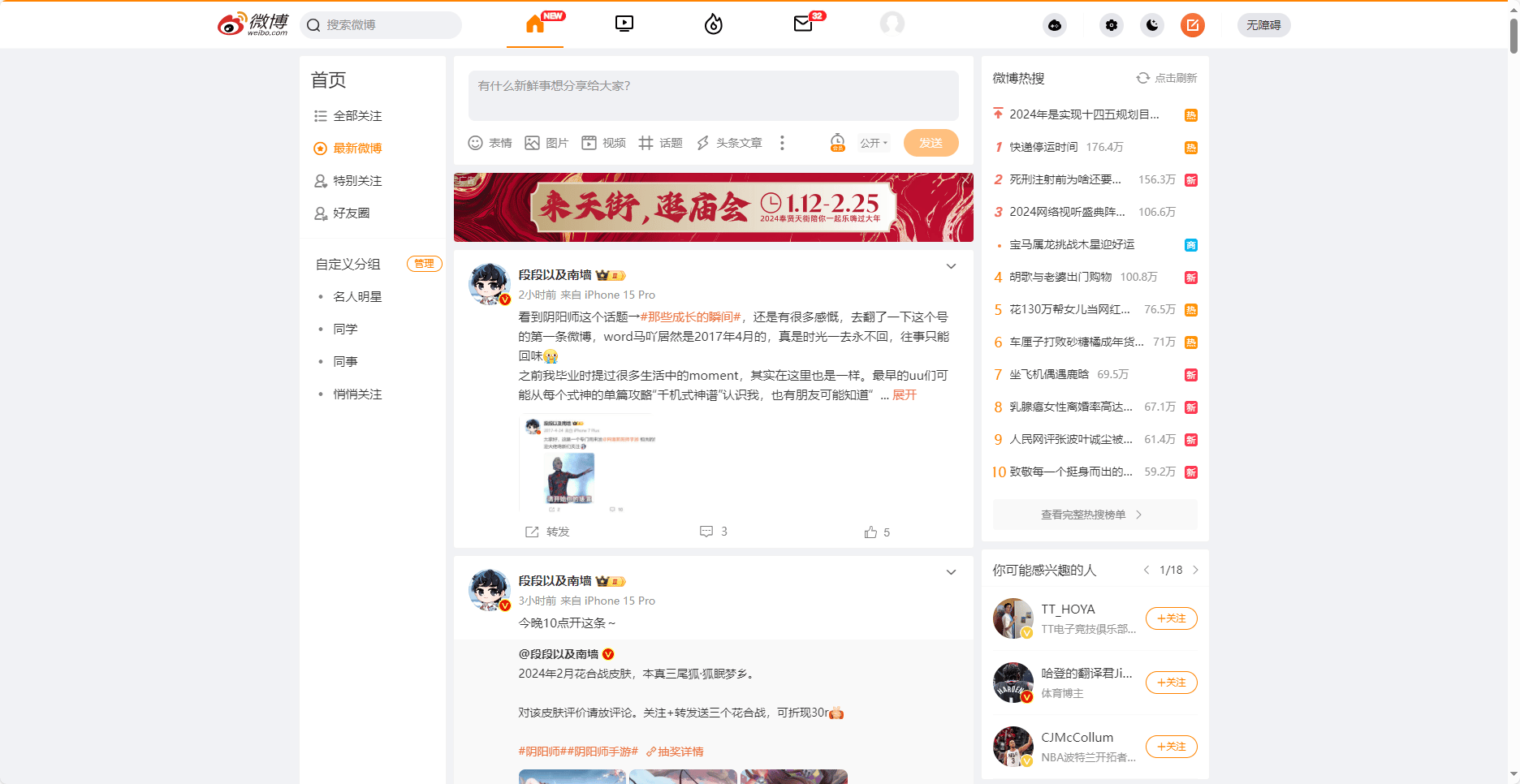
* 微博列表页

<img src="https://mintcdn.com/bazhuayu-rpa-docs/D6MJZZ__w_5ViTWO/helpcenter/getting-started/examples/images/a6lvK2-16.png?fit=max&auto=format&n=D6MJZZ__w_5ViTWO&q=85&s=80f9dd85de6cc1d6a1ed5fcbf8cc1435" alt="循环采集单网页列表数据-瀑布流类型网页" width="1872" height="966" data-path="helpcenter/getting-started/examples/images/a6lvK2-16.png" />