> ## Documentation Index
> Fetch the complete documentation index at: https://rpa.bazhuayu.com/helpcenter/llms.txt
> Use this file to discover all available pages before exploring further.

# 修改元素XPath实例

> 本文介绍修改XPath的实例

网页自动化中，我们通过鼠标捕获相似元素组，创建【循环相似元素（web）】去定位多个列表的数据。

一般情况下，通过以上方法创建的循环列表不会出错，能够精准定位到全部数据。但有时候也会遇到一些问题：比如列表中有的部分不是我们想要的，需要进行丢弃。

**这时候**，可以手动修改 XPath 去定位列表，丢弃不需要的部分。

以下通过实例进行说明。

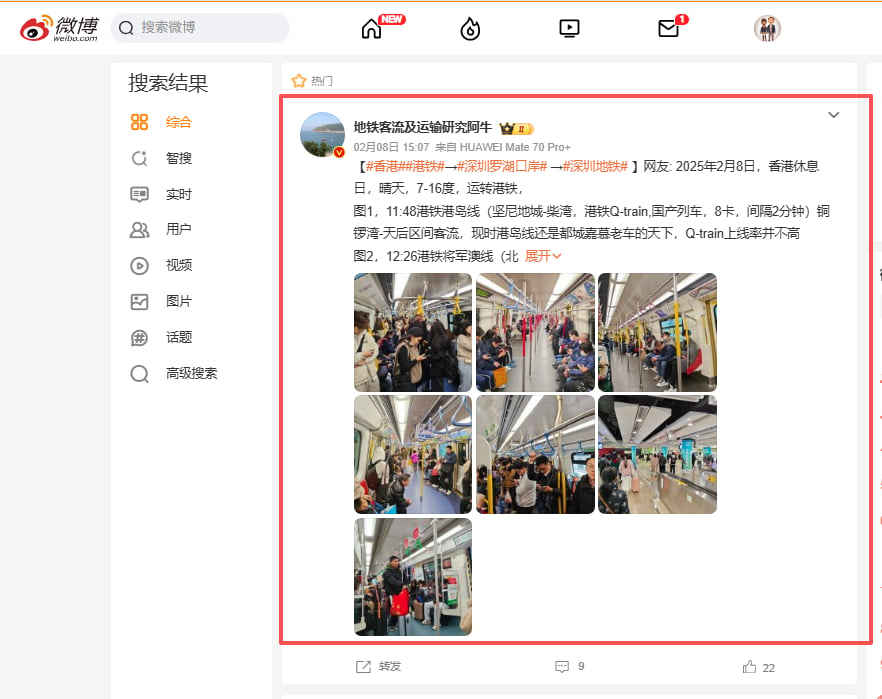
实例网址：[https://s.weibo.com/weibo？q=%E6%B7%B1%E5%9C%B3%E5%9C%B0%E9%93%81](https://s.weibo.com/weibo?q=%E6%B7%B1%E5%9C%B3%E5%9C%B0%E9%93%81)

应用实现：采集微博网页上的列表正文。

<img src="https://mintcdn.com/bazhuayu-rpa-docs/BVjex46aNNZSgW5f/helpcenter/guides/elements/xpath/images/modify-element-xpath-example-01.png?fit=max&auto=format&n=BVjex46aNNZSgW5f&q=85&s=d366bda599247a82459838fb99a7d37c" alt="" width="882" height="699" data-path="helpcenter/guides/elements/xpath/images/modify-element-xpath-example-01.png" />

## 一、用XPath过滤多余的项

### Step1：按照常规操作创建流程

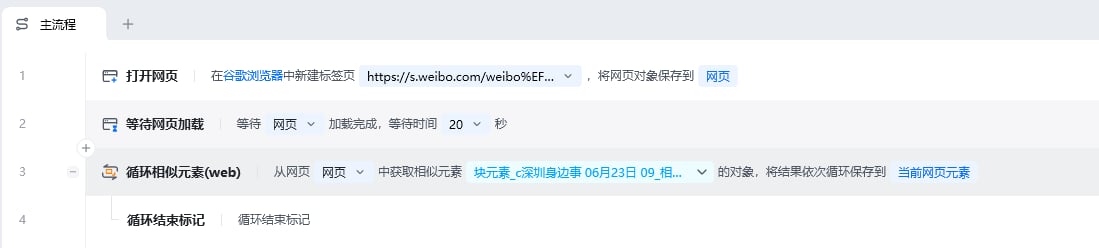
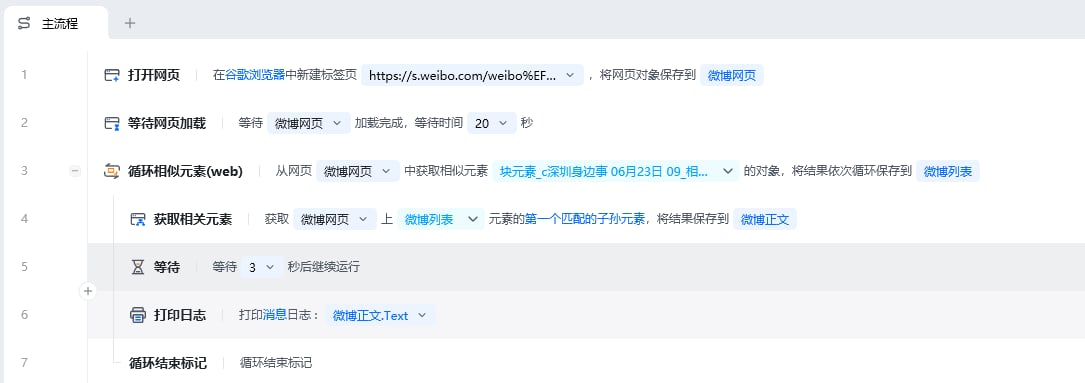
我们按照常规用【打开网页】指令打开微博页面，并通过【循环相似元素（web)】指令捕获微博列表元素组，并将结果保存到元素：微博列表

<img src="https://mintcdn.com/bazhuayu-rpa-docs/BVjex46aNNZSgW5f/helpcenter/guides/elements/xpath/images/modify-element-xpath-example-02.png?fit=max&auto=format&n=BVjex46aNNZSgW5f&q=85&s=1f54920f0351e759056a10e67a0043d5" alt="" width="1099" height="248" data-path="helpcenter/guides/elements/xpath/images/modify-element-xpath-example-02.png" />

### Step2：修改获得的列表组元素组的xpath

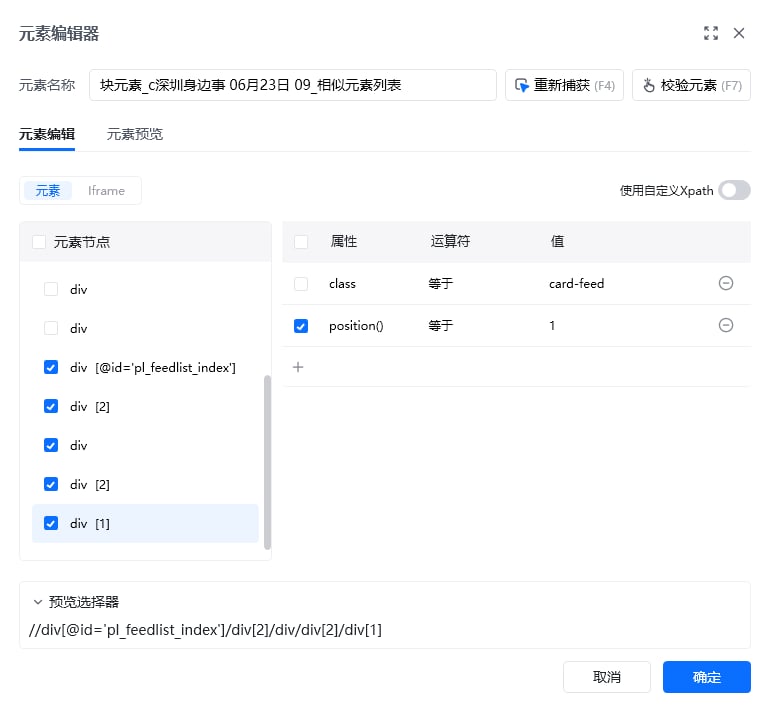
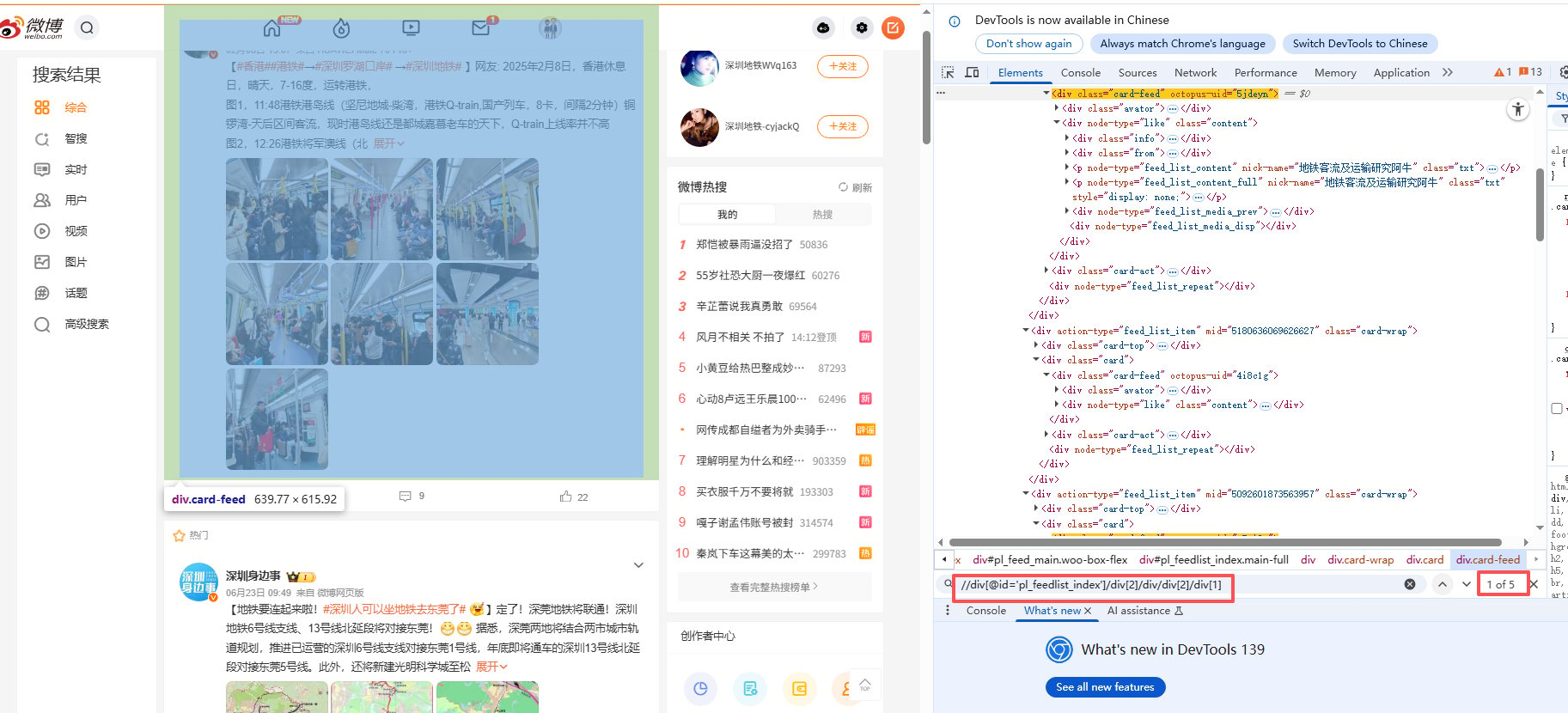
在元素库中，双击微博列表元素，查看该元素的xpath，任意浏览器F12，Ctrl+F，都可以调试XPath，发现不会定位到全部的热门文章

<img src="https://mintcdn.com/bazhuayu-rpa-docs/BVjex46aNNZSgW5f/helpcenter/guides/elements/xpath/images/modify-element-xpath-example-03.png?fit=max&auto=format&n=BVjex46aNNZSgW5f&q=85&s=993a3611f3d24bacb0a732617b5d9ef6" alt="" width="771" height="713" data-path="helpcenter/guides/elements/xpath/images/modify-element-xpath-example-03.png" />

<img src="https://mintcdn.com/bazhuayu-rpa-docs/BVjex46aNNZSgW5f/helpcenter/guides/elements/xpath/images/modify-element-xpath-example-04.png?fit=max&auto=format&n=BVjex46aNNZSgW5f&q=85&s=c2111326659a4d8d3c6b1bb5745e0362" alt="" width="1825" height="830" data-path="helpcenter/guides/elements/xpath/images/modify-element-xpath-example-04.png" />

### Step3：修改列表元素的XPath

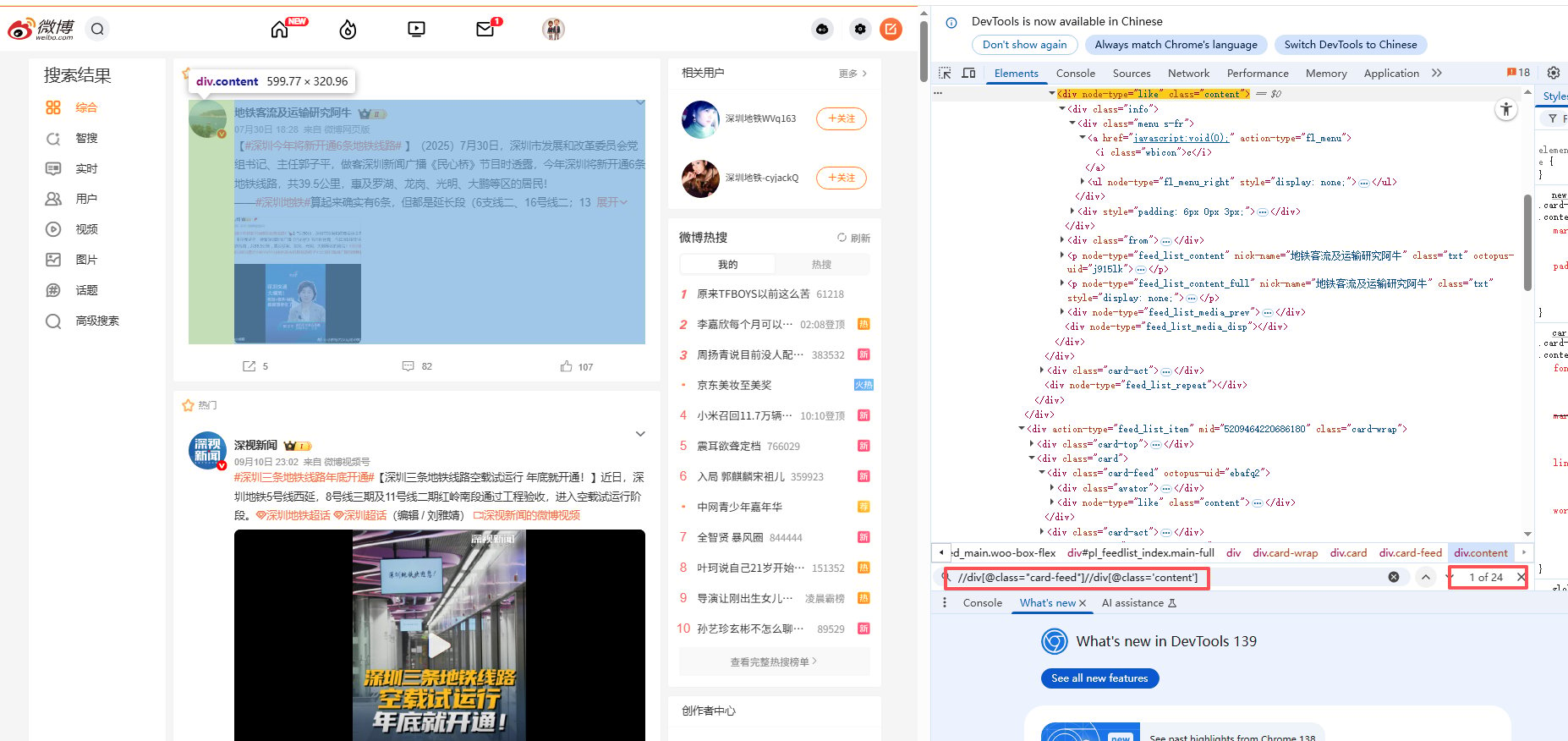
所以需要修改能定位到全部微博博文列表Xpath，通过观察可以知道，可以通过限制父元素来更精确的定位到所需的博文列表，在元素编辑器界面，切换成使用自定义Xpath,修改xpath为：

//div\[@class="card-feed"]//div\[@class='content']
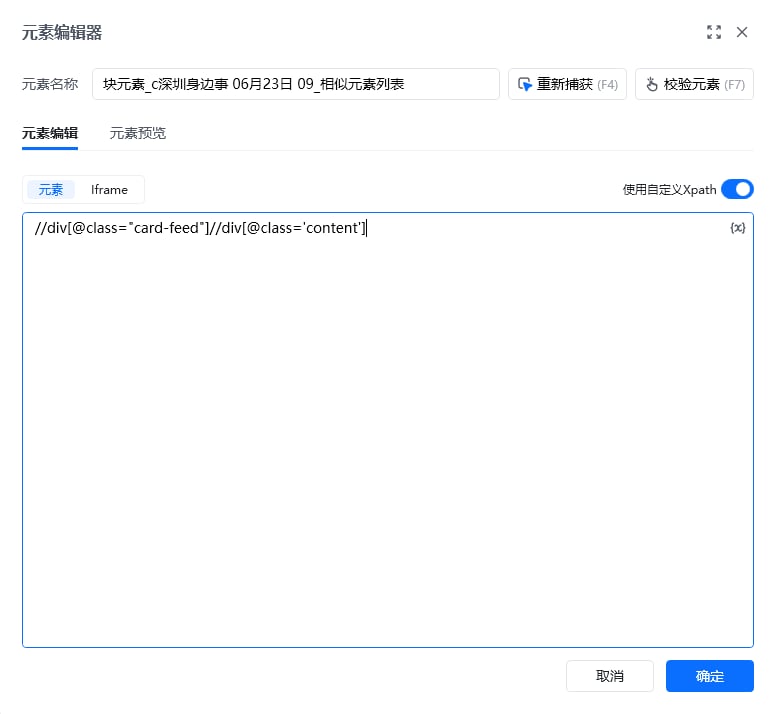
<img src="https://mintcdn.com/bazhuayu-rpa-docs/BVjex46aNNZSgW5f/helpcenter/guides/elements/xpath/images/modify-element-xpath-example-05.png?fit=max&auto=format&n=BVjex46aNNZSgW5f&q=85&s=61266ea3298c4b6c71e444aa0c0458a3" alt="" width="775" height="714" data-path="helpcenter/guides/elements/xpath/images/modify-element-xpath-example-05.png" />

<img src="https://mintcdn.com/bazhuayu-rpa-docs/BVjex46aNNZSgW5f/helpcenter/guides/elements/xpath/images/modify-element-xpath-example-06.png?fit=max&auto=format&n=BVjex46aNNZSgW5f&q=85&s=5d1fd60fbf77a3a66d00a56a19daf5d9" alt="" width="1854" height="876" data-path="helpcenter/guides/elements/xpath/images/modify-element-xpath-example-06.png" />

### Step4：循环获取每个博文的正文文本

使用【获取相关元素】指令获得列表的正文，关联方式选择匹配第一个子孙元素，并输入正文文本的相对xpath: //p\[@class="txt"]\[1]
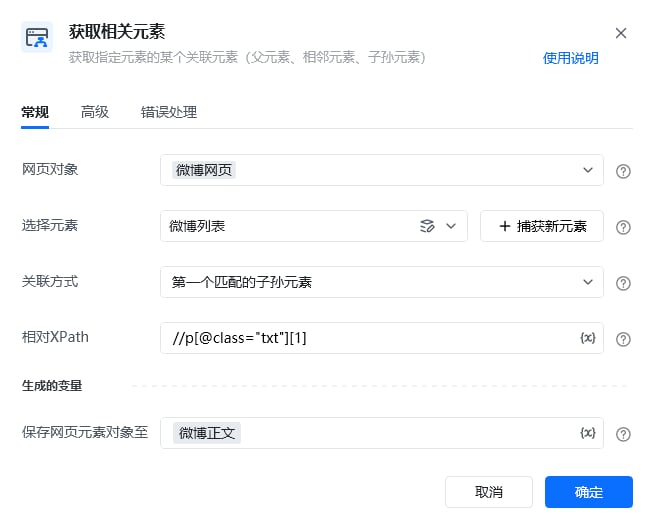
<img src="https://mintcdn.com/bazhuayu-rpa-docs/BVjex46aNNZSgW5f/helpcenter/guides/elements/xpath/images/modify-element-xpath-example-07.png?fit=max&auto=format&n=BVjex46aNNZSgW5f&q=85&s=1d3a1cf1d13351bdf6aedef6f4f1122c" alt="" width="652" height="528" data-path="helpcenter/guides/elements/xpath/images/modify-element-xpath-example-07.png" />

### 使用示例

此时就实现了精确循环列表每一个博文的正文内容。

<img src="https://mintcdn.com/bazhuayu-rpa-docs/BVjex46aNNZSgW5f/helpcenter/guides/elements/xpath/images/modify-element-xpath-example-08.png?fit=max&auto=format&n=BVjex46aNNZSgW5f&q=85&s=faeac3c80341247196ce14af3012d3bc" alt="" width="1085" height="383" data-path="helpcenter/guides/elements/xpath/images/modify-element-xpath-example-08.png" />

### 使用小Tips

**总结**：当发现循环列表定位过多，需要过滤多余的项，就需要在元素编辑器里修改该元素的定位Xpath。

<Info>
  使用过程中遇到问题？前往 [八爪鱼RPA 开发者社区问答板块](https://rpa.bazhuayu.com/community/questions) 提问，获取官方与社区帮助。
</Info>