> ## Documentation Index
> Fetch the complete documentation index at: https://rpa.bazhuayu.com/helpcenter/llms.txt
> Use this file to discover all available pages before exploring further.

# XPath与八爪鱼RPA

> XPath对于八爪鱼 RPA 的网页自动化十分重要，通常可以通过写一条正确的 XPath 定位到我们想要的元素

## 1. 什么是XPath？

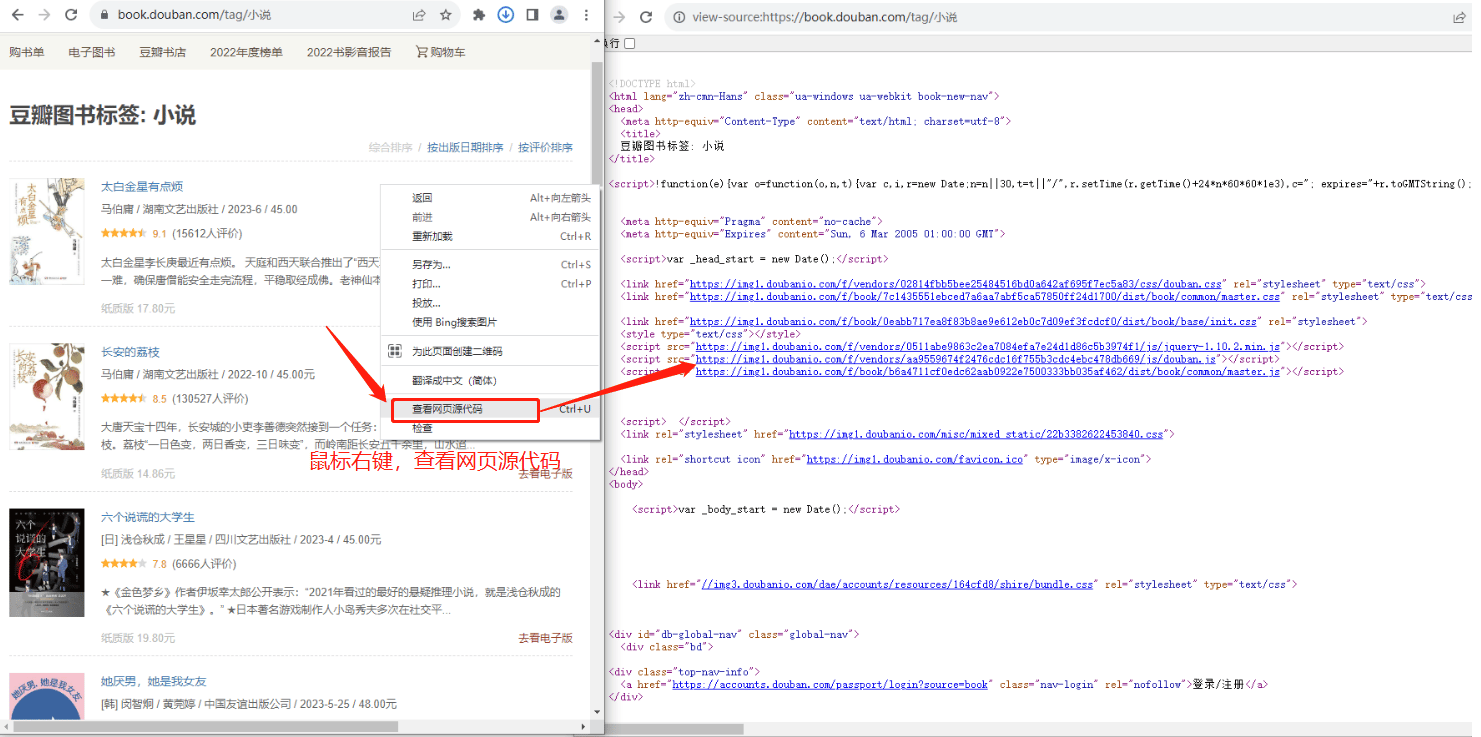
我们日常浏览的网页由HTML构建，在指定网页上通过鼠标右键【查看网页源代码】可查看网页结构。

XPath是查询语言，能精准定位和提取HTML文档中的元素或数据，助力网页数据分析与自动化测试，为网页内容导航。

<img src="https://mintcdn.com/bazhuayu-rpa-docs/BVjex46aNNZSgW5f/helpcenter/guides/elements/xpath/images/xpath-with-bazhuayu-rpa-01.png?fit=max&auto=format&n=BVjex46aNNZSgW5f&q=85&s=0da22a3960708b041c15bafaeb3fa192" alt="" width="1481" height="737" data-path="helpcenter/guides/elements/xpath/images/xpath-with-bazhuayu-rpa-01.png" />

### 新手示例：快速获取内置Xpath

在HTML文档中定位和提取数据时，XPath是一种高效的方法。通过使用浏览器的开发者工具或专门的XPath插件，您可以轻松找到页面上的目标元素，并快速生成可复用的Xpath路径表达式，从而实现数据的精准定位。

以在谷歌浏览器中查看元素XPath为例：

<table>
  <thead>
    <tr>
      <th style={{ verticalAlign: 'middle', width: '40%' }}>步骤</th>
      <th style={{ verticalAlign: 'middle' }}>附图</th>
    </tr>
  </thead>

  <tbody>
    <tr>
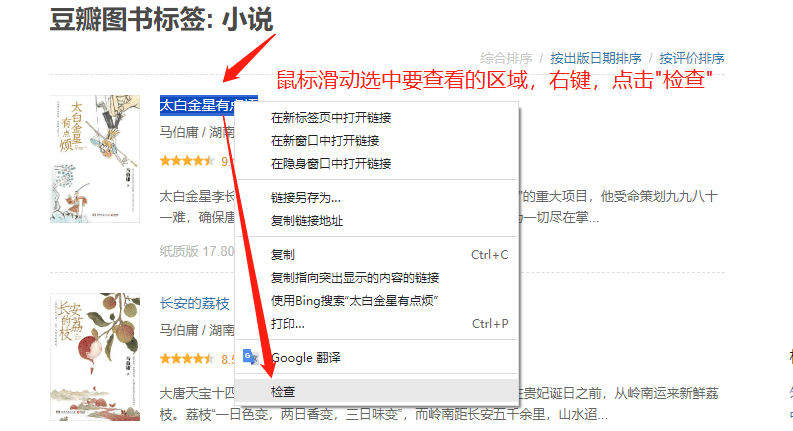
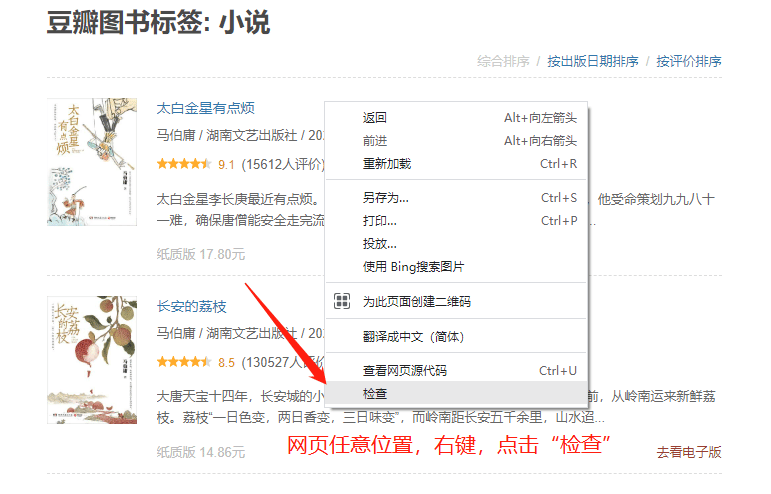
      <td style={{ verticalAlign: 'middle' }}>第一步：在网页中，点击鼠标右键选择 “检查”（或者按F12），进入开发者模式。</td>

      <td>
        <img src="https://mintcdn.com/bazhuayu-rpa-docs/BVjex46aNNZSgW5f/helpcenter/guides/elements/xpath/images/xpath-with-bazhuayu-rpa-02.png?fit=max&auto=format&n=BVjex46aNNZSgW5f&q=85&s=b1eb09b1baf7625af15e424d08e2bdfe" width="793" height="431" data-path="helpcenter/guides/elements/xpath/images/xpath-with-bazhuayu-rpa-02.png" />

        <p>（以上用于查看特定区域的源码）</p>

        <img src="https://mintcdn.com/bazhuayu-rpa-docs/BVjex46aNNZSgW5f/helpcenter/guides/elements/xpath/images/xpath-with-bazhuayu-rpa-03.png?fit=max&auto=format&n=BVjex46aNNZSgW5f&q=85&s=c66da220ca0c8ba495c70c90374ad715" width="771" height="494" data-path="helpcenter/guides/elements/xpath/images/xpath-with-bazhuayu-rpa-03.png" />

        <p>（以上用于查看整个网页的源码）</p>
      </td>
    </tr>

    <tr>
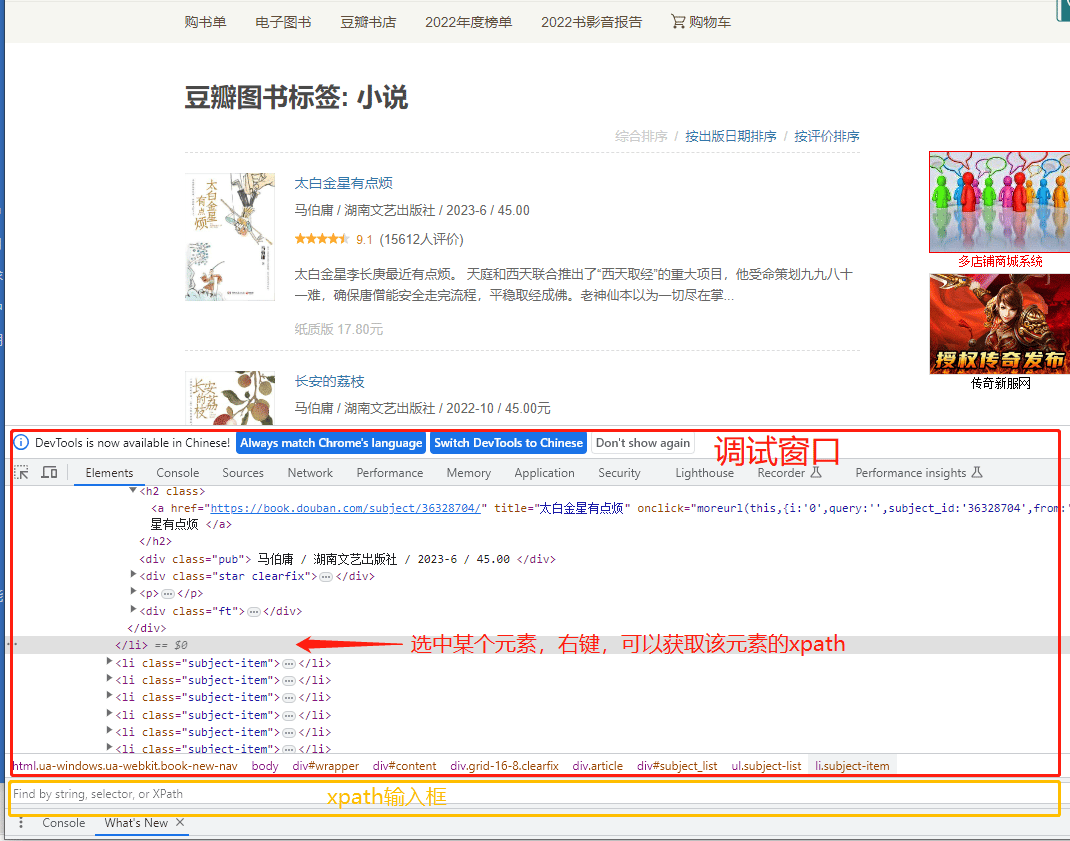
      <td style={{ verticalAlign: 'middle' }}>第二步：在调试窗口中，同时按下键盘的 Ctrl + F  ，调出调试窗口底部的输入框。</td>

      <td>
        <img src="https://mintcdn.com/bazhuayu-rpa-docs/BVjex46aNNZSgW5f/helpcenter/guides/elements/xpath/images/xpath-with-bazhuayu-rpa-04.png?fit=max&auto=format&n=BVjex46aNNZSgW5f&q=85&s=b9a27fe60260fe45765209d22eea1e92" width="1070" height="841" data-path="helpcenter/guides/elements/xpath/images/xpath-with-bazhuayu-rpa-04.png" />
      </td>
    </tr>

    <tr>
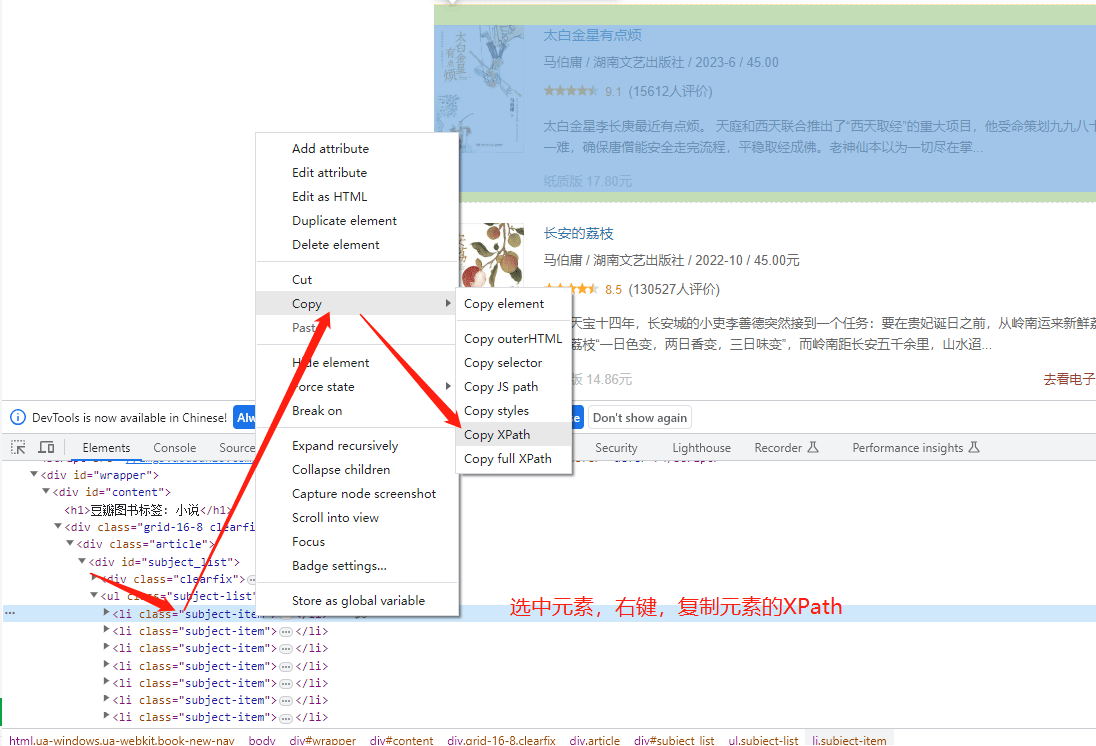
      <td style={{ verticalAlign: 'middle' }}>第三步：选中某个元素，鼠标右键即可复制该元素的Xpath。可将改Xpath填写到输入框中校验当前Xpath是否对应我们最开始选择的元素。</td>

      <td>
        <img src="https://mintcdn.com/bazhuayu-rpa-docs/BVjex46aNNZSgW5f/helpcenter/guides/elements/xpath/images/xpath-with-bazhuayu-rpa-05.png?fit=max&auto=format&n=BVjex46aNNZSgW5f&q=85&s=69417ebfb5c3cc395fc525dd1606ed35" width="1096" height="746" data-path="helpcenter/guides/elements/xpath/images/xpath-with-bazhuayu-rpa-05.png" />
      </td>
    </tr>
  </tbody>
</table>

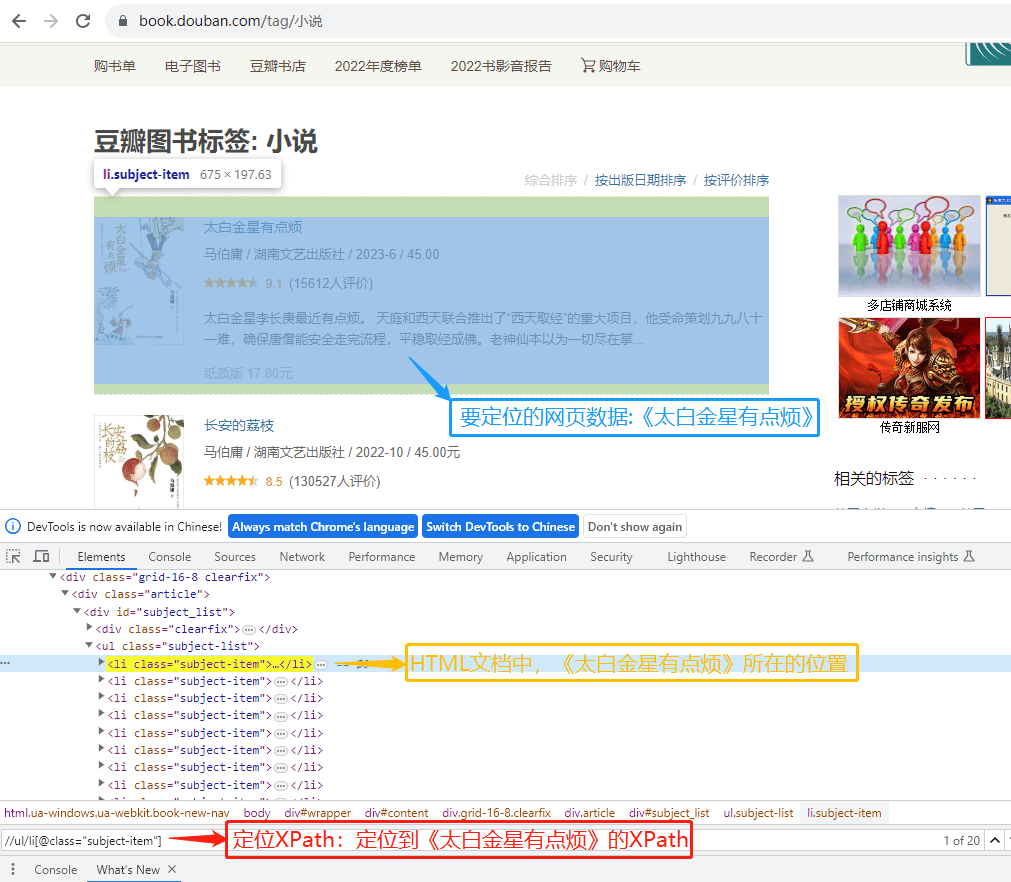
此时，要定位的网页数据、定位XPath、HTML文档结构三者的关系如下图：

<img src="https://mintcdn.com/bazhuayu-rpa-docs/BVjex46aNNZSgW5f/helpcenter/guides/elements/xpath/images/xpath-with-bazhuayu-rpa-06.png?fit=max&auto=format&n=BVjex46aNNZSgW5f&q=85&s=2bbdd963062846e02bff5f8bd84fdcbd" alt="" width="1011" height="882" data-path="helpcenter/guides/elements/xpath/images/xpath-with-bazhuayu-rpa-06.png" />

<br />

## 2. Xpath 在 RPA 中如何应用？

在RPA中，XPath能精准解析复杂网页结构，实现对目标元素的高效定位与数据提取，是自动化任务中不可或缺的强力工具。

演示步骤：

<table>
  <thead>
    <tr>
      <th style={{ verticalAlign: 'middle', width: '40%' }}>方法</th>
      <th style={{ verticalAlign: 'middle' }}>附图</th>
    </tr>
  </thead>

  <tbody>
    <tr>
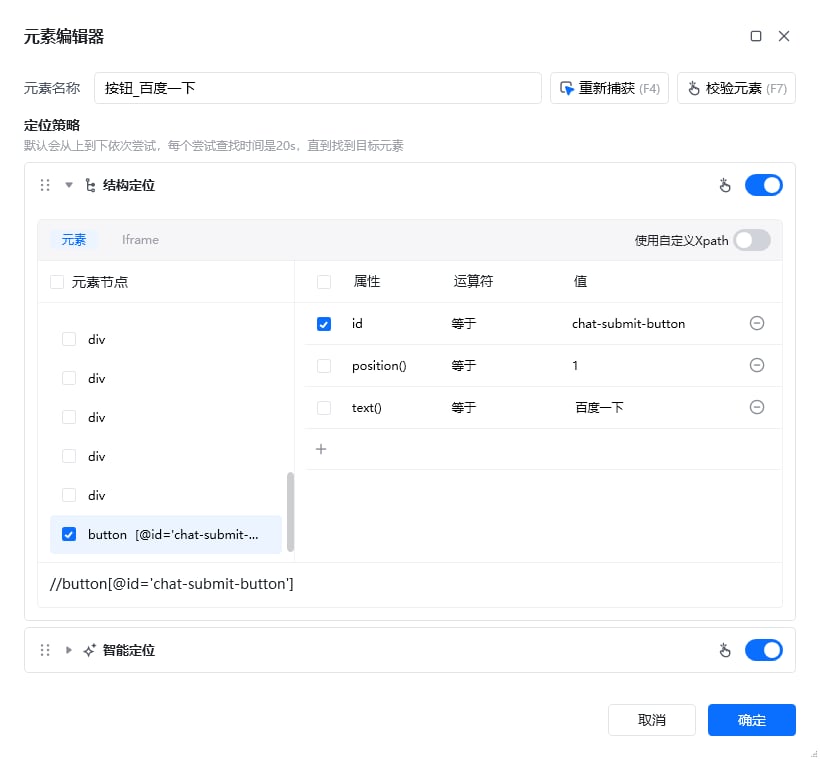
      <td style={{ verticalAlign: 'middle' }}>方法① 在元素库中，双击任意元素打开元素编辑器。可以查看或修改该元素的Xpath，以便更精确定位到元素。<br /><strong>注：</strong>2.2及以上版本新增结构定位（即智能定位），该功能可以生成比较稳定的Xpath，新用户可使用此功能</td>

      <td>
        <img src="https://mintcdn.com/bazhuayu-rpa-docs/BVjex46aNNZSgW5f/helpcenter/guides/elements/xpath/images/xpath-with-bazhuayu-rpa-07.png?fit=max&auto=format&n=BVjex46aNNZSgW5f&q=85&s=3d25cd3a661c9b7431c22cc794c36a38" width="820" height="760" data-path="helpcenter/guides/elements/xpath/images/xpath-with-bazhuayu-rpa-07.png" />
      </td>
    </tr>

    <tr>
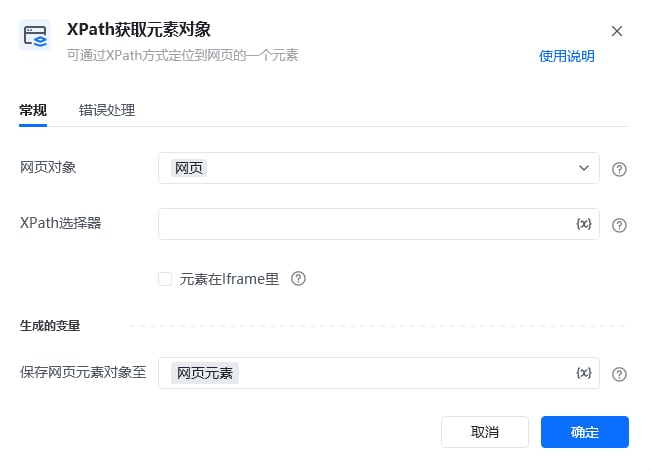
      <td style={{ verticalAlign: 'middle' }}>方法② 通过【Xpath获取元素对象】指令，输入准确的Xpath，即可精确定位到该Xpath对应的网页元素对象</td>

      <td>
        <img src="https://mintcdn.com/bazhuayu-rpa-docs/BVjex46aNNZSgW5f/helpcenter/guides/elements/xpath/images/xpath-with-bazhuayu-rpa-08.png?fit=max&auto=format&n=BVjex46aNNZSgW5f&q=85&s=8292f6fa38769aac4b7fa1f39693bd5f" width="650" height="471" data-path="helpcenter/guides/elements/xpath/images/xpath-with-bazhuayu-rpa-08.png" />
      </td>
    </tr>

    <tr>
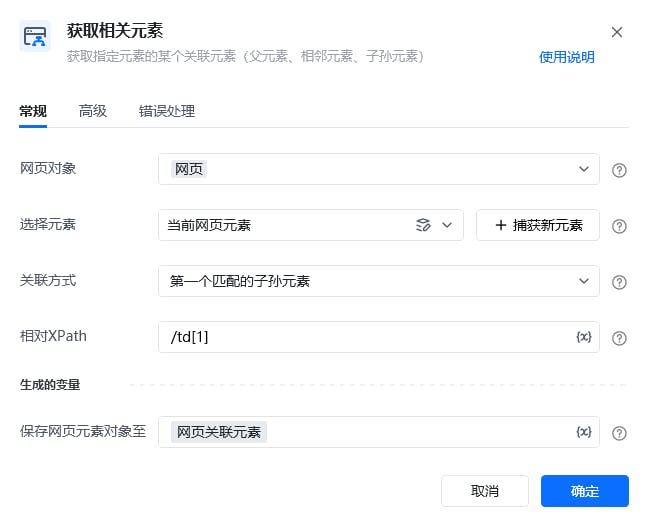
      <td style={{ verticalAlign: 'middle' }}>方法③ 在【获取相关元素】指令中，获得当前元素的父元素，子元素或相邻元素，子孙元素可以通过输入相对Xpath去定位。</td>

      <td>
        <img src="https://mintcdn.com/bazhuayu-rpa-docs/BVjex46aNNZSgW5f/helpcenter/guides/elements/xpath/images/xpath-with-bazhuayu-rpa-09.png?fit=max&auto=format&n=BVjex46aNNZSgW5f&q=85&s=f45b822ce854e5dd1aa960dccb560dd3" width="650" height="528" data-path="helpcenter/guides/elements/xpath/images/xpath-with-bazhuayu-rpa-09.png" />
      </td>
    </tr>
  </tbody>
</table>

<Info>
  使用过程中遇到问题？前往 [八爪鱼RPA 开发者社区问答板块](https://rpa.bazhuayu.com/community/questions) 提问，获取官方与社区帮助。
</Info>